Group Abstract Group Abstract

Message Boards Message Boards

0
|
20.2K Views
|
6 Replies
|
2 Total Likes
View groups...
Share
Share this post:

Arrow at the end of a parametric plot

Posted 12 years ago

I would like to add an arrowhead to the end of the parametric plot:

ParametricPlot[{Cos[t], Sin[t]}, {t, 0, 1}]

Is there an option to ParametricPlot to do this? I could not find it. If there is no option, can you please suggest a way to do this?

POSTED BY: Ferenc Beleznay
6 Replies

I found a much better and simpler solution on stackexchange that works with diffrent plots including "ParametricPlot". thanks to the user kglr

p0 = ParametricPlot[{Cos[t], Sin[t]}, {t, 0, 1}]

(*numbers used Arrowheads argument define the size of arrow heads and plot will be divided bt the length of arguments in list to place arrow*)
(*negative numbers means reverse arrow*)
p0 /. Line[x_] :> {Arrowheads[{.1}], Arrow[x]}
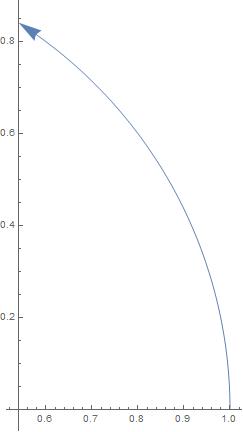
enter image description here

p0 /. Line[x_] :> {Arrowheads[{-.1, .1}], Arrow[x]}
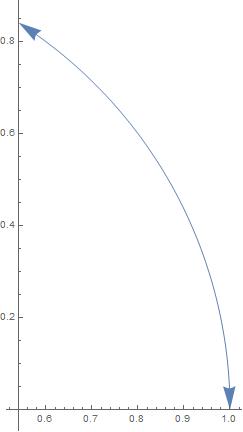
enter image description here

p0 /. Line[x_] :> {Arrowheads[{-.1, .5}], Arrow[x]}
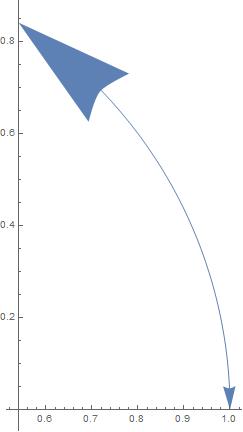
enter image description here

p0 /. Line[x_] :> {Arrowheads[{-.1, .1, .1, .1}], Arrow[x]}
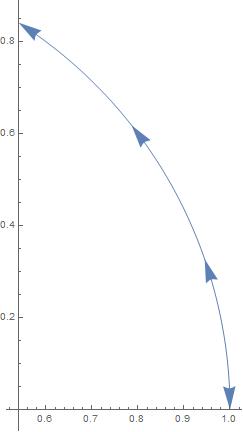
enter image description here

Unfortunately, version dependent solution is not good enough for me.

Okay.

I was hoping for a more elegant solution.

And your hope comes true ... you program it along the following lines

In[34]:= Clear[arrowParametricPlot]
arrowParametricPlot[f_List, p_List] := Block[{[Delta] = (p[[3]] - p[[2]])/100.},
   ParametricPlot[f, p, Epilog -> {Arrowheads[.1, 0], Arrow[{f /. p[[1]] -> p[[3]] - [Delta], f /. p[[1]] -> p[[3]]}]}, PlotRange -> All]
   ] /; Length[f] == 2 &&  Length[p] == 3 && !FreeQ [f[[1]], p[[1]]] && !FreeQ[f[[2]], p[[1]]]

producing pictures like

enter image description here

of course, there's no free lunch, so get the color of the arrow right on your own, please.

POSTED BY: Udo Krause

Check with

In[7]:= FullForm[ParametricPlot[{Cos[t], Sin[t]}, {t, 0, 1}]]

where the function data are and draw an arrow there

In[13]:= Graphics[Arrow[ParametricPlot[{Cos[t], Sin[t]}, {t, 0, 1}][[1, 1, 3, 2]]], Axes -> True]

ArrowOnParametricPlot

POSTED BY: Udo Krause
Posted 12 years ago

Thank you, this worked to some extent, but not in all the cases I need it. For example in

Graphics[Arrow[ParametricPlot[{Cos[t], Sin[t]}, {t, 0, -1}][[1, 1, 3, 2]]], Axes -> True]

the arrow goes to the wrong end of the curve. It goes to the end corresponding to t=0, not to t=-1. Is there some place I can look up a documentation how the FullForm of ParametricPlot is generated?

POSTED BY: Ferenc Beleznay
POSTED BY: Udo Krause
Posted 12 years ago
POSTED BY: Ferenc Beleznay
Reply to this discussion
Community posts can be styled and formatted using the Markdown syntax.
Reply Preview
Attachments
Remove
or Discard
