Group Abstract Group Abstract

Message Boards Message Boards

Roads to Lyon - done in the Wolfram Language

POSTED BY: Sander Huisman
13 Replies
Posted 7 years ago
POSTED BY: Marc Widdowson

enter image description here - another post of yours has been selected for the Staff Picks group, congratulations !

We are happy to see you at the tops of the "Featured Contributor" board. Thank you for your wonderful contributions, and please keep them coming!

POSTED BY: EDITORIAL BOARD

Realy cool! Beautiful post! I suggest you to use some compression in your file, they are too big. Maybe something like: Export["~/desktop/test.jpg",RandomImage[], "CompressionLevel"->0.2 ]

POSTED BY: Rodrigo Murta

They were only 10-20 Megabytes each ;-) I changes them to ~4 (rather than 18) megapixel images. I didn't notice with the fast connection!

POSTED BY: Sander Huisman

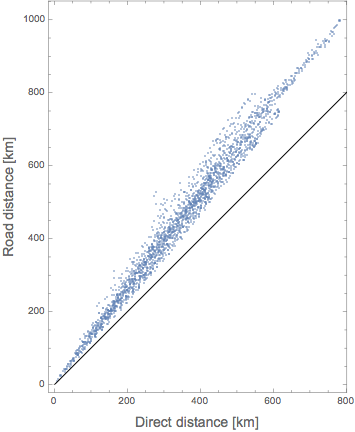
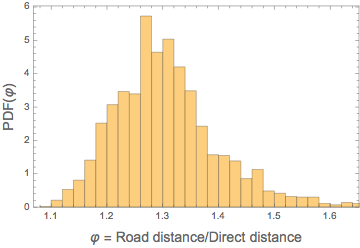
Also interesting is to look at the length of the route versus the direct distance:

copy=DeleteDuplicates[Flatten[#,1]]&/@alldata; (* merge data and delete duplicates*)
directlength=GeoDistance2@@@copy[[All,{1,-1}]]; (* calculate direct distance*)
routelength=BlockMap[GeoDistance2@@#&,#,2,1]&/@copy; (* calculate road distance *)
routelength=Total/@routelength; (* total it*)
ListPlot[{directlength,routelength}\[Transpose]/1000.0,Frame->True,AspectRatio->Automatic,Epilog->{Line[{{0,0},{1000,1000}}]},FrameLabel->(Style[#,14]&/@{"Direct distance [km]","Road distance [km]"})]
Histogram[routelength/directlength,Automatic,"PDF",Frame->True,FrameLabel->(Style[#,14]&/@{"\[CurlyPhi] = Road distance/Direct distance","PDF(\[CurlyPhi])"})]

where GeoDistance2 is a quick version of GeoDistance:

ClearAll[GeoDistance2]
GeoDistance2[{lat1_,lon1_},{lat2_,lon2_}]:=Module[{\[CurlyPhi]1,\[CurlyPhi]2,\[CapitalDelta]\[CurlyPhi],\[CapitalDelta]\[Lambda],a,c},
    {\[CurlyPhi]1,\[CurlyPhi]2}={lat1,lat2}Degree;
    \[CapitalDelta]\[CurlyPhi]=\[CurlyPhi]2-\[CurlyPhi]1;
    \[CapitalDelta]\[Lambda]=(lon2-lon1)Degree;
    a=Haversine[\[CapitalDelta]\[CurlyPhi]]+Cos[\[CurlyPhi]1]Cos[\[CurlyPhi]2]Haversine[\[CapitalDelta]\[Lambda]];
    c=2ArcTan[Sqrt[1-a],Sqrt[a]];
    6.3674446571 10^6c (* result in meters *)
]
enter image description here

enter image description here

I guess the average ratio describes how developed a country is/how mountainous it is/how many water bodies it has. A comparison for different countries would be very nice. But I don't want to kill the Wolfram servers...

POSTED BY: Sander Huisman
POSTED BY: Henrik Schachner
POSTED BY: Sander Huisman
POSTED BY: Vitaliy Kaurov

Dear Vitaliy,

for intra-city travel the function I posted here might be useful. The problem is that it uses the GoogleMaps API and only allows us to use a limited number of requests per day.

Cheers,

Marco

POSTED BY: Marco Thiel

Creating these lines for the routes on a country-scale should be quite easy; just some rotation and scaling. I'll give it a try later. I chose a grid of cities rather than all cities so that it is more homogeneously distributed over the area, and thus not biasing certain areas.

Thanks for the nice comments!

POSTED BY: Sander Huisman
POSTED BY: Marco Thiel

Hi Marco,

Thanks for the kind words. Unfortunately I didn't save the times. But should be also possible. I might try tonight. Just to clarify: I'm also not using the distance now. I just color it by how often a piece of road is 'used' by all the routes. But it might be interesting to see it as a graph indeed. I will dig deeper later...

thanks!

POSTED BY: Sander Huisman
Reply to this discussion
Community posts can be styled and formatted using the Markdown syntax.
Reply Preview
Attachments
Remove
or Discard