Group Abstract Group Abstract

Message Boards Message Boards

0
|
7.8K Views
|
6 Replies
|
3 Total Likes
View groups...
Share
Share this post:

[?] Avoid boundaries disappearing between cells during segmentation?

I have asked the question on MSE as well: https://mathematica.stackexchange.com/questions/146550

I have the following image that i segment into respective cells using the function below:

segmentImage[binarizedMask_?ImageQ] := 
Module[{seg, areas, indexMaxarea, maxArea},
seg = MorphologicalComponents@*ColorNegate@Dilation[binarizedMask, 1];
areas = ComponentMeasurements[seg, "Area"];
{indexMaxarea, maxArea} = First@MaximalBy[areas, Last] /. Rule -> List;
If[maxArea > 20000, ArrayComponents[seg, Length@areas, indexMaxarea -> 0], seg]];
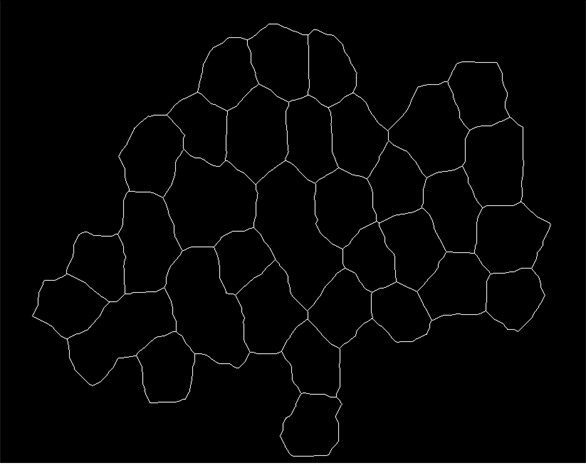
enter image description here

The result of the segmentation img2 = segmentImage[img]//Colorize is shown below:
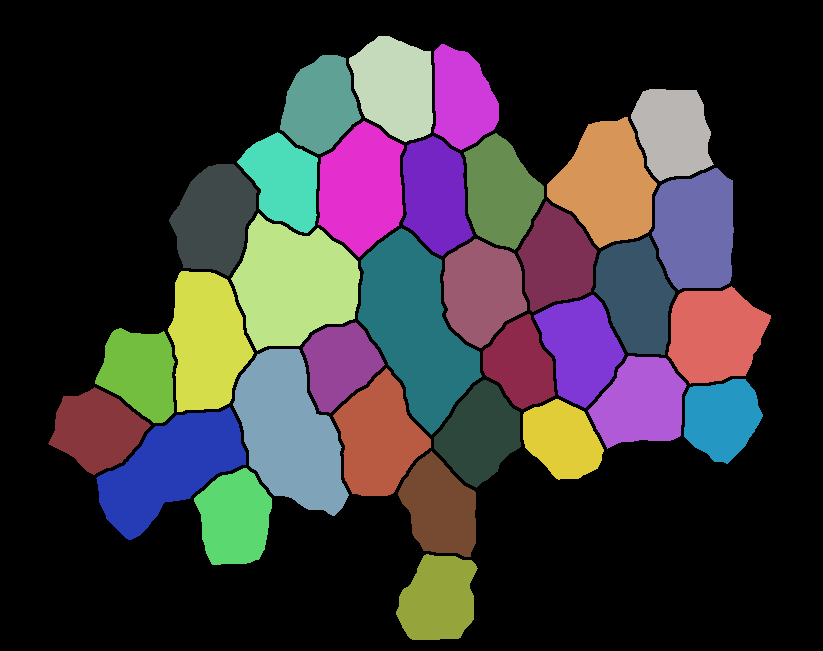
enter image description here

The problem that I am facing is that the boundaries between the cells are completely lost. I cannot recover any information of the neighbours or the neighbourcount:

ComponentMeasurements[img2,"NeighborCount"]
(* {1 -> 0, 2 -> 0, 3 -> 0, 4 -> 0, 5 -> 0, 6 -> 0, 7 -> 0, 8 -> 0, 
9 -> 0, 10 -> 0, 11 -> 0, 12 -> 0, 13 -> 0, 14 -> 0, 15 -> 0, 
16 -> 0, 17 -> 0, 18 -> 0, 19 -> 0, 20 -> 0, 21 -> 0, 22 -> 0, 
23 -> 0, 24 -> 0, 25 -> 0, 26 -> 0, 27 -> 0, 28 -> 0, 29 -> 0, 
30 -> 0, 31 -> 0, 32 -> 0, 33 -> 0} *)

This should not be the case since in the original image the cells are sharing boundaries. Is there a way to recover the neighbours or better way to do segmentation so that I do not lose boundaries between the cells?

POSTED BY: Ali Hashmi
6 Replies

Hi Ali,

try this:

mask = Dilation[Binarize@img2, 2];
img3Data = WatershedComponents[ColorNegate@img2, Method -> "Basins"] ImageData[mask];

which means:

enter image description here

With this one can do things like

ComponentMeasurements[img3Data, "NeighborCount"]

Hope that helps, regards -- Henrik

POSTED BY: Henrik Schachner

Thanks this looks very neat. We also figured another way on MSE !

POSTED BY: Ali Hashmi

Btw in your last line of code is the ImageData[mask] being multiplied ?

POSTED BY: Ali Hashmi

Yes, a multiplication with an "overall mask" is needed because of the result of WatershedComponents.

We also figured another way on MSE !

And - what is the solution ???

POSTED BY: Henrik Schachner

ComponentMeasurements[Dilation[segmentImage[img],2]//Colorize,"NeighborCount"] does not work, however, ComponentMeasurements[Dilation[segmentImage[img],2],"NeighborCount"] i.e. without Colorize works. Not sure why

POSTED BY: Ali Hashmi
POSTED BY: Henrik Schachner
Reply to this discussion
Community posts can be styled and formatted using the Markdown syntax.
Reply Preview
Attachments
Remove
or Discard