The interesting pattern @Jim Baldwin observed has most likely to do with the number of gray levels induced by aliasing; if this number of gray levels is plotted against rotation this becomes obvious:
xrimg = Table[{x, ImageRotate[img, x]}, {x, 0, Pi, Pi/100}];
ListLinePlot[{#1, (Length@*DeleteDuplicates@*Flatten@*ImageData)[#2]} & @@@ xrimg, PlotRange -> All]
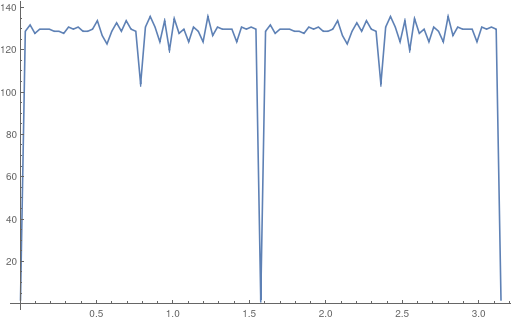
So I guess one should work here with binarized images only.
But my main point here is that I was in a way wrong in my post above: This method is not suitable to calculate caliper width! One can easily see this in the following example, where the diameter of the circle by no means has anything to do with caliper:
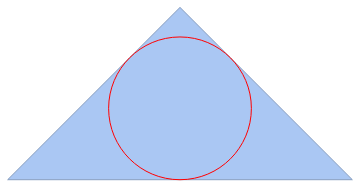
But nevertheless this method can be useful if the true shape is used instead of the convex hull, and if one no longer concentrates on "caliper" but more on a term like "belly". That gives me my modified routine:
bellyWidth[img_Image] := Module[{borderPts, order, baktMesh},
  borderPts = ImageValuePositions[Thinning[EdgeDetect[Binarize[img]]], 1];
  order = First@FindCurvePath[borderPts];
  baktMesh = MeshRegion[Polygon@borderPts[[order]]];
  -2. NMinValue[SignedRegionDistance[baktMesh, {\[FormalX], \[FormalY]}], {\[FormalX], \[FormalY]}  \[Element] baktMesh]]
Lets check:
rimg = Table[ImageRotate[img, x], {x, 0, Pi, Pi/25}];
{#, bellyWidth[#]} & /@ rimg
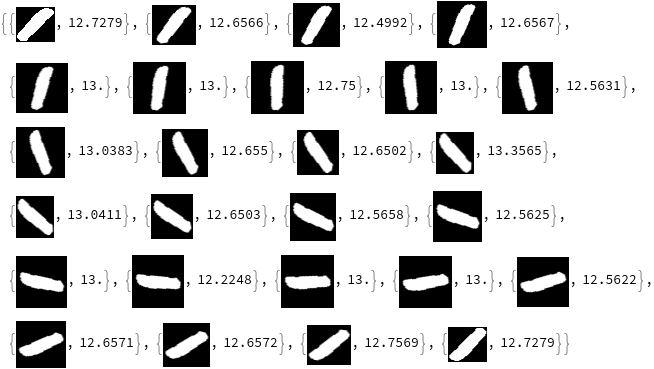
The discrepancies now are (far) below one pixel.



