Group Abstract Group Abstract

Message Boards Message Boards

[WSG22] Daily Study Group: Getting Started with Mathematica and WL

Posted 4 years ago
POSTED BY: Arben Kalziqi
15 Replies
POSTED BY: Ratheesh Babu S
Posted 4 years ago

Hint: Use IntegerDigits, Map and Style.

POSTED BY: Rohit Namjoshi

One more note, for now: some students requested that the poll questions be made available because of timezone issues preventing them from taking the polls/watching the lectures in real-time. I've added a notebook with the poll questions (answers bolded) to the downloads folder.

POSTED BY: Arben Kalziqi

Our next Daily Study Group runs August 15-19 and would make a great next step for anyone who just completed the Getting Started study group. The focus will be on creating notebooks to express ideas and develop workflows for data science, modeling, research, education and more. Sign up here.

POSTED BY: Jamie Peterson
POSTED BY: Arben Kalziqi

How would you write the following function in abbreviated mode?

Function[u, 3 + u][x]

Thanks,

Mitch Sandlin

POSTED BY: Mitchell Sandlin

Hi Mitch! You're looking for:

3+#&[x]

The # represents the slot into which an input will go (analogous to a what a variable in a function does) and the & closes it off. At that point, the whole construct 3+#& acts like any other function f.

POSTED BY: Arben Kalziqi

Not exactly since I am not using "#" but instead using "u" as my symbol. In using a different symbol other than #, it appears to be defined in the 1st parameter of the Function[] definition and I was wondering how the symbol is defined in the abbreviated form.

Thanks Again,

Mitch Sandlin

POSTED BY: Mitchell Sandlin

# represents an arbitrary input without making explicit reference to a dummy variable like u or x. Except for in some very particular edge cases where you're nesting pure anonymous functions and can get into ambiguities about which slot is being referred to, it is exactly the same as Function[u,3+u] (which is also equal to Function[3+#]).

Do you have some particular use case in mind where these are not equivalent? If so, could you provide some more information?

POSTED BY: Arben Kalziqi

Hi Arben;

Actually, I copied the function directly from the documentation (possibly the 1st entry in the examples) and was just wondering how to convert it into the abbreviated form.

Thanks,

Mitch Sandlin

POSTED BY: Mitchell Sandlin

Hi Mitch—the abbreviated form is what I stated above. Are you looking for a way to convert what you've written into that abbreviated form? If so, I'm not sure that there's a "native" way to do that, but you also shouldn't need to do that because these are functions that you write from scratch anyway, so you would just choose the format you wanted when writing them for the first time.

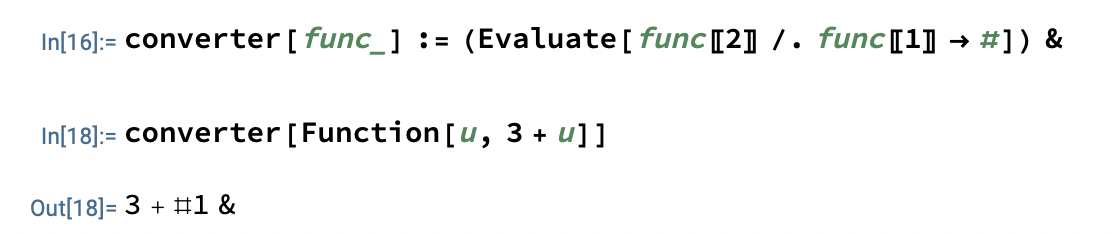
Here's a hacky solution that I've come up with; I can't guarantee that it works in 100% of cases: converter[func_] := (Evaluate[func[[2]] /. func[[1]] -> #]) & It extracts the "function" part of the Function, then replaces the "variable" part with a Slot[1] (#). The "Evaluate" is to make this operation actually evaluate, because by default it's taking the right-hand side as a pure function per se and thus not evaluating it. Then, I put a & at the end of this replaced version to close off the newly-made pure anonymous function. enter image description here
POSTED BY: Arben Kalziqi

Due to popular demand, a Q&A digest is being compiled throughout the week, and this is posted along with the other Study Group materials at the download location. Check your Study Group reminder and recording notification emails for that link. The Q&A digest for Days 1 and 2 is now available.

POSTED BY: Jamie Peterson

I am intrigued but confused by RemoteBatch.
There is a lack of relevant topics and content in the community and document center.
Could Wolfram U consider offering some courses?

POSTED BY: Tsai Ming-Chou
POSTED BY: Arben Kalziqi

This is great news!

POSTED BY: Tsai Ming-Chou
Reply to this discussion
Community posts can be styled and formatted using the Markdown syntax.
Reply Preview
Attachments
Remove
or Discard
