Hello Wolfram community.
I have been using Mathematica for a while, for different purposes, but recently I have been faced with an Image processing super simple problem and I am kind of lost. In our office we have a bunch of old documents that we need to digitalize. We do have them in PDF and the quality is quite good so Mathematica does a quite good job with TextRecognize.
However, depending on the type of the page and the section of the page (Only text, text with graphics, or text in tables) TextRecognize will work better if I use RecognitionPrior as "Column" or "Block".
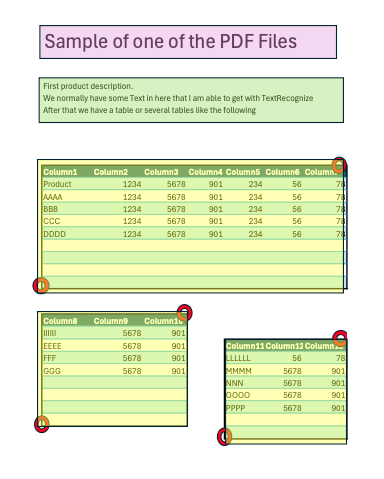
So my dilemma is to make the bounding boxes for the document so that I can structure the data as a table later on. For example Pink box is the title, Green box the Product Description and Yellow the Products details (see image or attached pdf). My biggest challenge is the Yellow boxes as they change size and position. I want to be able to detect the Red Spots I marked so I can draw the BoundingBox
I figured out that almost all tables start with the same Header Pattern, So I am getting all Pixels with that color and then checking when the color changes in X . Something like
headercolor=RGB[a,b,c];
headercolorspositions=PixelValuePositions[thisimage, headercolor]
DerivativeFilter[headercolorspositions]
I am sure there is an easier way to do this. Like selecting the part of the image I want and then just looking for that pixel sequence inside ImageData.
I feel like I am trying to kill a bug with a cannon. If you have any simple solution it will be appreciated