Let's start from scratch.
data =
 Dataset[{
   <|"A" -> "a-1", "B" -> "b-1", "C" -> "c-1"|>,
   <|"A" -> "a-2", "B" -> "b-2", "C" -> "c-2"|>}]
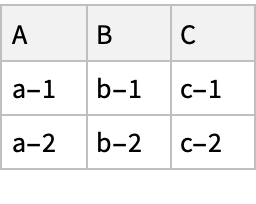
Now let's do a query with just one operator.
data[f]
(* f[{<|"A" -> "a-1", "B" -> "b-1", "C" -> "c-1"|>, <|"A" -> "a-2", "B" -> "b-2", "C" -> "c-2"|>}] *)
The function f was applied to the entire collection. It was not applied to each row. That first operator can be used to filter or to aggregate.
Integers are interpreted as a Part specification. Anything that looks like a Part specification will be interpreted as a Part specification.
data[1]
(* Gives you the first "row" *)
You can provide an explicit function.
data[Most]
(* Gives you all but the last "row", which in this case will just be a single row dataset--notice that the result is slightly different than the previous. *)
The function can be a selector.
data[Select[#["A"] == "a-2" &]]
(* Selects the second "row" *)
The function can be an aggregator.
data[Length]
(* 2 *)
Now let's add a second operator.
data[f, g]
(* f[{g[<|"A" -> "a-1", "B" -> "b-1", "C" -> "c-1"|>], g[<|"A" -> "a-2", "B" -> "b-2", "C" -> "c-2"|>]}] *)
Notice that g is applied to each record. Just like with the first operator, g can be a Part or a selector or an aggregator or any function you want.
data[f, "C"]
(* f[{"c-1", "c-2"}] *)
In this case f isn't doing anything. A more typical example would be:
data[All, "C"]
You can keep going deeper with operators.
data[f, g, h]
Notice how h gets applied to each value in each record. Again, we can do whatever we want with that operator:
data[All, "A", Capitalize]
data[All, "A", StringDelete["-"]]
data[All, "A", StringLength]
Here's an example where we aggregate at the top level after selecting at the record level and applying a function at the "field" level:
data[Total, "A", StringLength]
(* 6 *)
That is all very general because your question was very general. Maybe it would be clearer if you told us what kind of query you want to do on your data. Working through a specific example might clarify how this all works.



