I wonder if anyone can help to solve a - to me - rather mysterious matter. I wrote a notebook containing some calculations. At the beginning of the code, a drop-down menu is presented from which the user can select, by clicking, the input data that the notebook should use. The input data are stored in a GitHub repository, and the purpose of the drop-down menu is just to choose which GitHub input file should be read and downloaded for the subsequent calculations. I wrote the piece representing the drop-down menu with the help of the AI Assistant, because my knowledge was not sufficient to write it.
The notebook worked very well, and it still does. The problem is that now, by opening the notebook, I can only see the visual representation of the drop-down menu, see the attached screenshot. 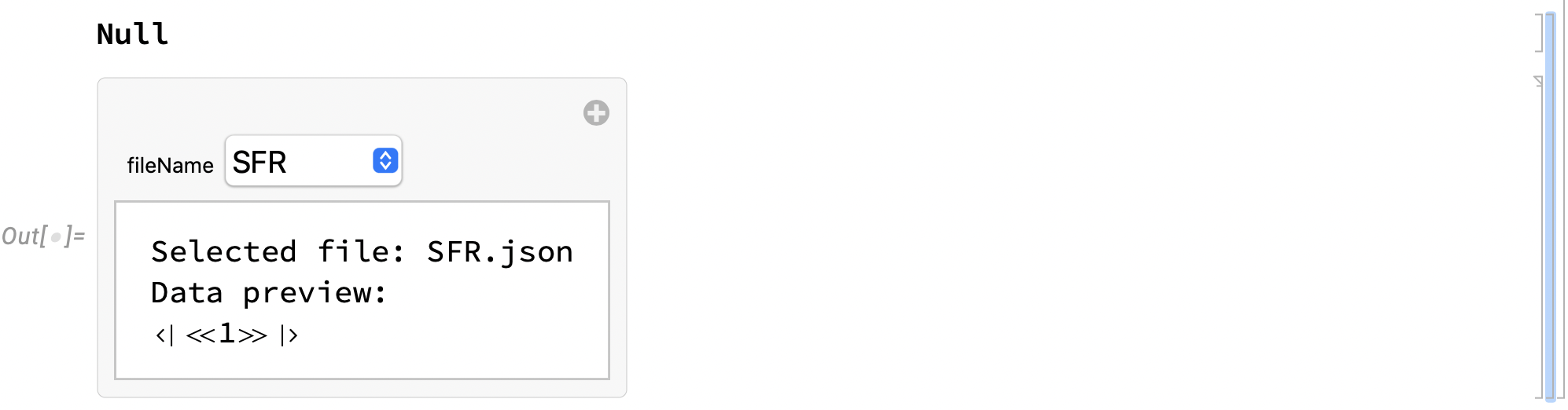
However, if I want to see its content, and hence I click on the marker on the right hand side of the margin, the code does not appear, only the expression "Null". This is already seen above the drop-down menu in the attached screenshot, which was taken after I clicked on the marker on the r.h.s. margin.
The true mystery (for me) is that the piece of code, which generates the drop-down menu, must be still there, because THE DROP-DOWN MENU STILL WORKS! My wondering is why I cannot see the hidden piece of code, and how I could make it visible again.
For the information of the kind people who are prepared to help me to solve this puzzle, here is the code (taken from an earlier version of the notebook where it is still visible):
ClearAll["Global`*"]\[IndentingNewLine]Manipulate[\[IndentingNewLine] data=Import[\[IndentingNewLine] StringJoin[\[IndentingNewLine] "https://raw.githubusercontent.com/imre-chalmers-se/IET_book/refs/heads/main/data/active/",\[IndentingNewLine] fileName,\[IndentingNewLine] ".json"\[IndentingNewLine] ],\[IndentingNewLine] "RawJSON"\[IndentingNewLine] ];\[IndentingNewLine] \[IndentingNewLine] (* Display the imported data or a message *)\[IndentingNewLine] Column[{\[IndentingNewLine] "Selected file: " <> fileName <> ".json",\[IndentingNewLine] "Data preview: ",\[IndentingNewLine] Short[data]\[IndentingNewLine] }],\[IndentingNewLine] \[IndentingNewLine] {{fileName,"SFR"},{"SFR","Allegro","MSDR","PWRSMR","LWRSMR","MSFR","LFRSMR","FHR"},ControlType->PopupMenu}]
The notebook itself, from which the above screenshot was taken, is attached to this note. It was also uploaded to the Wolfram Repository, and can be downloaded from the Notebook Archive:
https://notebookarchive.org/2025-05-7dypmeq
The drop-down menu is seen in Section 1: "Select the reactor for the calculations and read the corresponding data file". Clickiing on the cell margin will show the text "Null" instead of the above snippet.
I am very grateful if someone can help solve this mystery. The significance of the matter is that the Notebook in the Archive was used to do the calculations and the plots in the newly published book "Surveillance and Diagnostics of Next Generation Nuclear Reactors", and it is referred to in the book. The readers are encouraged to run the Notebook, reproduce the figures in the book, do calculations with modified input data, or even upload new data to the GitHub repository. The way the data is collected, and the address of the GitHub repository, are in the now invisible snippet; this is why it is important to me to make the content visible. I am grateful for any possible help.
 Attachments:



