While working on internal projects, I often found that want to add extra functionality on top of the existing functions of TestReport and TestCreate, TestEvaluate etc. Recently I made an effort to compile all of these custom functionalities into my own package and publish it for general use on my own Github account here.
I have tried to make the Github repo reasonably self-explanatory, but I would like to post some of the headline functionality here for everyone's benefit. The main code is found in UnitTestFramework.wl, which I deliberately kept as a single file so that it's easy to load remotely using
Get["https://raw.githubusercontent.com/SjoerdSmitWolfram/UnitTestFramework/refs/heads/main/UnitTestFramework/Kernel/UnitTestFramework.wl"]
Of course, you can also install the paclet and load it locally. The repository has an example paclet with a small test suite to show broadly how things are expected to be structured. The example paclet also has a WolframScript file that gives can be used and adapted to run your unit tests from the command line so you can easily run them without interrupting your main workflow.
What is UnitTestFramework and why should you use it?
UnitTestFramework is a reusable test runner for paclet-style Wolfram Language projects. It is built around the standard MUnit workflow, but adds a more practical layer on top for people who need to run larger or more structured test suites.
The main idea is simple: keep using familiar test constructs such as TestCreate, but gain better control over how tests are discovered, configured, tagged, skipped, summarized, and run from automation.
This matters because once a test suite grows beyond a handful of files, you usually want more than a raw TestReport. You want a way to separate quick local runs from full runs, mark known failures without losing visibility, skip auto-generated or expensive tests when appropriate, and get a summary that is actually useful in CI (continuous integration) and day-to-day development.
Main functionalities
Configuration of test suites
One of the main features of the framework is that test runs are driven by a project-level configuration file such as TestConfig.m (though other formats like .json are also supported to some extent). Instead of hard-coding behavior into ad hoc scripts, you can define things such as:
- where test files live
- which test files to include
- which paclet contexts should be loaded
- whether to abort on the first unexpected failure (so you can easily reproduce the kernel state at the point of failure)
- whether to run a full test suite or a quicker local version
- custom initialization and evaluation behavior and fine control over which contexts are visible while tests are running.
- isolation of the contents of each test file (so that variables defined in one test file do not affect tests in another file)
- local machine-specific overrides through an optional LocalConfig file
- configuration of local dependencies, such as other paclets that you're developing in unison with the one you're currently testing
If you're using the .m format for the TestConfig file, you can also extend the unit test framework with your own code, such as helper functions for deciding how to handle numerical noise in outputs.
The test configuration file makes the test runner much easier to reuse across projects because it factors out all of the project-specific peculiarities into a file that's easy to commit and maintain. The same framework can be loaded once and then adapted per paclet by changing the config, rather than rewriting the test infrastructure every time. You can even have multiple test files to configure different ways to run the tests.
Most projects will require minimal setup to get the test suite up and running; the main property to configure will be the "PacletContexts". Other properties only need to be tinkered with if the project is structured differently from the default assumptions.
Tagging tests
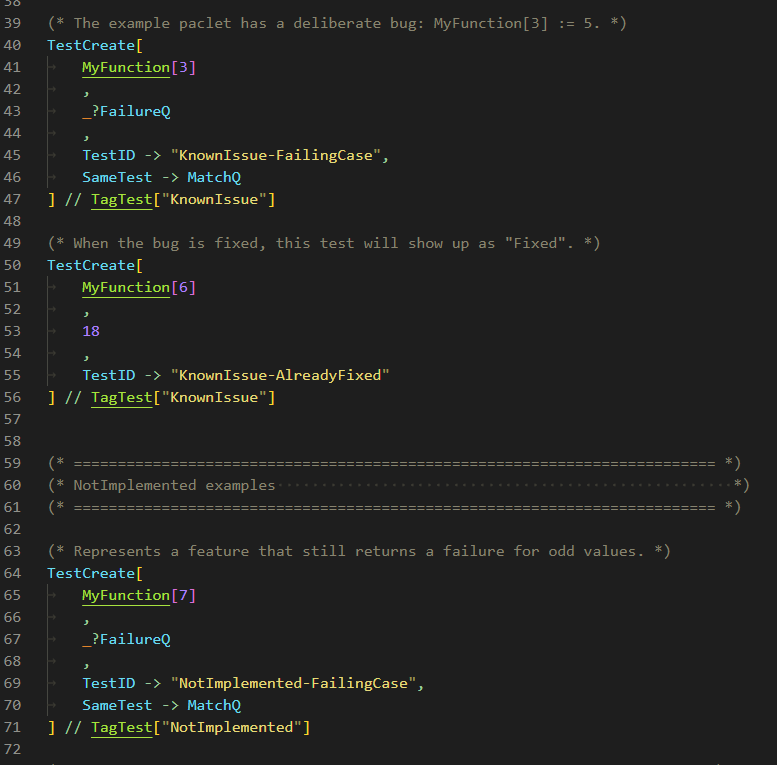
A second major feature is test tagging through TagTest.
This lets you attach metadata to tests in a structured way and then use that metadata to control execution and reporting. For example, you can mark tests as:
- known issues
- not yet implemented
- performance tests
- generated tests
- full-report-only tests
- to-be-skipped
That turns out to be extremely useful in practice. Real test suites are not always just pass or fail. Sometimes a failure is expected because a bug is known. Sometimes a test is intentionally present before the implementation exists (i.e., test-driven development). Sometimes a test is too expensive for every local run. Tags make those cases explicit instead of forcing them into awkward workarounds.
Test summaries
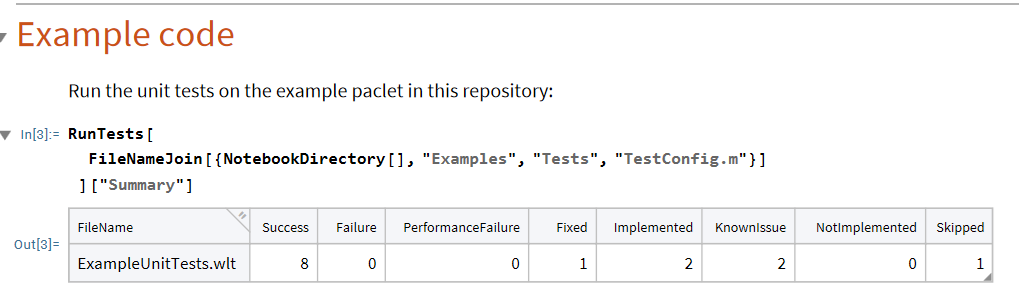
The framework also adds categorized summaries on top of the raw test results. Instead of only seeing whether a run passed or failed, you can group results into categories such as Success, Failure, KnownIssue, NotImplemented, PerformanceFailure, Fixed, Implemented, and Skipped. This gives a much better high-level view of the state of a test suite and helps answer questions like:
- Which files are producing real failures?
- Which failures are already known?
- Which not-yet-implemented tests have started passing?
- Which tests were skipped in a local run?
For CI, the framework also builds a filtered report focused on the categories that should actually affect pass/fail decisions, while still keeping the richer result structure available for analysis.
Command line interface
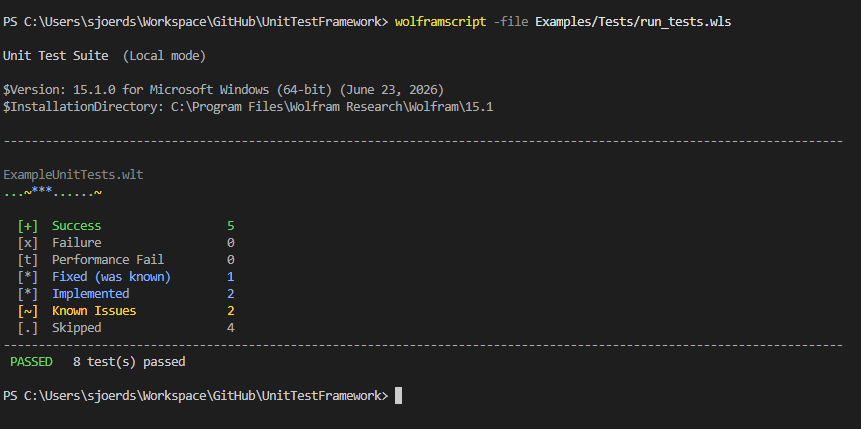
The repository also includes example scripts for running tests from the command line, which makes the framework suitable for automation and CI workflows.
That means you can use the same test infrastructure both interactively inside the Wolfram Language and non-interactively from scripts. If you maintain paclets or other structured projects, this makes it much easier to integrate testing into build pipelines, local shell workflows, and repeatable project setup.
The example unit tests can be run from the command line (assuming you start it in the root directory of the repository) with the following line:
wolframscript -file Examples/Tests/run_tests.wls
The overall goal is to make Wolfram Language testing feel less like a one-off notebook activity and more like a maintainable development workflow. If you have any questions or suggestions, please let me know!



