Group Abstract Group Abstract

Message Boards Message Boards

0
|
6.4K Views
|
5 Replies
|
0 Total Likes
View groups...
Share
Share this post:

Represent three dimensions of data on a 2D ListPlot?

Posted 9 years ago

Is it possible to make a List Plot in which each point is colored based on the count of that point's {x,y} occurrence in the data set? Specifically, I have data of the form data={{x1,y1}->c1, ... ,{xn,yn}->cn} where cn is the nth count for the occurrence of {xn,yn} in the data set. I can almost get what I want in two ways:

Method 1:

ListPlot[{#1} & @@@ data,PlotMarkers -> cf /@ #2 & @@@ data]

where cf is my ColorDataFunction[], and I have neglected my plotting options for clarity.

Method 2:

ListPlot[{#1} & @@@ data,PlotStyle -> cf /@ #2 & @@@ data]

again where cf is my ColorDataFunction[], and I have neglected my plotting options for clarity.

For method 1, the rendered markers are large squares, and for method 2, the markers are automatically sized. In both cases, I loose control of marker size and shape customization.

POSTED BY: Jacob Lapenna
5 Replies

Thank you for the excellent responses. I could not figure out how to use all the plot formatting I wanted with Graphics (in particular log scale and grid lines within the plot). However, for the record, I did end up figuring out something that worked for me:

Here's a small sample of my data (the first 10 list elements of 14,869 elements), with the entire data list attached:

{{5, 198.047} -> 366, {6, 198.047} -> 392, {7, 198.047} -> 
  388, {7, 208.471} -> 734, {8, 198.047} -> 351, {8, 208.471} -> 
  744, {9, 198.047} -> 315, {9, 208.471} -> 768, {9, 218.894} -> 
  1003, {10, 198.047} -> 272}

First, I defined a plotting function that generates a list of plotting directives for a common point size and individual point color, and then uses this list to plot all the points:

pdPlot[list_, string_, pointSize_] := Module[{directives},

  directives = 
   Directive[PointSize[pointSize], #] & /@ 
    Map[cf, #2 & @@@ list/Max[#2 & @@@ list]];

  ListPlot[{#1} & @@@ list, ScalingFunctions -> "Log", 
   ImageSize -> Large, Frame -> True, 
   PlotRange -> {{0, 360}, {200, 5000}}, 
   FrameTicks -> {{Automatic, None}, {{0, 90, 180, 270, 360}, None}}, 
   GridLines -> {{0, 90, 180, 270, 360}, Automatic}, 
   PlotLabel -> "Partial Discharge Detection via " <> string, 
   FrameLabel -> {"Phase (degree)", "Charge (pC)"}, 
   PlotStyle -> directives]

  ]

Where:

cf = ColorData["Rainbow"]

I then call the function with my data list, title string, and a point size I found to work well:

pdPlot[couplerData, "80 pF Iris Coupling Capacitor", 0.0075]

Which yields the following plot:
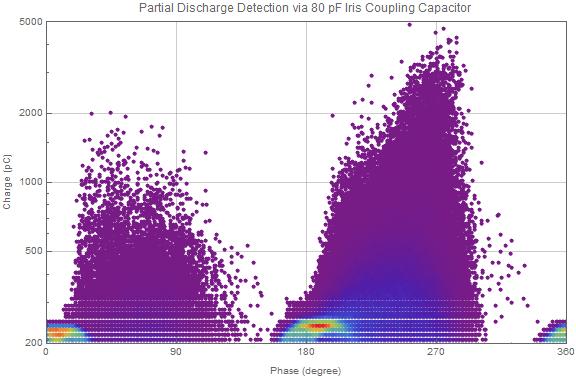
enter image description here

Next, I am working on the appropriate plot legend to show the color scale.

Attachments:
POSTED BY: Jacob Lapenna

You may consider using BubbleChart, if you haven't already. It has a similar purpose.

POSTED BY: Gianluca Gorni

Apart from Gianlucas short and elegant solution I think it might be a good idea to reorder your data first. This way you can make sure that "interesting" points are not overlapped by "uninteresting" ones. Here a minimal example (using List of List instead of List of Rules):

data = RandomInteger[100, {100^2, 2}];
tdata0 = Tally[data];
tdata1 = GatherBy[SortBy[tdata0, Last], Last];
tdata2 = Transpose /@ tdata1;
tdata3 = First[Transpose@tdata2];

Here in this case we have 7 different occurences:

Length[tdata3]
(* Out:    7 *)

Now in the most simple case we can do

ListPlot[tdata3, AspectRatio -> Automatic, 
 PlotStyle -> {Directive[GrayLevel[0], PointSize[1 s]], 
    Directive[GrayLevel[.5], PointSize[2 s]], 
    Directive[RGBColor[0, 0, 1], PointSize[3 s]], 
    Directive[RGBColor[1, 0, 0], PointSize[4 s]], 
    Directive[RGBColor[1, 1, 0], PointSize[5 s]], 
    Directive[RGBColor[0, 0, 1], PointSize[6 s]], 
    Directive[RGBColor[0, 1, 0], PointSize[7 s]]} /. s -> .005]

which already results in:

enter image description here

Well, of course if you do not have that many data, then Gianlucas solution is surely preferable!

POSTED BY: Henrik Schachner

I would try with graphics primitives:

data = {{0, 0} -> 2, {1, 1} -> 1, {-2, -3} -> 1};
nmax = Max[data[[All, -1]]];
Graphics[{PointSize[Large], 
  data /. ({x_, y_} -> n_Integer) :> {Hue[n/nmax], Point[{x, y}]}}]
POSTED BY: Gianluca Gorni
POSTED BY: EDITORIAL BOARD
Reply to this discussion
Community posts can be styled and formatted using the Markdown syntax.
Reply Preview
Attachments
Remove
or Discard
