Group Abstract Group Abstract

Message Boards Message Boards

Put a texture onto a 3d model?

Posted 8 years ago

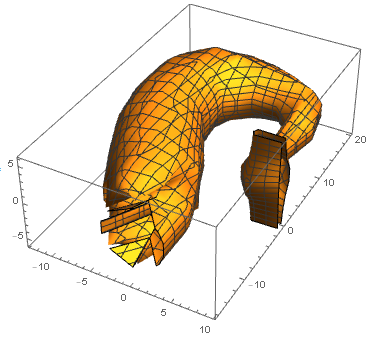
I am currently getting a mangled model whenever I try and add a texture. The obj file was obtained from exporting the heart model provided by wolfram. Any help would be appreciated.

ListSurfacePlot3D[Import["C:\\Users\\Ellis\\Documents\\theheartP4.obj", "VertexData"], 
 PlotStyle -> Texture[ExampleData[{"ColorTexture", "CheetahFur"}]]]

mangled model

POSTED BY: Fred Crithlow
10 Replies
Posted 8 years ago
POSTED BY: Hans Milton
Posted 8 years ago

First get the data from the Wolfram database:

heartModel = AnatomyData[Entity["AnatomicalStructure", "Heart"], "Graphics3D"];
furryTexture = Texture[ExampleData[{"ColorTexture", "CheetahFur"}]];

Then:

RegionPlot3D[
    DiscretizeGraphics@heartModel,
    PlotStyle -> furryTexture
 ]

enter image description here

POSTED BY: Hans Milton
Posted 8 years ago
POSTED BY: Fred Crithlow
Posted 8 years ago

Dont know exactly what went wrong for you. But it probably has something to do with ListSurfacePlot3D/VertexData versus RegionPlot3D/DiscretizeGraphics. Compare these two examples:

shuttleModelA = ExampleData[{"Geometry3D", "SpaceShuttle"}];
RegionPlot3D@DiscretizeGraphics@shuttleModelA

enter image description here

shuttleModelB = ExampleData[{"Geometry3D", "SpaceShuttle"}, "VertexData"];
ListSurfacePlot3D[shuttleModelB, MaxPlotPoints -> 50]

enter image description here

POSTED BY: Hans Milton

You can add more options

ListSurfacePlot3D[Import["C:\\Users\\Ellis\\Documents\\theheartP4.obj", "VertexData"], 
PlotStyle -> Texture[ExampleData[{"ColorTexture", "CheetahFur"}]], MaxPlotPoints -> 35, Mesh -> None, PlotRange -> All]
Posted 8 years ago

I originally had those options used, changing the max plot points only changed how intricately the model was mangled.

ListSurfacePlot3D[
Import["C:\\Users\\Ellis\\Documents\\theheartP4.obj", "VertexData"], 
PlotStyle -> Texture[ExampleData[{"ColorTexture", "CheetahFur"}]], 
MaxPlotPoints -> 35, Mesh -> None, PlotRange -> All]

enter image description here

I have also used a few different models in case somehow the vertex data was incorrect prior to projecting a texture onto it.

POSTED BY: Fred Crithlow

Which model of the heart was used? There is a 3D model

AnatomyData[Entity["AnatomicalStructure", "Heart"], "Graphics3D"]
Posted 8 years ago

The heart object that I used was the model from wolfram, but I still had a mangled end result.

POSTED BY: Fred Crithlow

Welcome to Wolfram Community! Please make sure you know the rules: https://wolfr.am/READ-1ST

The rules explain how to format your code properly. If you do not format code, it may become corrupted and useless to other members. Please EDIT your posts and make sure code blocks start on a new paragraph and look framed and colored like this.

int = Integrate[1/(x^3 - 1), x];
Map[Framed, int, Infinity]

enter image description here

POSTED BY: EDITORIAL BOARD
Reply to this discussion
Community posts can be styled and formatted using the Markdown syntax.
Reply Preview
Attachments
Remove
or Discard