Group Abstract Group Abstract

Message Boards Message Boards

Extract nuclei from images with dark cytoplasm?

Posted 8 years ago

Hello and thank you in advance for your help. Please, see, for instance, the following two images.

Cell 1 Cell2

Any ideas for a correct isolation of the nuclei? Unfortunately, these images are from our archive and they cannot be recaptured. The sample also cannot be re-prepared. This is a “tricky” challenge. Nothing seems to work for a correct isolation.

POSTED BY: Sotirios Maipas
3 Replies
POSTED BY: Wolfgang Hitzl

Hi Sotirios,

here comes a simple first guess:

ClearAll["Global`*"]
web = {"http://community.wolfram.com//c/portal/getImageAttachment?\
filename=cell-4-9-1.jpg&userId=1438211", 
   "http://community.wolfram.com//c/portal/getImageAttachment?\
filename=cell-4-9-2.jpg&userId=1438211"};
imgs0 = Import /@ web;
thrh = FindThreshold /@ imgs0;
nucs = ColorNegate /@ MapThread[MorphologicalBinarize, {imgs0, thrh}];
MapThread[HighlightImage, {imgs0, nucs}]

This gives:
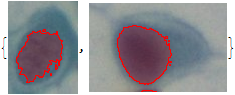
enter image description here

Does that help?

Regards -- Henrik

POSTED BY: Henrik Schachner

Dear Henrik,

Thank you very much for your very valuable help!!!

I will inform you about the results.

Thank you once again!

Best regards, Sotirios

POSTED BY: Sotirios Maipas
Reply to this discussion
Community posts can be styled and formatted using the Markdown syntax.
Reply Preview
Attachments
Remove
or Discard
