Group Abstract Group Abstract

Message Boards Message Boards

0
|
4.4K Views
|
8 Replies
|
2 Total Likes
View groups...
Share
Share this post:

ContourPlot3d Inside a Sphere Boundary?

Posted 6 years ago

Hello Wolfram Scientists!

Any idea how to do a Region Function "boundary" sphere instead of the default cube shape in Mathematica? I would like to encapsulate a ContourPlot3D smoothly inside of a sphere?

Thank you so much!

POSTED BY: Ricardo Canedo
8 Replies

I am sorry Ricardo, I don't understand what do you mean with "cut the mesh". Can you show me an example?

POSTED BY: Ahmed Elbanna
Posted 6 years ago

Example:

enter image description here

POSTED BY: Ricardo Canedo
Posted 6 years ago
POSTED BY: Ricardo Canedo
Posted 6 years ago

enter image description here

I basically need the sphere to cut the mesh. But Ball is not working on my end, unfortunately.

POSTED BY: Ricardo Canedo
Posted 6 years ago

Would it be possible to do this as a Region Function of a Sphere? Does this method cut the mesh smoothly?

Thank you!

POSTED BY: Ricardo Canedo
Posted 6 years ago

Thank you, Ahmed!

The code works well but when I pass on to my code, I get this error:

Show::gtype: Times is not a type of graphics.

Do you know why?

POSTED BY: Ricardo Canedo

Hi Ricardo

One solution is that you can hide the box around your figure and add a sphere around it using Show. This allows lots of customizations for the surrounding sphere.

Show[Graphics3D[{Opacity[0.3], Sphere[{0, 0, 0}, 4]}], 
 ContourPlot3D[x^3 + y^2 - z^2, {x, -2, 2}, {y, -2, 2}, {z, -2, 2}], Axes -> False, Boxed -> False]
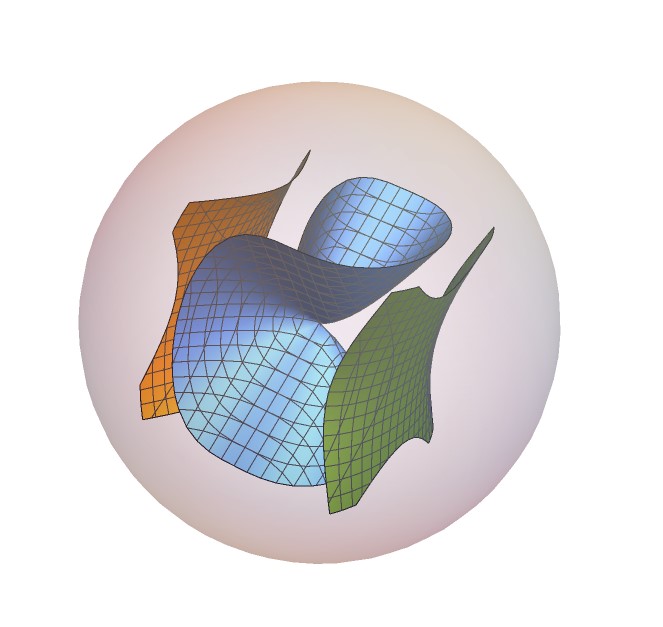

enter image description here

POSTED BY: Ahmed Elbanna
Reply to this discussion
Community posts can be styled and formatted using the Markdown syntax.
Reply Preview
Attachments
Remove
or Discard