Group Abstract Group Abstract

Message Boards Message Boards

0
|
3.2K Views
|
5 Replies
|
2 Total Likes
View groups...
Share
Share this post:

Coloumn Graphics with a shape placed on both elements

Posted 5 years ago

I want to make the following plot:

enter image description here

The blue one is

p1 = Plot[x Sin[x] - 1, {x, -2.5, 2.5}]

and the red one is

p2 = Plot[Evaluate[D[x Sin[x] - 1, x]], {x, -2.5, 2.5}, 
  PlotStyle -> Red]

(Copied from this tutorial)

and then I used

GraphicsColumn[{p1, p2}]

I want to insert these two black vertical lines that would attract notice from the reader on a more subtle figure I am working on (I drew these two lines with Windows Paint).

Is that possible?

POSTED BY: Ehud Behar
5 Replies
Posted 5 years ago

@Henrik Schachner,

Thanks so much for your advice. It is exactly what I was looking for.

POSTED BY: Ehud Behar

Hi Rohit,

I guess those coordinates are in terms of ImageDimensions[<respective graphics>], i.e. this transformation might be pretty ugly.

POSTED BY: Henrik Schachner
Posted 5 years ago

Nice, I would not have thought of that. There must be a way to convert from plot coordinates to graphics coordinates?

POSTED BY: Rohit Namjoshi
Posted 5 years ago

Hi Ehud,

I don't think there is a way to do that without rasterizing the column and adding the lines. If combining the plots is acceptable

Show[p1, p2,
 Graphics@InfiniteLine[{1.1, 0}, {0, 1}],
 Graphics@InfiniteLine[{-1.4, 0}, {0, 1}],
 PlotRange -> All]
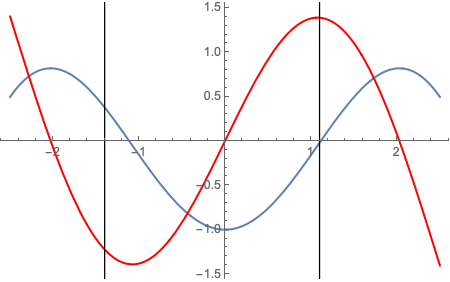
enter image description here

or

Show[p1, p2,
 GridLines -> {{{1.1, Black}, {-1.4, Black}}, None},
 GridLinesStyle -> Directive[Black, Thickness[0.003]],
 PlotRange -> All]

POSTED BY: Rohit Namjoshi

Ehud,

if it is just for a single graphic, then here is a really "quick and dirty" way: You make a right-click with your mouse over the graphics generated from GraphicsColumn[{p1, p2}], choose "Get Coordinates" and read out the respective values. This then can be used for GridLines, e.g.:

GraphicsColumn[{p1, p2}, GridLines -> {{90, 260}, None}, GridLinesStyle -> Thick]

enter image description here

But I am curious myself for a clean solution.

POSTED BY: Henrik Schachner
Reply to this discussion
Community posts can be styled and formatted using the Markdown syntax.
Reply Preview
Attachments
Remove
or Discard