Group Abstract Group Abstract

Message Boards Message Boards

[WSG21] Daily Study Groups featuring Notebooks: Intro and Going Further

85 Replies
Posted 4 years ago

The correct answer to Problem 6 in this quiz seems incorrect to me, or at least the wording in the answers is quite ambiguous. Without giving away the answer, consider

Module[{x}, x]
POSTED BY: Rohit Namjoshi
Posted 4 years ago

How soon do we have to submit the solution to the quiz - Going Further with Notebooks? Gurbax Singh

POSTED BY: Gurbax Singh

Hi. I submitted all my quizzes for the previous NB class on time.
Do I have to submit them again?

I rechecked it: there are 6 quizzes; all are accepted.
Please, comment. Thanks. M

Yes, Abrita. I did complete the last Quiz (one with 10 questions (?)). Thank you. I enjoyed the class. Its Highlight was the presentation on bridges. This can explain to many why the Wolfram language is so valuable not only in special applications, but also in everyday life... And there was also many important technical insights and details. Overall, those five meetings were condensed and instructive. My great thanks to the whole team! Looking forward to the class on difEqs. Some emphasis on the nonlinear dynamics would be appreciated.

Michael.

Posted 4 years ago

That's very nice. If the question is really "when", then perhaps Print[Now] instead of Print[MousePosition["Graphics"]]?

POSTED BY: Rongoetz
Posted 4 years ago
POSTED BY: Rongoetz

Thank you, rongoetz. Very helpful. M

Posted 4 years ago

Hi Michael, do you mean what is shown in the attachment? (To local reference you need to write the word "paclet:" in front of the link on the reference)

Attachment

POSTED BY: lara wag

Great! Thank you very much, Lara. M

And it's a good breathing exercise :)

Thank you, Abrita. You are saying that this is not recommended. But is it possible? Sure, it does not work directly and blocks evaluation. But can we hack it? May be with some version of Hold or anything that prevents evaluation at some step/level. Any advice would be appreciated. M

Posted 4 years ago
POSTED BY: Rongoetz
Posted 4 years ago
POSTED BY: Rongoetz
Posted 4 years ago
POSTED BY: Rongoetz
Posted 4 years ago

By playing with a screen image I pasted into a text cell in Mathematica, I found out how to interactively modify the image. When I double click the image a pop-up menu appears below the image that enables me to interactively modify the image.

POSTED BY: Gerald Dorfman

Right, we can use the Image Assistant toolbar as explained in the documentation for Predictive Interface

enter image description here

Posted 4 years ago
POSTED BY: Gerald Dorfman

I did some tests creating notebooks automatically with code and data, here they are:

Create a Wolfram Notebook with Wikipedia Data
https://community.wolfram.com/groups/-/m/t/2398375

Create a Wolfram Notebook from a novel text file
https://community.wolfram.com/groups/-/m/t/2398391

Create Wolfram Notebook from WEB API JSON data
https://community.wolfram.com/groups/-/m/t/2398806

POSTED BY: Daniel Carvalho

Cool examples Daniel. Thanks for sharing.

Thank you, Daniel. M

Daniel, could you please advise what would be an appropriate name for my Roam page with this type of entries? How about "Creating Wolfram notebooks from (?) various data sources"? Thanks. M

POSTED BY: Daniel Carvalho

Awsome! Thank you.

Posted 4 years ago
POSTED BY: Heidi Liu
Posted 4 years ago
POSTED BY: Heidi Liu
Posted 4 years ago

From Gurbax Singh I have noticed the following two points: 1. To get the item bullet (the red little square), you can tap Shift+8/, it may give you the bullet or the star as it is supposed to do. However, if your cursor is blinking on the insertion bar and then you tap Shift+8/, you will get the beautiful red bullet every time.

  1. You can insert a different bullet as follows: go to Format->CellDingbat->a popup menu of 28 bullets to choose from shows - square (filled/empty), circle (filled/empty), wolf, diamond, and others. However, they are in black/white.

Question: How can you style it - change its color, etc.

POSTED BY: Gurbax Singh

Style the character you want to use for the CellDingbat as you would like:

Style[Framed[\[Wolf], Background -> Black, FrameMargins -> 0], 
 FontSize -> 24, RGBColor[1., 0.5, 0.1`]]

Add it as the CellDingbat option for the cell:

CellPrint[
 Cell["A test subitem", "Text", 
  CellDingbat -> 
   BoxData[
    ToBoxes[
     Style[Framed[\[Wolf], Background -> Black, FrameMargins -> 0], 
      FontSize -> 24, RGBColor[1., 0.5, 0.1`]]]]]]

enter image description here

Posted 4 years ago
POSTED BY: Updating Name

Very impressive, Gurbax. So far you are apparently the winner! Please accept my congrats (subject to other participants' approval) !

PS: Using @#&_/ would give an extra bonus :)

Posted 4 years ago

If I recall correctly, in today's session someone asked about formatting typeset equations over multiple lines, where each line is aligned to the equals sign.

I tried looking for clear answers for a while and couldn't find anything that would apply to DisplayFormula or DisplayFormulaNumbered cells, assuming the goal is to just include typeset math in a notebook (and not just "computable" Input).

A first try was using an Input cell of the form:

enter image description here

where the two equations are entered via inline TeX input (control-4 on macOS). Of course, the result isn't just typeset math as text.

I did find a workaround by creating a DisplayFormula or DisplayFormulaNumbered cell, then using the math notation palettes or keyboard shortcuts to create a one-column, multiline "matrix/array" (without delimiters). I then entered one equation per line. For each equation, I positioned the cursor to just before the equals sign and entered "escape-a-m-escape" to enter alignment markers. After that, I showed the cell expression (shift-command-e on macOS) and modified the GridBoxAlignment option to "=", as shown below. This resulted in the numbered equation (2) shown in the screenshot image below.
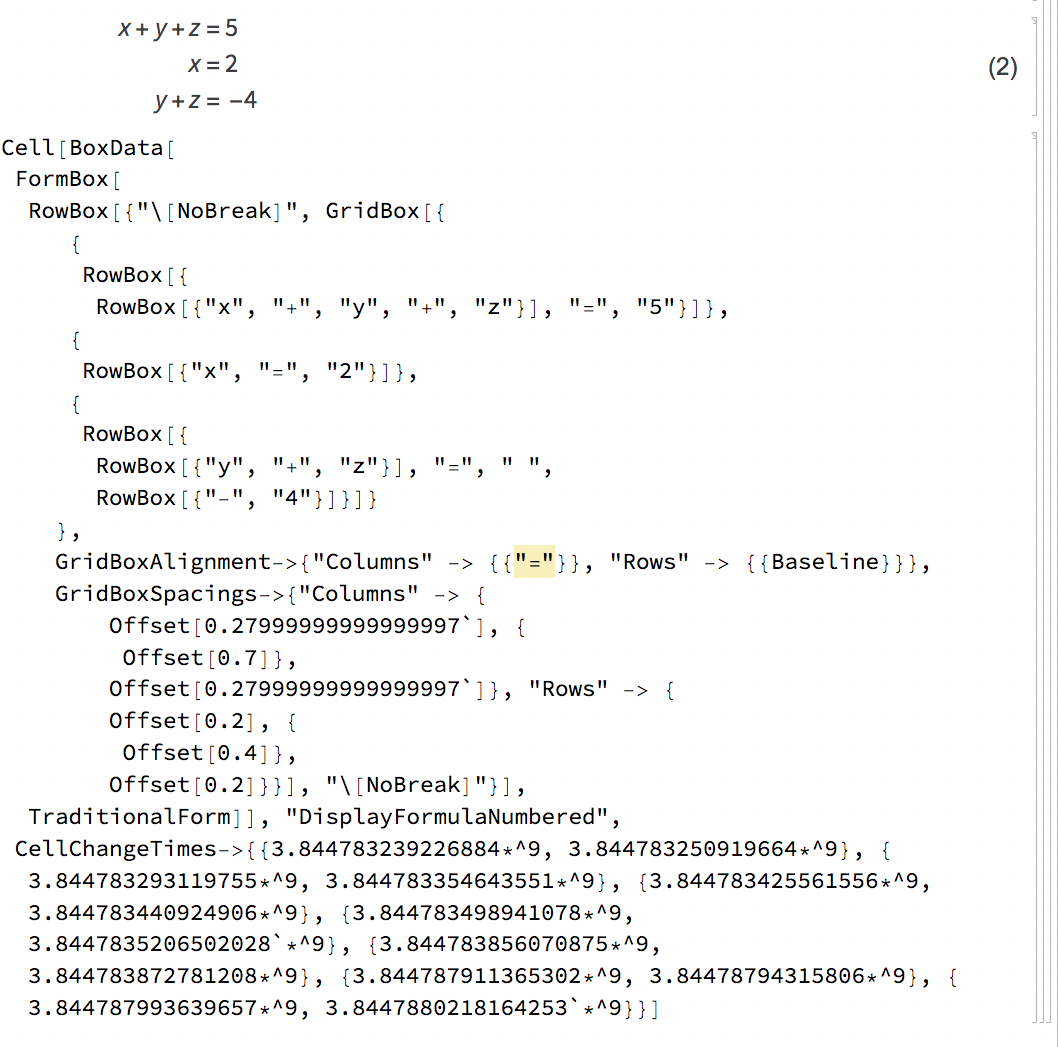
enter image description here Note: I duplicated the DisplayFormulaNumbered cell to include both views in the image above.

I would imagine that there's a much better way to do this type of multiline typesetting. So, I offer my less-than-great attempt in the hope that someone else has figured out a more elegant solution or may gain some inspiration to do so.

Cheers,

Dave

POSTED BY: Dave McCollum
Posted 4 years ago

Abrita wrote:

To align equations on the "=" sign you can use from the palette Writing Assistant -> Math Cells -> Equal Symbol Aligned Math Cell.

Aha. Thanks! I thought that there should be some way to align cells using the interactive math palettes/features but couldn't find it...

POSTED BY: Dave McCollum
POSTED BY: John Burgers

Right, if we close a programmatically created notebook without saving it, we will not be able to get back the Notebook object.

POSTED BY: John Burgers

Thanks, John. Just trying to build a bridge between the current and previous classes. The #s, @s and &s already require refreshment! :) Best. M

Posted 4 years ago

If you want more # @ //.... :-)

g = Grid[#, Frame -> All, Background -> {{}, {}, {{2, 5} -> Orange}}] &;
t = Range[10 # + 1, 10 # + 8] & /@ Range@4;
t // g
POSTED BY: Rohit Namjoshi

Awesome, Rohit! In my view, Range mapping Range is really out of box! And it's very nicely compartmentalized, with elegant "post-processing" (can I put it this way?) . Thank you!

POSTED BY: John Burgers

Thanks for the challenge Abrita,

Here is my interpretation of that image,

Grid[Table[Style["x", Bold, FontSize -> 30], {5}, {7}], 
 Background -> {None, {{Green, Yellow}}, {{2, 3} -> Red, {2, 5} -> 
     Orange, {4, 3} -> Purple, {4, 5} -> Magenta}}, 
 Spacings -> {1, 1}]
POSTED BY: John Burgers
Posted 4 years ago
POSTED BY: Luis Phillips
Posted 4 years ago
POSTED BY: lara wag

Hello Iara, Your very observant, much more than I. So I defer to your solution. the darker line initially did catch my eye as odd, so I omitted it. Would love to see how you transitioned the vertical spacing, you may be correct that x's in the top row are raised somewhat, still I think the vertical alignment is Center on all the remaining rows. I'm guessing that your absorbing a lot from this course just by being so attentive !! Best Wishes. John.

POSTED BY: John Burgers
Posted 4 years ago
Attachment

Attachments:
POSTED BY: lara wag

Just found the video, but it was suddenly interrupted by the announcement of the forthcoming session. Is there a YouTube version? Thanks.

Attachment

Attachments:
POSTED BY: John Burgers
Posted 4 years ago
POSTED BY: Gerald Dorfman

Interactive Wordcloud

Resource of the day: A great video class explaining the Manipulate function: https://www.wolfram.com/wolfram-u/catalog/gen702/

Is there a way to maintain the syntax coloring in PDF or any other exports?

POSTED BY: James Choi

Hi James, Thanks for an excellent question. Unfortunately I do not have an answer for you yet but I have reached out for more information. I'll post on the thread as soon as I have something.

You need to set the "ShowSyntaxStyles" option to True. For example:

SetOptions[EvaluationNotebook[],PrintingStyleEnvironment -> "Printout", ShowSyntaxStyles -> True]
Export[FileNameJoin[{NotebookDirectory[], "ShowSyntaxStylesPrintout.pdf"}], EvaluationNotebook[]];
SystemOpen[%]

Attached is an example notebook and the corresponding PDF.

POSTED BY: James Choi
POSTED BY: Steven Zimmerman

A nice post on community about a custom stylesheet: https://community.wolfram.com/groups/-/m/t/2018326

Posted 4 years ago
POSTED BY: Wissam Barakat
Posted 4 years ago
POSTED BY: Updating Name

Question of the day: What is one notebook feature that you have found especially useful in your work?

POSTED BY: Steven Zimmerman

Folding and unfolding the groups of cells :)

Posted 4 years ago
POSTED BY: Rongoetz
Reply to this discussion
Community posts can be styled and formatted using the Markdown syntax.
Reply Preview
Attachments
Remove
or Discard