Group Abstract Group Abstract

Message Boards Message Boards

Load DICOM with actual data values: Import/Export changes data

I'm very happy with the continued improvement of the Dicom import and export functionality and speed. However, there is one issue with the current implementation that makes it very unuseful if you do quantitative image analysis. It might be that I miss an option if not I think this should be fixed.

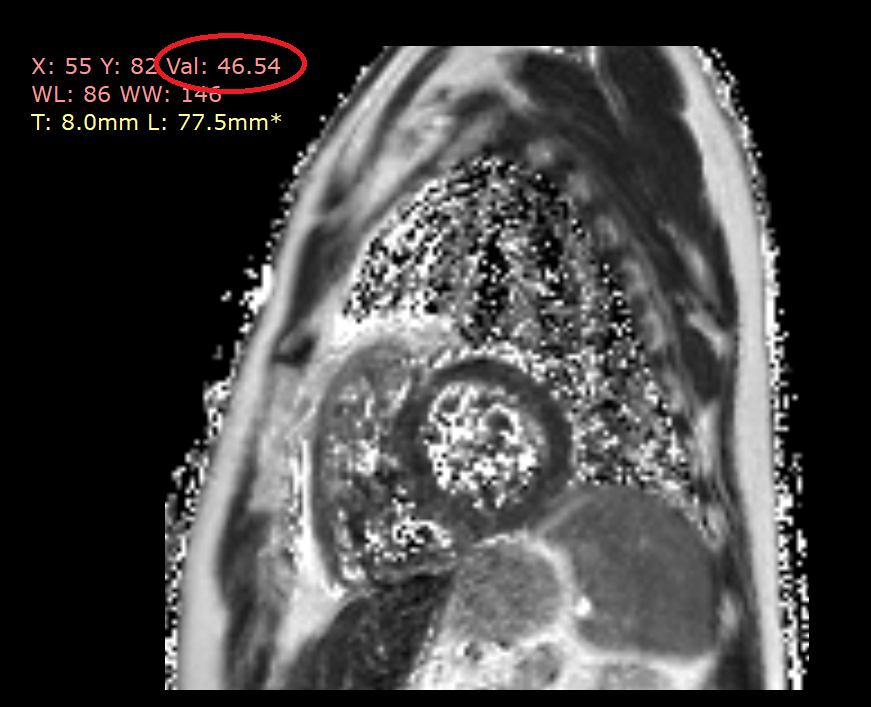
In the Mathematica documentation and examples, Dicom data is typically shown and imported as images which I understand for display purposes. But I consider the information in Dicom files as data, very well curated and standardized. For many (MRI) applications, the actual quantitative values of voxels stored in Dicom actually have meaning, values, and even units. For example in the image below each voxel value is actually a quantitative measure of T2 relaxation time in the heart, where the values are stored in milliseconds as voxel values as is also mentioned in the metadata.

enter image description here

enter image description here

To get from the stored values to quantitative values (WV, DV or FP) the fields from the header and the equations are well defined.

Header values:

  • SV = stored value of DICOM PIXEL DATA without scaling
  • WS = RealWorldValue slope (0040,9225) "RWVSlope"
  • WI = RealWorldValue intercept (0040,9224) "RWVIntercept"
  • RS = rescale slope (0028,1053) "RescaleSlope"
  • RI = rescale intercept (0028,1052) "RescaleIntercept"
  • SS = scale slope (2005,100E) "ScaleSlope"

Outputs:

  • WV = real world value
  • FP = precise value
  • DV = displayed value

Formulas:

  • WV = SV * WS + WI
  • DV = SV * RS + RI
  • FP = DV / (RS * SS)

So my first try was that I want to obtain the "RawData" to access the SV pixel data, which does not output anything.

enter image description here

Eventually, if I import this Dicom file into Mathematica I have to use a lot of tricks to get to the correct stored values. The Dicom images I use are stored as 12-bit Integers but are converted by Mathematica to a Numerical array with type Int16. Also, I have to specifically specify that I don't want any "DataTransformation" which by default rescales the data and actually changes some voxel values!!!!

In[1]:= << QMRITools`

{meta, data, bd} = 
  Import[file, {"dicom", {"MetaInformation", "Data", "BitDepth"}}, 
   "DataTransformation" -> None];
dataT = Import[file, {"dicom", {"Data"}}];

{dd = ToExpression[
   StringJoin @@ 
    StringCases[NumericArrayType[data], DigitCharacter]], bd}
{ss, rs, ri} = 
 meta /@ {"2005_100e", "RescaleSlope", "RescaleIntercept"}

{data, dataT} = Normal@{data, dataT};

svT = 2.^bd (dataT/(2.^dd));
pfT = (rs svT + ri)/(rs ss);

sv = 2.^bd (data/(2.^dd));
pf = (rs sv + ri)/(rs ss);

PlotData[pfT, pf]

Out[3]= {16, 12}

Out[4]= {1.99854, 0.500366, -2.}

For my current research, I need the PF values and to get them correctly I have to:

  1. Use "DataTransformation"->None, which is not really well documented what it actually does. But based on what I see actual values of the data are changed by clipping the histogram, which for default handling of medical data is never OK!! enter image description here
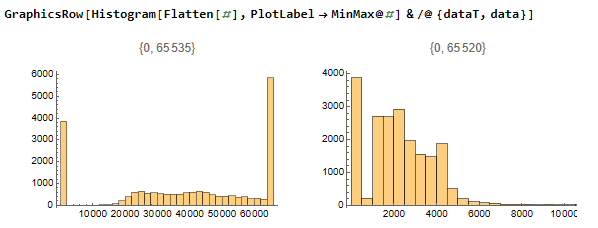
  2. As far as I am aware the only way to obtain the actual stored values of my Dicom data (the actual binary values stored in the file itself) I have to find the actual BiteDepth and the imported data type and rescale my data accordingly.

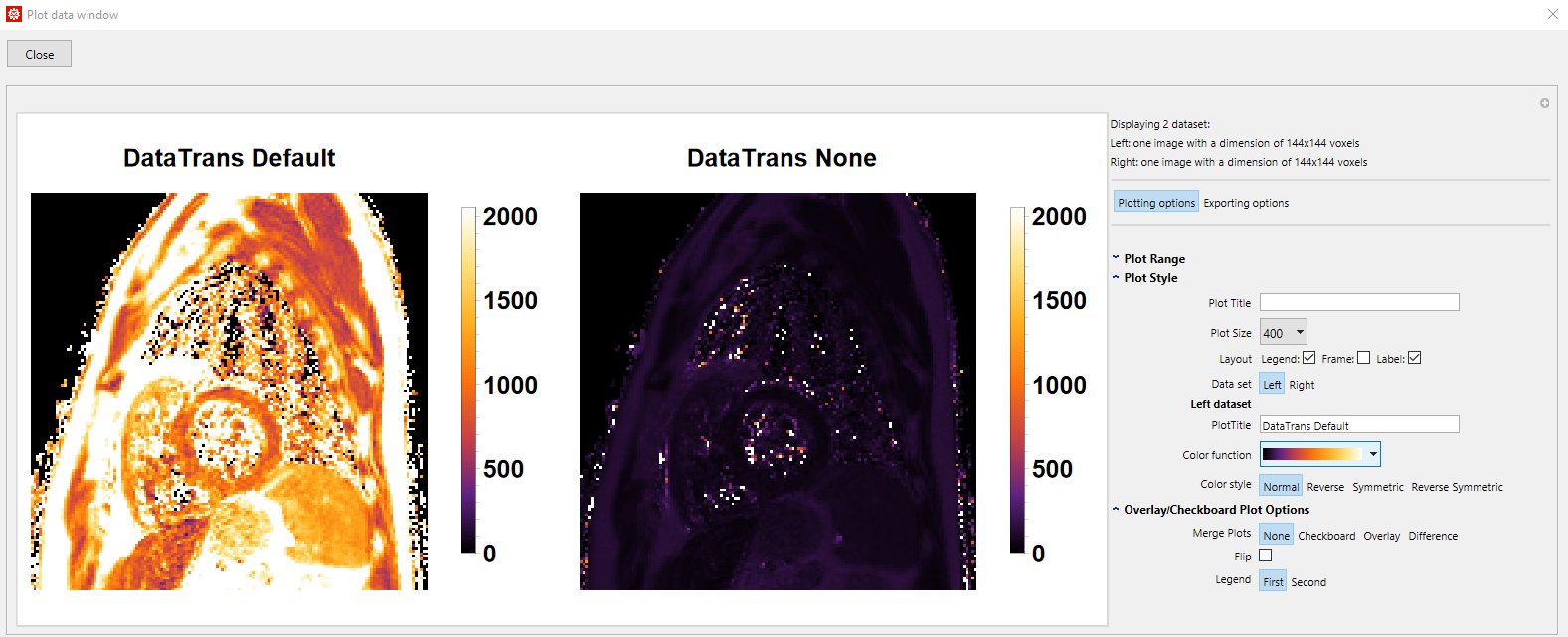
Below are the obtained PF valued data I need with and without DataTransformation. Although the image on the right might look less appealing with default range and scaling it is actually correct when scaled apropriately. enter image description here enter image description here
Am I missing a correct option for getting the actual data stored? If not this should definitely be changed. Dicom is the international standard to transmit, store, retrieve, print, process, and display medical imaging information. With the current implementation, it is impossible to Import and Export such files without actually changing the stored data.

Thanks, Martijn

POSTED BY: Martijn Froeling
5 Replies
POSTED BY: Rafal Chojna

Awesome! Very helpful information!

I was not aware of the DICOMTools will dig a bit into that.

And indeed the 2005 tag is a vendor-specific one, if i remember correctly all odd first numbers are generally vendor-specific.

Thanks again for the information!

POSTED BY: Martijn Froeling
POSTED BY: Rafal Chojna
POSTED BY: Martijn Froeling

I am coming upon this interesting thread years later. I want to comment on the sentence, "We went for this design because otherwise a vast majority of DICOM files would return an all-black image by default, which wouldn't be very useful." I think there's a hidden assumption about to whom the functionality is meant to be useful.

With automatic transformation and glossy images, Import[]'s DICOM handling is useful to non-professionals who want to quickly put an existing DICOM image in a format that is easy to qualitatively analyze. That may be useful to patients who are generating informed questions for their healthcare providers. It is also useful to people who are running demos of Wolfram's functionality to generate sales.

With automatic transformation and glossy images, Import[]'s DICOM handling is NOT useful to healthcare providers, because as the OP mentioned: "...based on what I see actual values of the data are changed by clipping the histogram, which for default handling of medical data is never OK!!" Conventions like this are very serious in medicine because doctors need images free of manipulations that could affect the interpretation of key features of the image. So anyone who wanted to build a medical image processing app in Mathematica that meets government standards would have to show they are explicitly working around this default behavior.

Without automatic transformation, Importing a DICOM indeed gets you mostly-black images initially, but it seems that is what's useful to researchers. The OP was a very polite way of saying that without the ability to extract the raw voxel values, Wolfram's exciting new Import functionality for DICOMs was effectively useless to researchers. And the solution was for researchers to use a then-undocumented "RawPixelData" tag. (There's a single line about it in this article https://reference.wolfram.com/language/ref/format/DICOM.html now... was that there 4 years ago?) But in research, reproducibility is paramount, and reproducibility is curtailed greatly by "black box" functionality in software.

I wonder if sometimes the community would be better served by more candor and clarity about which functionality is meant to be useful to which users. Right now the main documentation page for DICOM reads like it's geared toward people who have never heard of a DICOM image until that day, and it's very important to keep that language in place in order to continue facilitating learning. But the info a researcher needs to do even 1 micro-step of their work ("RawPixelData" --> "DICOM pixel data without scaling") is buried in the Import Elements section, and a person who doesn't read that far is making a rational choice since Wolfram documentation just doesn't always cover the relevant technical information. This post was a demonstration of someone having to figure out for themself what's happening "under the hood" in order to make the functionality useful for their application area.

A fix could possibly look like creating an "Application Areas" section on documentation pages. For the DICOM page (https://reference.wolfram.com/language/ref/format/DICOM.html) that section would be close to the top and it would say something right at the beginning like:

"Import[] by default scales pixel values by clipping the histogram to ensure that the first image generated from the data has visible features. Researchers who want to perform a quantitative analysis must Import the "RawPixelData" element or Import with "DataTransformation" -> None".

Doing this would potentially allow researchers to get to their real work faster, without compromising other people's learning.

Reply to this discussion
Community posts can be styled and formatted using the Markdown syntax.
Reply Preview
Attachments
Remove
or Discard