You sent me your data file and the example notebook and I took a look at them. The reason why it appears that your data columns are appended is that you are looking at the result using TableForm. Remember that your original data is a rectangular array--which is a list of lists, each of equal length. When you then remove your dashed strings using any of my methods above, the result is a non-rectangular array. The lists in the outermost list each may have a different length. When you use TableForm to display this on screen each such list (a "row" in the TableForm display) is left justified. However, this is not showing the column structure... it is just showing what is in each row. (In fact, by left justifying the display of the ragged array of data, TableForm is indeed showing the correct index structure that you would need to use if you were using the Part function.) Since the array is no longer rectangular, the meaning of a column is ambiguous relative to original rectangular data array since the information on which column any item came from is lost. Here is a simple example of a rectangular array with elements that we wish to remove.
test={{a, b, c}, {1, "XXX",2}, {e, f, g}, {"XXX",3,"XXX"}}
When one shows it using TableForm its rectangular structure is clear
TableForm[test]
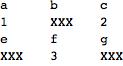
Now remove the "XXX" strings:
test1 = test /. "XXX" -> Sequence[]
Which gives the following non-rectangular array (and where the information on which column of the original array each element came from is lost):
{{a, b, c}, {1, 2}, {e, f, g}, {3}}
And here is how this looks when one uses TableForm on it
TableForm[test1]
![TableForm[test1]](/c/portal/getImageAttachment?filename=tableForm.jpg&userId=124419)
For small arrays this behavior is pretty clear. But in your case you had very long rows and so the ragged righthand side was not visible on your screen. You would have had to scroll the cell very far to the right to see this hint as to what was at the root of your concern.
If you want to retain the rectangular form of your array so that you can then use it in matrix calculations, the approach to removing the stringified dashs sequences would be to replace them by an appropriate number.



