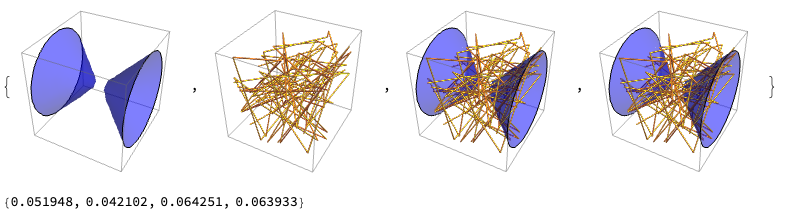
Yes, This is the most expensive combination. But there is an option for performance goal, (you need to list opaque objects before all transparent objects) to get a more rendering accurate result:
dat = Table[
   x^2 + y^2 - z^2 + RandomReal[0.1], {x, -2, 2, 0.2}, {y, -2, 2,
    0.2}, {z, -2, 2, 0.2}];
g1 = First@
   ListContourPlot3D[dat, Contours -> {0}, Mesh -> None,
    ContourStyle -> Directive[{Blue, Opacity[0.5]}]];
g2 = {MaterialShading["Gold"], Tube[RandomReal[20, {10, 10, 3}]]};

gr1 = Graphics3D[{g1}];
gr2 = Graphics3D[{g2}];
gr3 = Graphics3D[{g2, g1},
   BaseStyle ->
    RenderingOptions -> {"3DRenderingMethod" -> "HardwareDepthBuffer"}];
gr4 = Show[gr2, gr1,
   BaseStyle ->
    RenderingOptions -> {"3DRenderingMethod" -> "HardwareDepthBuffer"}];

{gr1, gr2, gr3, gr4}
Graphics`RenderTiming /@ {gr1, gr2, gr3, gr4}