Group Abstract Group Abstract

Message Boards Message Boards

Manipulate and dynamic complex input fields

Posted 11 years ago

Hello, I really new to Mathematica and I am working on developing interactive CDF. To understand the basics I start with a simple example but even with that I have a problem. In this simple CDF I want to able enter a function (Sin, Cos...) This is the example that I started from

Panel[DynamicModule[{f = Sin[ x]}, Column[{InputField[Dynamic[f]], Dynamic[Plot[f, {x, -5, 5}]]}]]]

But here I would like to be able not only change the function also the range and one more parameter such as frequency. So I know I need to use manipulate (I want to use as CDF) Manipulate[

DynamicModule[{f = Sin[o x + p]}, 
Column[{InputField[Dynamic[f]], Dynamic[Plot[f, {x, -5, 5}]]}]], {o,1, 10}, { p, 2, 10}]

but here I can't change the function even I type Cos and slide the o or p it goes back to Sin.

I actually prefer something like this

Manipulate[
 DynamicModule[{f = Sin[o x + p]}, 
  Column[{InputField[Dynamic[f]], Dynamic[Plot[f, {x, -5, 5}]]}]], 
 InputField[Dynamic[o]], InputField[Dynamic[p]]]

but Manipulate did not like the InputField.

Any idea how I can do this?

POSTED BY: Erdem Uguz
10 Replies
Posted 11 years ago

here I adapt the inputfield for xL and xR but I would like to have tags for there on the left such as Lower Limit = "Inputfield" Upper Limit = .. Function = ... Result = FieldHint -> "Enter a string" does not work I think because I set the inputfields to a number. How can put these name tags?

Manipulate[
 Panel[DynamicModule[{f = Sin[x], xR = 1, xL = 0}, 
   Column[{InputField[Dynamic[xL]], InputField[Dynamic[xR]], 
     InputField[Dynamic[f]], 
     Dynamic[NumberForm[
       NIntegrate[f, {x, xL, xR}, WorkingPrecision -> nw], 
       np]]}]]], {{np, 10, "NumberFormat"}, 10, 30, 
  1}, {{nw, 16, "WorkingPrecision"}, 10, 30, 1}]
POSTED BY: Erdem Uguz
Posted 11 years ago

I made something like this

Manipulate[
 Panel[DynamicModule[{f = Sin[x]}, 
   Column[{InputField[Dynamic[f]], 
     Dynamic[NumberForm[NIntegrate[f, {x, xL, xR}], np]]}]]], {xL, 0, 
  1}, {xR, 0, 1}, {np, 10, 30, 1}]

It works for CDF ...

POSTED BY: Erdem Uguz
Posted 11 years ago

I believe there is at least for Enterprise CDF which I use but to be honest documentation is not as good as MATLAB.

POSTED BY: Erdem Uguz

Honestly, I am not sure what the problem is. Wolfram Language documentation is the best I've seen, you just need to look thoroughly what is available. Before I list resources, is this type interface you want? Note you can enter arbitrary numerical values and functions, with condition they are mathematically proper. You can also restrict the type of things you enter so newbies won't break interface. Resources are below.

Manipulate[Plot[f[x, k], {x, -9, 9}, Filling -> Axis],
 {f, {JacobiSN, JacobiCN, JacobiND}},{{f, JacobiSN}},{{k, .5}}]

![enter image description here][1]

Resource

  • [Manipulate: see Scope >> Controls section][2]
  • [Introduction to Control Objects][3]
  • [Introduction to Manipulate][4]
  • [Introduction to Dynamic][5]
  • [Advanced Manipulate Functionality][6]
  • [Advanced Dynamic Functionality][7]
  • [Computable Document Format (CDF) Free Courses][8]

[enter image description here][8]

POSTED BY: Sam Carrettie
POSTED BY: Patrik Ekenberg
Posted 11 years ago

This is really nice it will help me a lot. Let me ask you couple of things (I appreciate your help)

In your code you o with oval and p with pval because you are using hold? Do you know away of doing it with a calculate button? As in the code will wait for that push button or a tick in order to make the calculation?

POSTED BY: Erdem Uguz

Hi!

You could add a button that when pressed, assigns the plot expression to a variable:

Manipulate[
 Column[{Button["Calculate", 
    plot = Plot[
      ReleaseHold[ReplaceAll[f, {o -> oval, p -> pval}]], {x, -5, 5}]],
   Dynamic[plot]}], {{oval, 1, "o"}, 1, 10}, {{pval, 2, "p"}, 2, 
  10}, {{f, Hold[Sin[o x + p]]}, 
  InputField[Dynamic[f], Hold[Expression]] &}, {{plot, 
   Plot[Sin[1 x + 2], {x, -5, 5}]}, None }
 ]
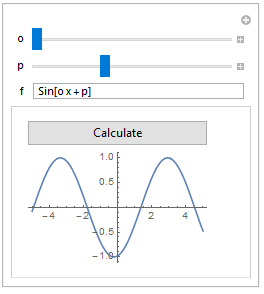
plot button

plot is a dynamic variable inside manipulate, but since I specified "None", it does not have a control associated with it.

I realized what causes the problem in your original code:

Manipulate[DynamicModule[{f = Sin[o x + p]}, 
Column[{InputField[Dynamic[f]], Dynamic[Plot[f, {x, -5, 5}]]}]], {o,1, 10}, { p, 2, 10}]

Since o and p are tracked by manipulate, any changes to them will reevaluate expressions inside of it. This includes the assignment f=Sin[o x +p] in DynamicModule. In fact, I think the whole dynamic module will be re-instanced.

POSTED BY: Patrik Ekenberg

I am afraid CDF has severe limitations to the kind of inputs it allows. I hope somebody else will give some details.

POSTED BY: Gianluca Gorni
Posted 11 years ago

Thanks for the reply. I can live with that to learn something but eventually I need more complex inputs. I am trying to develop apps for scientific calculations where I need to have a input field that the user can enter a function of his desire with desired values of the variables not limited sliders.

POSTED BY: Erdem Uguz
POSTED BY: Gianluca Gorni
Reply to this discussion
Community posts can be styled and formatted using the Markdown syntax.
Reply Preview
Attachments
Remove
or Discard