Group Abstract Group Abstract

Message Boards Message Boards

0
|
8.6K Views
|
6 Replies
|
0 Total Likes
View groups...
Share
Share this post:

Make conditional statement work in M10.0.2?

Posted 10 years ago
POSTED BY: Dan M
6 Replies

As a novice you should get a habit of looking in docs. There are many examples and you would understand the nature of error very quickly. Even syntax like /. can be looked up in docs:

enter image description here

POSTED BY: Sam Carrettie
Posted 10 years ago

Thanks for the help. I rewrote the statement and it worked. In the "Basic Math Assistant", a right arrow is both in the Calculator area and the Typesetting>Arrows areas. I used dash and greater than, "->", to write the statement.

POSTED BY: Dan M

Hi Dan,

your problem is that you used RightArrow, whereas you should use Rule. This is a bit difficult to see in the output:

enter image description here

So it looks the same but it is not. The following lines show what is going on:

{a, b, c} /. {c \[RightArrow] b, b \[RightArrow] a} // Hold // FullForm
{a, b, c} /. {c -> b, b -> a} // Hold // FullForm

The sceenshot shows the output.
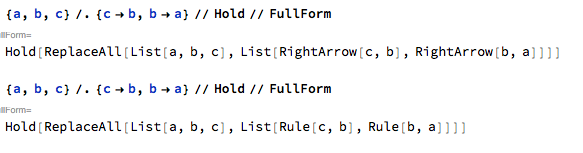
enter image description here

So the issue is that both RightArrow and Rule are rendered in the same way. If you type it in as -> it should work.

Cheers,

Marco

POSTED BY: Marco Thiel

It seems that you copied the code and the "->" (\[Rule]) was interpreted as the \[RightArrow]. So the following code must work:

In[5]:= {a, b, c} /. {c -> b, b -> a}

Out[5]= {a, a, b}

Sorry. My reply is much later but your did not show up until after I posted. Sorry.

Cheers,

Marco

POSTED BY: Marco Thiel
Reply to this discussion
Community posts can be styled and formatted using the Markdown syntax.
Reply Preview
Attachments
Remove
or Discard