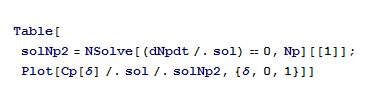
I get an error : Solve was unable to solve the system with inexact coefficients. The
answer was obtained by solving a corresponding exact system and
numericizing the result. >>
No,
I don’t think I am doing it right, I am not getting any plots for it. I dont know how to explain my porblem. may be this is not the right way , but I have attached an example file of what i am doing but a smaller version of it. please ignore the parameters and equations.
It is in the Table section is where i want help,
I need to plot Cp against delta against and for different Np conditions such as Np = 1,2,3 ,4,5.
what i am doing now is really taking all my time. i am manually entering these values in excel and plotiing them. it really really takes a lot of time..
No,
I don’t think I am doing it right, I am not getting any plots for it. I dont know how to explain my porblem. may be this is not the right way , but I have attached an example file of what i am doing but a smaller version of it. please ignore the parameters and equations.
It is in the Table section is where i want help,
I need to plot Cp against delta against and for different Np conditions such as Np = 1,2,3 ,4,5.
what i am doing now is really taking all my time. i am manually entering these values in excel and plotiing them. it really really takes a lot of time..