Group Abstract Group Abstract

Message Boards Message Boards

1
|
10.8K Views
|
5 Replies
|
4 Total Likes
View groups...
Share
Share this post:

Issue when plotting rectangular region with RegionPlot?

I came across a glitch in RegionPlot when plotting a simple implicitely defined rectangular region: the corners of the rectangle are clipped. It appears only when setting PlotRange to Full while with an explicitely set identical PlotRange, the glitch vanishes. Furthermore, when defining the rectangle explicitely using ParametricRegion instead of ImplicitRegion, there is also no problem. For illustration see the code below. Any idea what may cause this? Ist it a bug or a feature? I suspect the observed behaviour might result from different meshing of the region internally, however, I wonder why the same region results in different plots depending on how PlotRange is set.

lx = 5;
ly = 10;

regi = ImplicitRegion[0 <= x <= lx && 0 <= y <= ly, {x, y}];

plotl = RegionPlot[regi,
   Frame -> True,
   AspectRatio -> Automatic,
   PlotRange -> Full];

plotm = RegionPlot[regi,
   Frame -> True,
   AspectRatio -> Automatic,
   PlotRange -> {{-lx/50, lx + lx/50}, {-ly/50, ly + ly/50}}];

rege = ParametricRegion[{x, y}, {{x, 0, lx}, {y, 0, ly}}];

plotr = RegionPlot[rege,
   Frame -> True,
   AspectRatio -> Automatic,
   PlotRange -> Full];

GraphicsRow[{plotl, plotm, plotr}, ImageSize -> Large]

Output of code above

POSTED BY: Karl Krieger
5 Replies

It's definitely the way the region mesh is generated using the region function. All the options of the resulting plots are similar with the exception of the PlotRange and PlotRangePadding.

plotl = RegionPlot[regi, Frame -> True, AspectRatio -> Automatic, 
   PlotRange -> Full, Mesh -> All];
plotm = RegionPlot[regi, Frame -> True, AspectRatio -> Automatic, 
   PlotRange -> {{-lx/50, lx + lx/50}, {-ly/50, ly + ly/50}}, 
   Mesh -> All];
plotr = RegionPlot[rege, Frame -> True, AspectRatio -> Automatic, 
   PlotRange -> Full, Mesh -> All];

Select[Permutations[{lx, ly, 0, 0}, {2}], 
   RegionMember[regi, #] &] & /@ {regi, rege}

ops = InputForm[#][[1, 2]] & /@ {plotl, plotm, plotr};
com = Intersection @@ ops
Complement[#, com] & /@ ops

{plotl, plotm, plotr}
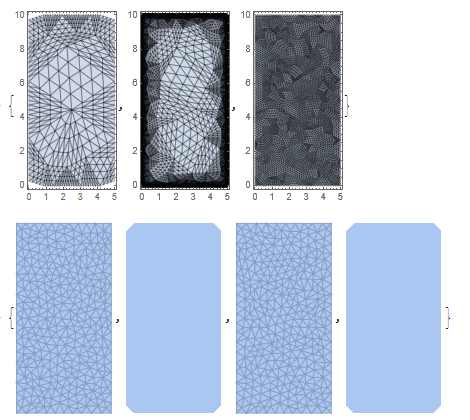
enter image description here

It seems the way the region is generated makes the difference.

{DiscretizeRegion[regi], Region[regi], DiscretizeRegion[rege], 
     Region[rege]}

This looks like that in RegionPlot, ImplicitRegion uses Region to start it's Mesh and ParametricRegion uses DiscretizeRegion to start its Mesh.

Table[RegionPlot[regi, AspectRatio -> Automatic, Mesh -> All, 
  MaxRecursion -> i], {i, 0, 3}]
Table[RegionPlot[rege, AspectRatio -> Automatic, Mesh -> All, 
  MaxRecursion -> i], {i, 0, 3}]
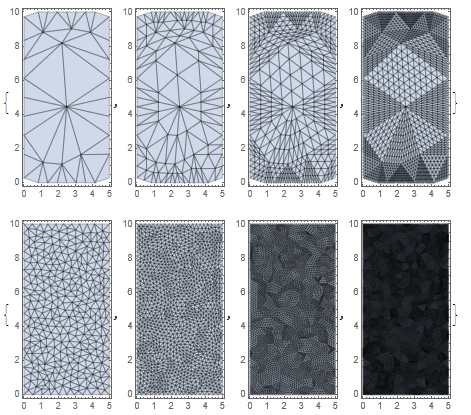
enter image description here

I just don't get why increasing the PlotRange to go just outside the region function changes everything.

POSTED BY: Martijn Froeling
POSTED BY: Karl Krieger
POSTED BY: Murray Eisenberg
Posted 2 years ago

And here's an EVEN SIMPLER example. (Still Mathematic 12.2 on Windows 10)

Attachments:
POSTED BY: David Golber
Posted 2 years ago

Here's another example, even simpler. Mathematica 12.2 running on Windows 10

Attachments:
POSTED BY: David Golber
Reply to this discussion
Community posts can be styled and formatted using the Markdown syntax.
Reply Preview
Attachments
Remove
or Discard