Group Abstract Group Abstract

Message Boards Message Boards

7
|
14.6K Views
|
16 Replies
|
18 Total Likes
View groups...
Share
Share this post:

Cannot generate paclet documentation due to crash Mathematica 13.0

POSTED BY: Martijn Froeling
16 Replies

On the topic of PacletTools: I noticed that loading PacletTools and GeneralUtilities at the same time gives a shadowing issue with CatchAll:

<< GeneralUtilities`
<< PacletTools`
POSTED BY: Sjoerd Smit

Hi Martijn, just a quick update. I tried to reproduce the crash but was unable to. But I'm using v13.0 on macOS 10.15.7, and presuming based on your screenshots, you're using Windows, which could explain the different behavior.

A couple of notes on DocumentationBuildHTML:

  • It accepts the same predicate function as a third argument, so like with DocumentationBuildNotebooks, you can work around the crash by building specific notebooks for the time being.
  • You will probably want to specify the following options (PacletDocumentationBuild[.., "HTML"] does this for you):
DocumentationBuildHTML[
    ...,
    "UseLanguageExtension" -> False,  (* Output "file.html", not "file.html.en" *)
    "CompleteHTMLQ" -> True,          (* Include the JavaScript/CSS assets necessary to correctly render the HTML *)
]
POSTED BY: Connor Gray

Thanks! I will give the HTML build another try!

Yes, I'm on Windows:
Edition Windows 10 Enterprise
Version 21H2
OS build 19044.1466
Windows Feature Experience Pack 120.2212.3920.0

POSTED BY: Martijn Froeling

Hi Conor, today I have installed release 13.1.

It seems that the PacletDocumentationBuild is working now, and my Mathematica is no longer crashing. Not sure if anything has changed, but at least it works, which is great!

However, I do get some errors while running, although they don't seem to influence the build. For the documentation, I get this error, the referred file is indeed there but cannot be deleted I guess.

enter image description here

When I build the HTML I get the same but when the build starts with the symbol pages these errors pop up for each page, which is not the case for the guide pages.
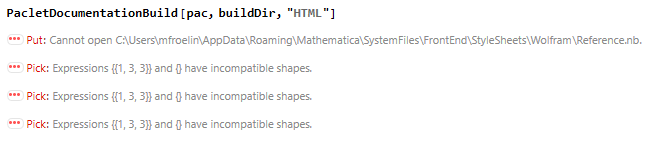
enter image description here

And again there are some issues with the reference.nb file.

enter image description here

When installing the Paclet I often get this error. If it happens its always the same file that gives the issue and I have to quit the kernel to recover Mathematica, after that it always works immediately.

enter image description here

Happy to see everything working!

POSTED BY: Martijn Froeling
Posted 4 years ago

Hi Martijn,

I'm glad to see that the build experience has improved for you. There were a number of FrontEnd issue addressed in v13.1; it seems likely that one or more of them may have contributed to the crashes you experienced. The DeleteFile operations are unknown to me, but the Pick[..] messages are an issue I've run into before that occurs when the grid options in one of the 'Usage' sections at the top of a symbol reference page are not formed correctly. I don't have a correct example available off-hand, but you might try re-creating the notebook that is generating those messages; it's likely whatever is wrong was simply an accidentally deleted part of the typesetting of the usage message.

It's on my list to improve that error message in the future.

POSTED BY: Updating Name

I'll give that a try. I indeed remember there was an issue with the formatting of multi-line usage messages using the documentation palette. I'll see if that has changed in the new release and let you know if it will work.

Tnx!

POSTED BY: Martijn Froeling

I have rebuild de documentation pages using the palet, which now solves the errors and the issue I had before using that. This indeed removed the error I had before but now new weird things happen.

enter image description here

The errors keep coming and are not suppressed by the frontend (4 per page so over 2500), and they did break the frontend twice, but not every time. With Quiet@ it seems more stable.

If the build completes the pages that come out of it doesn't seem to be formatted correctly. Left is the page generated by the documentation palet, right is the page that comes from using PacletDocumentationBuild[paclet, buildDir].

enter image description here

The HTML build I haven't been able to complete now but will give it another try later.

I did commit the new doc pages to my git if you want to see what's going on.

POSTED BY: Martijn Froeling

After doing some comparison i noticed that for the old and new generated and template Guide and Function pages indeed the header of the documents has changed. The Meta information is now at the bottom but at the top of the pages the "New Modified etc." line is indeed missing.

enter image description here

enter image description here

POSTED BY: Martijn Froeling

Hi Martijn, I'm sorry you've run into this issue. A fix for this is now available in the form of PacletTools v0.0.12, which was released on Monday as an automatic paclet update.

You can check if v0.0.12 has already been installed automatically using PacletObject["PacletTools"]["Version"]. If the installed version is less than v0.0.12, then you can trigger the update mechanism using PacletInstall["PacletTools"].

v0.0.12 contains fixes for the GetNotebookHistoryData bug shown above, and an issue with building the new authoring notebook format. EDIT: To be clear, the build issue with the new authoring notebook is exactly the issue shown in your screenshot of AnisoFilterTensor — that is also fixed in PacletTools v0.0.12.

Please let me know if you run into further issues. I appreciate your patience.

POSTED BY: Connor Gray

Awesome! will give it a try!

Tnx for the swift update. Will let you know how things work out.

POSTED BY: Martijn Froeling

Everything seems to work as intended! It also seems a bit quicker, building 700 pages in ~10 min where it used to be almost 20.

Thanks for all the help

enter image description here

POSTED BY: Martijn Froeling

Hi Conner,

Today I tried to also rebuild my HTML documentation after the successful completion of the normal documentation build. However the issue that was there with the errors related to the new layout of the template files that was fixed for the normal documentation is still there for the HTML build.

enter image description here

POSTED BY: Martijn Froeling
POSTED BY: Connor Gray

Hi Conor,

Awesome! thanks for the feedback, very helpfull. With this, I'm sure I can make it work!

I normally don't commit the function pages since they are automatically generated (either by workbench or the documentation pallette). I'm committing them now to the main branch so you should be able to find them now.

EDIT: additional note. not all pages look pretty since the function that generates them still had some issues and the workaround for that was to much work to fix .

If I find out where and for which file stuff crashes I will let you know.

POSTED BY: Martijn Froeling

Very much agree on the rebuilding of documentation when you only change some code files. PacletBuild should be smart enough to figure out that documentation notebooks don't need rebuilding in that situation. A simple file hash or something like that should take care of it. It should also have an option to wipe the old build and start from scratch (in case you want to be thorough).

Also: PacletTest is basically unusable in it's current form since it only works if you add the extension:

{"Tests", "Root" -> "./Tests", Method -> "Experimental-v1"}

No one is going to figure that out by themselves without expecting the source code.

POSTED BY: Sjoerd Smit
Reply to this discussion
Community posts can be styled and formatted using the Markdown syntax.
Reply Preview
Attachments
Remove
or Discard
