Here are some alternative conversions and a note about Excel.
(* Gianluca's method: compare with tolerance *)
res1 = {{{1.`, 1.` + 7 $MachineEpsilon, 1.` + 8 $MachineEpsilon}}} /.
   x_Real /; x == Round[x] :> Round[x];
res1 // InputForm
(*  {{{1, 1, 1}}}  *)

(* Exact comparison *)
res2 = {{{1.`, 1.` + $MachineEpsilon, 1.` + 8 $MachineEpsilon}}} /.
   x_Real /; x - Round[x] == 0 :> Round[x];
res2 // InputForm
(*  {{{1, 1.0000000000000002, 1.0000000000000018}}}  *)

(* Tolerance like Excel's *)
res3 = Block[{Internal`$EqualTolerance = Log10[15.999999999]},
   {{{1.`, 1.` + 7 $MachineEpsilon, 1.` + 8 $MachineEpsilon}}} /.
    x_Real /; x == Round[x] :> Round[x]
   ];
res3 // InputForm
(*  {{{1, 1, 1.0000000000000018}}}  *)
Velvel Kahan describes Excel as using "cosmetic rounding." Excel seems to try to eliminate small rounding errors when the results are close to a real number with a finite decimal expansion. (Or perhaps, it's more accurate to say it assumes small differences from such numbers are due to rounding errors.) The parentheses operator seems to turn off the cosmetic rounding and restore IEEE 754 behavior. For instance machine epsilon
$\varepsilon=2^{-52}$,
$x=1+k\varepsilon$ is rounded to
$1$ for
$k=1,\dots7$ but not for
$k \ge 8$ (line 2 in the Excel image below). And
$x-1$ is zero for
$k=1,\dots7$ (line 3). But the parentheses around the Excel formula restores the difference
$k\varepsilon$ (line 4).
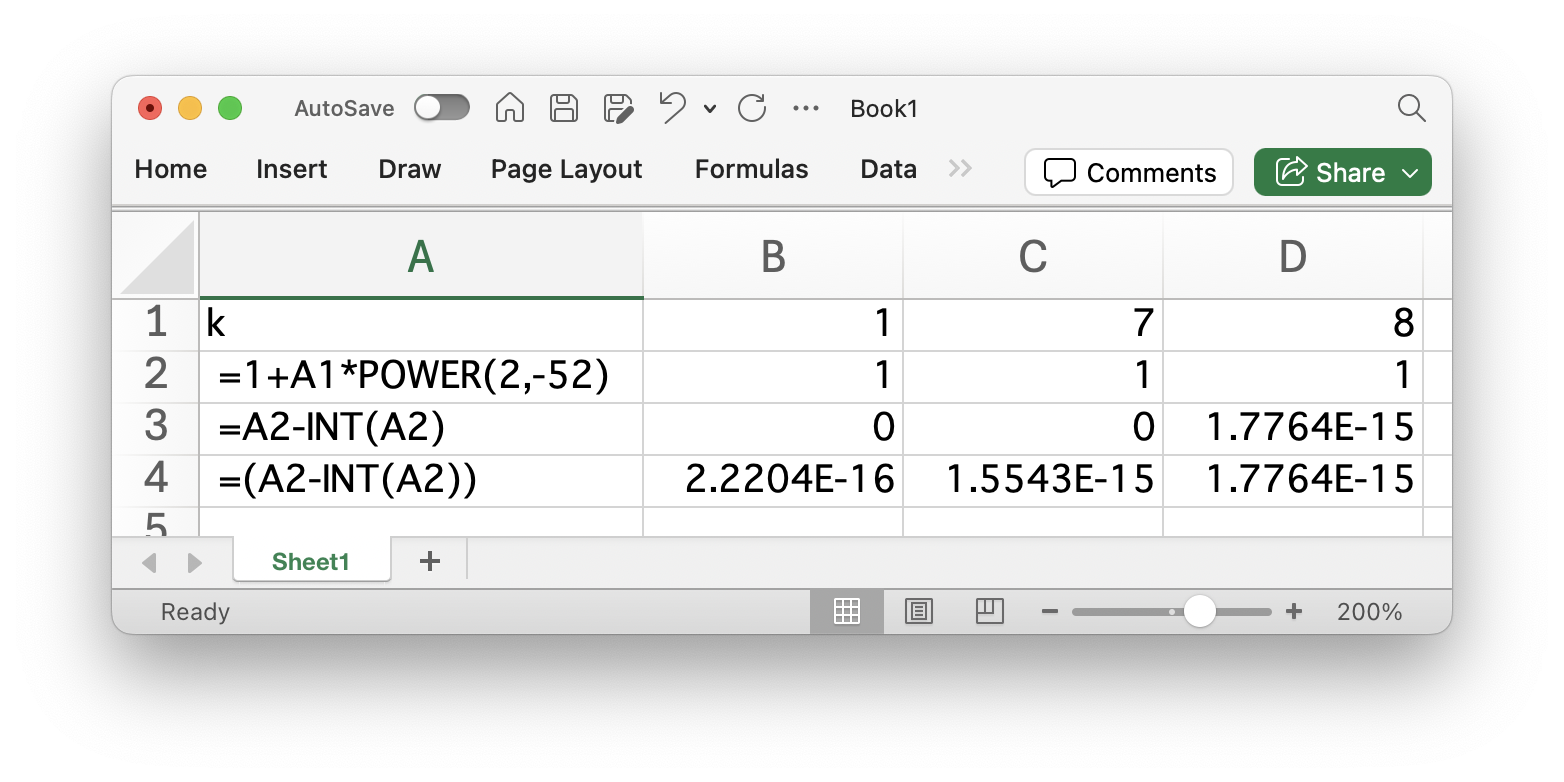
Note that the raw numbers in line 2 when imported into Mathematica are
1.0000000000000002`, 1.0000000000000016`, 1.0000000000000018`
None of them are 1 as shown in the spreadsheet or in some of the results of the codes above. If you want to convert only floats that are exactly integers, then I would use the "exact comparison" code above.



