Wolfram has developed several features for integrating our technology with LLMs. The major products are chat notebooks, Notebook Assistant, LLM functions, remote MCP server, the AgentTools paclet, and AgentOne. With all these offerings, it is confusing to know which one to use. This notebook should help you figure it out.
Please comment about your experience with our AI product, we'd love to hear:
- Questions
- Suggestions
- Use cases
- Anything else you'd like to share
Chat Notebook and Notebook Assistant
Who are they for
If you are using a notebook and you want AI to help you by writing, fixing, or editing the code, these are the tools for you. Chat notebooks and Notebook Assistant are built right into the notebooks that Wolfram users are familiar with. These are great for quick tasks with a relatively small scale. You can ask them for pure code assistance help or to help solve problems where you think Wolfram will be a helpful tool.
How do I use it
To use either chat notebooks or Notebook Assistant, it's easiest with an Wolfram Notebook Assistant + LLM Kit subscription.
In recent versions, all notebooks are essentially chat notebooks. To use Chat notebooks, just insert a ChatInput cell into the body of a notebook (just click between cells and click single quote character). You can ask an LLM about whatever comes above that cell.
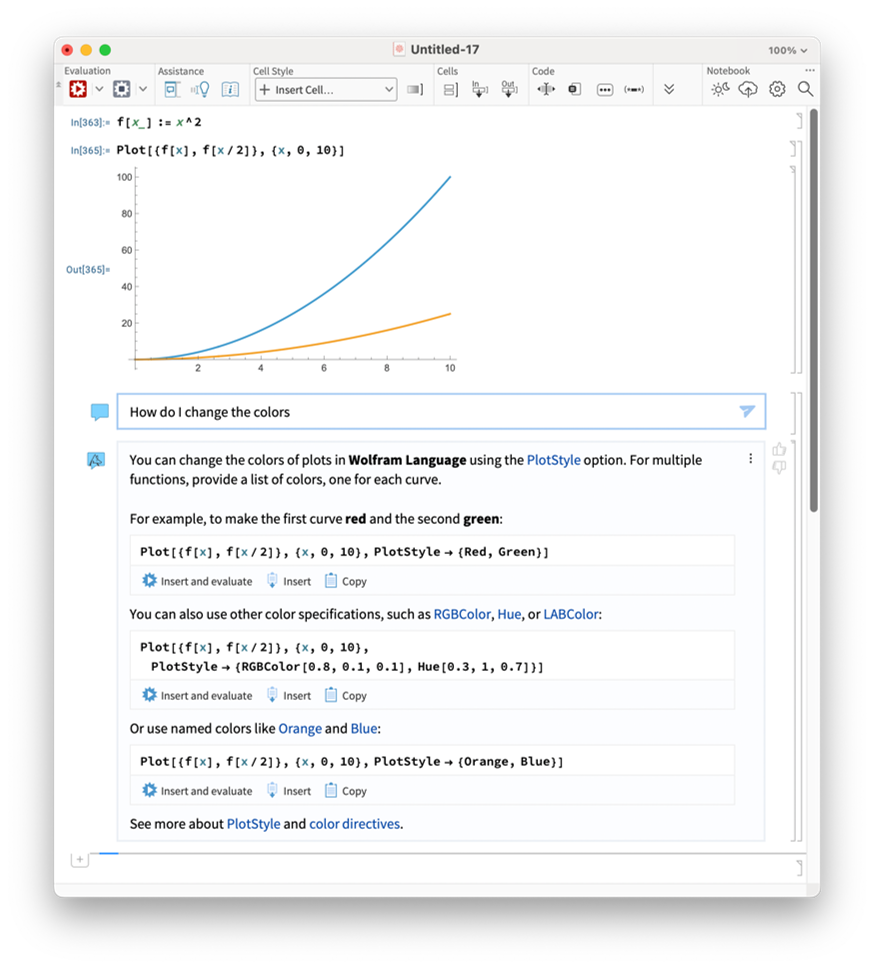
To use Notebook Assistant, open the sidebar using the button in the toolbar  . Type your question or demand in the input field and send it. The AI will "see" whatever is in the notebook.
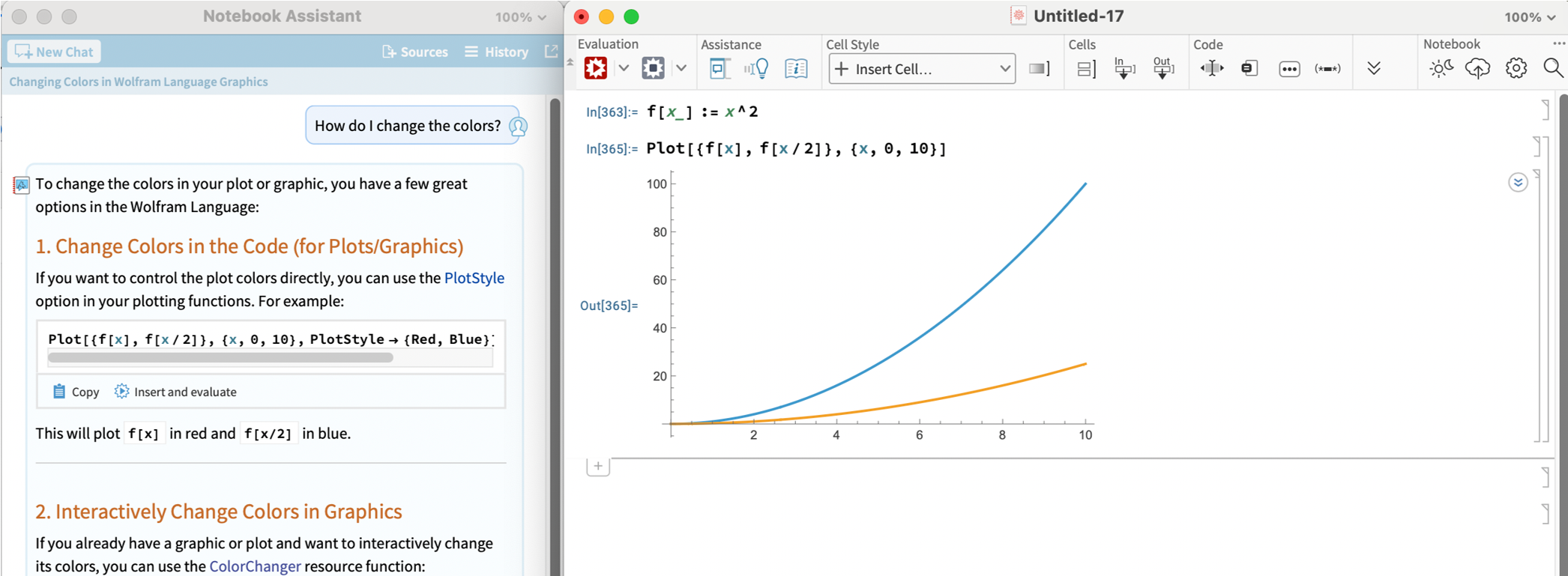
There are subtle differences between the responses generated by Notebook Assistant and chat notebooks, because there are differences in the prompting, tools, and context. But I find the interface to be the most important difference. Most of the time I find it useful to have the chat conversation outside of the main notebook, so I use Notebook Assistant more than chat notebook cells. If I want to change the way the AI is working by customizing the LLM model, persona or tools, I use a chat cell. It has a menu that makes it easy. But you should try them both and see what works for you.
LLM-based functions
Who are they for
If instead of wanting AI to help you create code, you want to create code that uses AI, then LLM-based functions are the right tool for you. There are many related functions: LLMSynthesize, LLMFunction, LLMSubmit, ChatEvaluate, ServiceExecute, etc. Each is well documented, so I won't go into details here.
How do I use it
First you need to think about which service you want to use (OpenAI, Anthropic, Gemini, etc). Whatever service you choose there is a way to do it using these functions. Usually you will need to use the LLMEvaluator and Authentication options. The simplest way is to use Wolfram's LLMKit subscription. Then we take care of everything, your normal Wolfram account will just make it work.
LLMSynthesize["The sky was "]
Out[]= "The sky was painted with hues of orange and pink as the sun dipped below the horizon, casting a warm glow over the world. Wispy clouds drifted lazily, catching the fading light, while the first stars began to twinkle in the deepening blue. A gentle breeze whispered through the trees, carrying the sweet scent of blooming flowers. It was a moment of tranquility, a perfect transition from day to night."
Here is an example using OpenAI:
LLMSynthesize["The sky was ",
LLMEvaluator -> <|"Model" -> {"OpenAI", "gpt-5.1"}|>,
Authentication -> SystemCredential["OPENAI_API_KEY"]]
Out[]= "...the color of television, tuned to a dead channel.If you're writing and want options, here are a few more ways to continue that line:- "The sky was bruised purple, heavy with unshed rain."- "The sky was a flat, exhausted gray, like someone had rubbed all the blue out of it."- "The sky was the pale white of old bones, washed clean by years of wind."Tell me the tone or genre you're going for (poetic, sci‑fi, horror, romance, etc.), and I can tailor a bunch of variations."
These functions are extremely customizable, for example, you can add LLMTool and LLMPromptGenerator features to make your own functions work with the AI.
MCP Service and the AgentTools paclet
Who are they for
If you are using an AI tool outside of a Wolfram product, like Cursor, Claude Code, or Antigravity and want to add Wolfram technology to it, you want to use one of our MCP servers. There are multiple ways to do that.
If you have a Wolfram desktop product like Mathematica or Wolfram Engine AND are focused on Wolfram Language development, then you should use the AgentTools paclet. This is the best choice for people building large-scale projects featuring Wolfram Language code.
If you do not have a Wolfram desktop product OR if you are more interested in using Wolfram's tools, like computation and knowledge APIs, for creating non-Wolfram code then you should use the MCP Service.
Most applications support our remote-hosted MCP server, but a few require special authentication protocols so in that case we also have a desktop application for connecting to the remote MCP server.
How do I use the AgentTools paclet
First you want a Wolfram Notebook Assistant + LLM Kit subscription. You can use the paclet without it, but it will work much better with the subscription because internally, it will use Wolfram Notebook Assistant + LLM Kit to improve results.
Then, follow the instructions in the documentation for the Wolfram/AgentTools paclet. The paclet contains tools for installing its own configuration into most common applications. For users that are using agentic coding tools, take a look at the Quick Start for AI Coding Applications. For users that are using in chat applications, like Claude Desktop, take a look at Quick Start for Chat Clients.
How do I use the MCP Service
First you need an MCP Service subscription. This is different than Notebook Assistant + LLM Kit. If you already have Notebook Assistant + LLM Kit, you probably want to use the AgentTools paclet. To make use of the MCP Service, you will also need access to an LLM through your MCP client.
Once you have an MCP Service subscription you can follow the instructions for your application here.
AgentOne
Who is it for
If you use an LLM directly via an API already and want to swap it out with one that has Wolfram knowledge and computation built into to it, then you use should use the AgentOne API. AgentOne is the whole shebang, all prepackaged together into one API that you can use in place of another LLM API.
How do I use AgentOne
Contact our partnerships team.
Decision flowchart created with help from Notebook Assistant
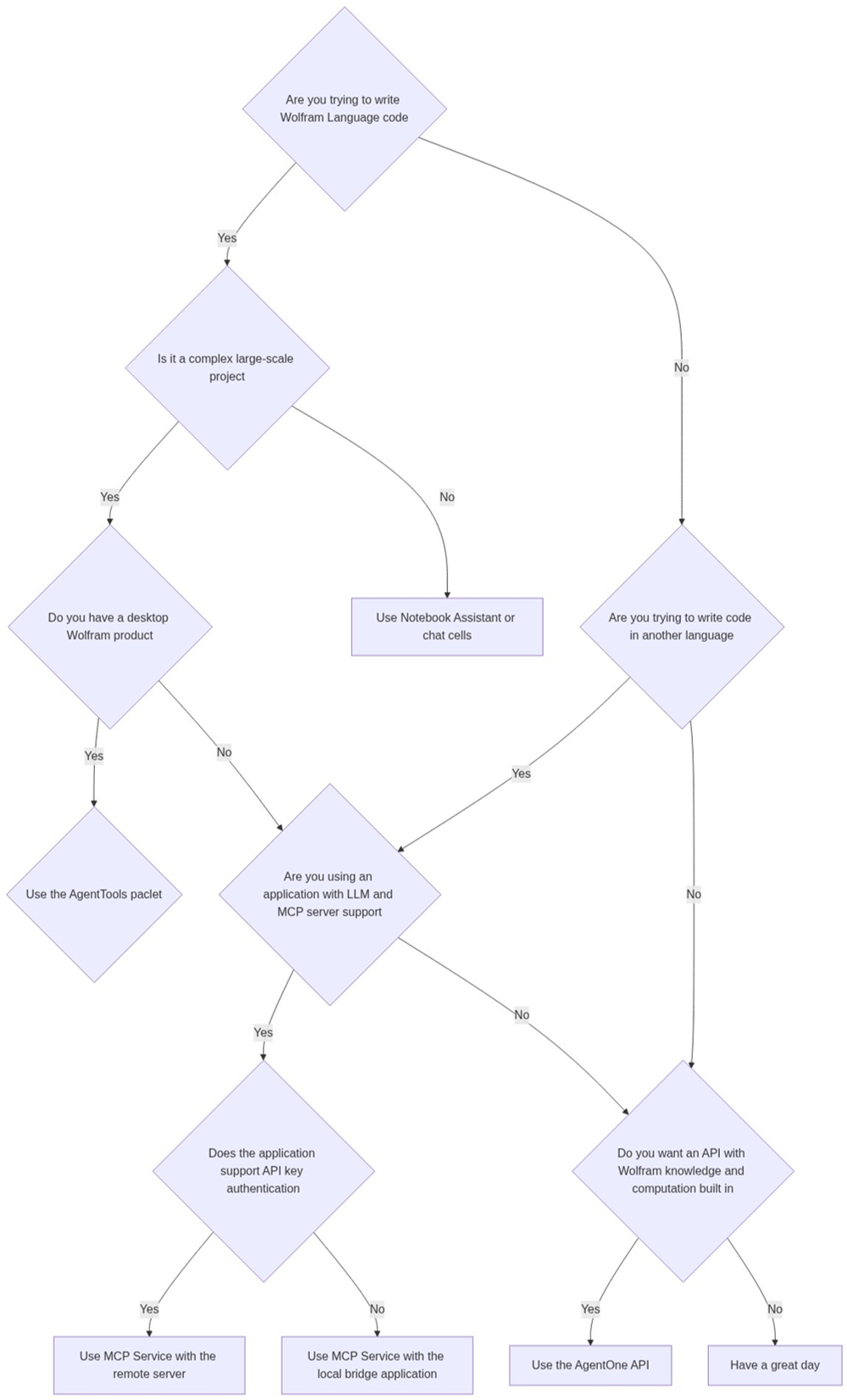
Flowchart code:
ResourceFunction["MermaidInk"]["flowchart TD
    A{Are you trying to write Wolfram Language code} -- Yes --> J{Is \
it a complex large-scale project}
    A -- No --> B{Are you trying to write code in another language}
    B -- Yes --> C{Are you using an application with LLM and MCP \
server support}
    B -- No --> G{Do you want an API with Wolfram knowledge and \
computation built in}
    C -- Yes --> D{Does the application support API key authentication}
    C -- No --> G
    D -- Yes --> E[Use MCP Service with the remote server]
    D -- No --> F[Use MCP Service with the local bridge application]
    G -- Yes --> H[Use the AgentOne API]
    G -- No --> I[Have a great day]
    J -- Yes --> K{Do you have a desktop Wolfram product}
    J -- No --> L[Use Notebook Assistant or chat cells]
    K -- Yes --> M{Use the AgentTools paclet}
    K -- No --> C
"
     ]



