Group Abstract Group Abstract

Message Boards Message Boards

Crystallica: A package to plot crystal structures

General information and download links

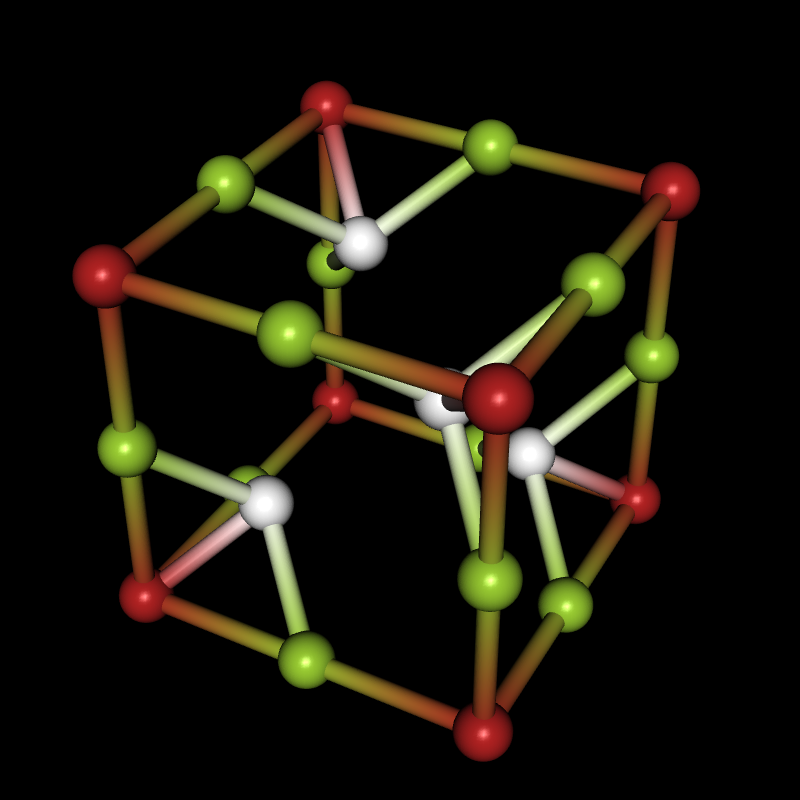
If you're interested in crystal structures, you can now download the Crystallica application from the Wolfram Library Archive, and then you can do things like this:

Needs["Crystallica`"];
CrystalPlot[
{{5.4,0,0},{0,5.4,0},{0,0,5.4}},
{{0,0,0},{0,0,.5},{0,.5,0},{.5,0,0},{.24,.24,.24},{.24,.76,.76},{.76,.24,.76},{.76,.76,.24}},
{1,2,2,2,3,3,3,3},
AtomCol->{"Firebrick","YellowGreen",White},AtomRad->.4,
BondStyle->2,BondDist->3,
CellLineStyle->False,AddQ->True,Lighting->{{"Directional",White,ImageScaled[{0,0,1}]}},Background->Black]
enter image description here

Here are the download links for Crystallica and two other packages you may need:

Crystallica - contains the functions CrystalPlot and CrystalChange

CifImport - contains an import function for CIF files

VaspImport - contains an import function for files related to VASP

Once you've installed Crystallica (by saving the entire Crystallica folder - not the zip archive - to $USerBaseDirectory/Applications and re-starting the Kernel), you can enter Crystallica into the Documentation Center and you'll find lots of useful examples. Most of the examples in this post are taken from the Documentation. For the other two packages, just install them and evaluate this:

?CifImport
?VaspImport

I'll first show you a few things the CrystalPlot function can do when you already have crystal structure data inside Mathematica, wherever it may have come from. Then we'll take a look at how to get the data into Mathematica in the first place, which is where CifImport and VaspImport will come into play - but we'll get data from other sources as well. I'll cover the different import solutions in separate replies to this thread, because I have a feeling that I'll be rambling on and on and on...

Simple plot

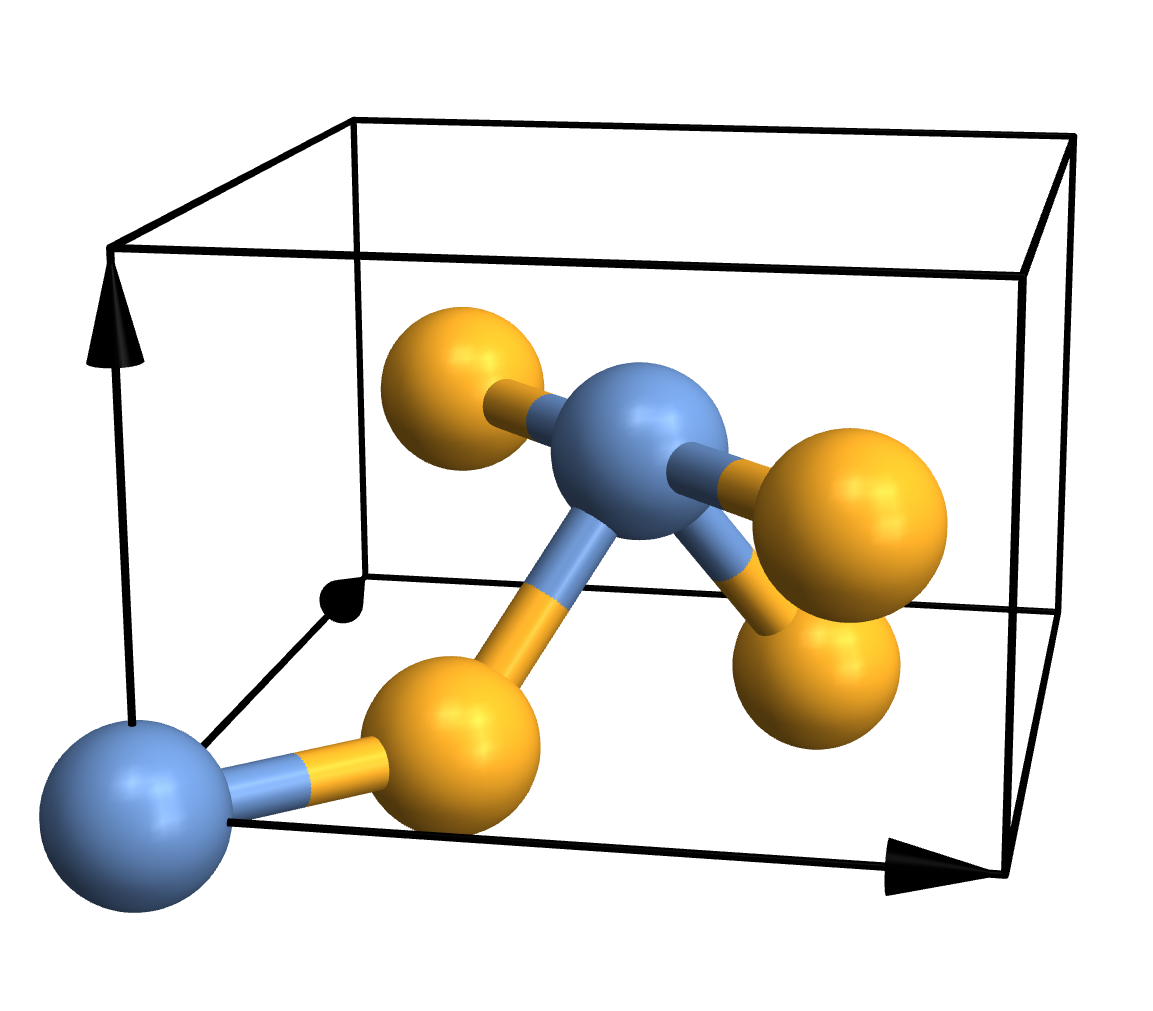
Traditional ball-and-stick plots are usually just fine, so the simplest thing you can do is this:

CrystalPlot[
{{4.5,0,0},{0,4.5,0},{0,0,3}},
{{0,0,0},{.5,.5,.5},{.2,.8,.5},{.3,.3,0},{.7,.7,0},{.8,.2,.5}},
{1,1,2,2,2,2}]
enter image description here

As you can see, CrystalPlot expects three arguments. The first one contains the lattice vectors, which are simply the three vectors that create the parallelepiped that constitutes the cell. The second argument contains the atomic coordinates, but they're given in the basis of the lattice vectors (which is quite useful in crystallography). The third argument is a list of integers that gives the atom types, with one entry for each atom. If you want to plot a molecule instead, you can call CrystalPlot with just two arguments: A list of atom coordinates in cartesian space, and a list of atom types. Everything else you see in the plot - the atoms, bonds, colours, arrows etc. - represents the default settings of various layout options.

Advanced atoms and bonds

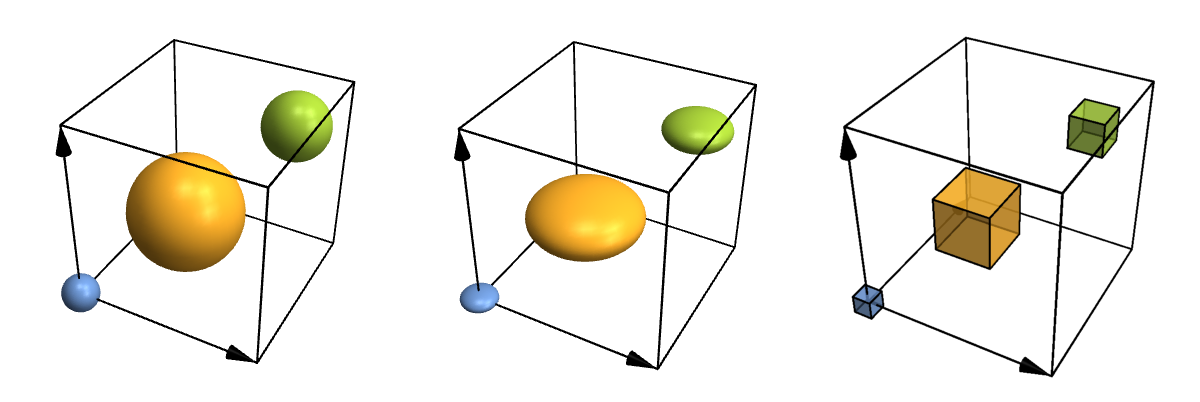
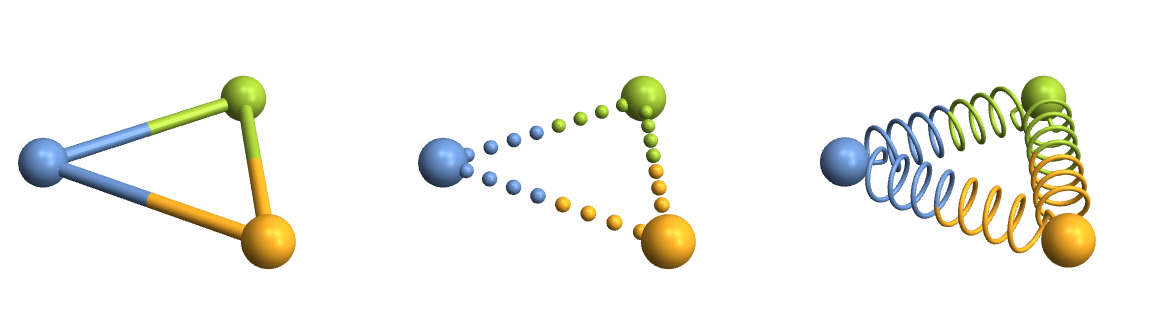
Let's take a look at some more advanced options just for fun. For instance, atoms and bonds can look any way you need them to, because you can specify your own functions for them. You can also fine-tune where to put bonds and what to do with their thickness and colour in a physically (or chemically) meaningful way, but I won't show that here. So here are some customized atoms and bonds:

Row[Table[
CrystalPlot[{{4,0,0},{0,4,0},{0,0,4}},{{0,0,0},{.4,.4,.4},{.8,.8,.8}},{1,2,3},
AtomRad->{.4,1.2,.7},AtomFunction->style,ImageSize->400],
{style,{
(Ball[#1,#2]&),
(Scale[Sphere[#1,#2],{1,1,.5}]&),
({EdgeForm[Thick],Opacity[.7],Cuboid[#1-.5*#2,#1+.5*#2]}&)
}}]]
enter image description here

Row[Table[
CrystalPlot[{{0,0,0},{5,0,0},{2.5,4,0}},{1,2,3},BondDist->6,BondStyle->style,ImageSize->400],
{style,{
1,
Function[{bonds,partcol},Table[{If[ii<.5,partcol[#,1],partcol[#,2]],Sphere[bonds[[#,1]]+ii*(bonds[[#,2]]-bonds[[#,1]]),.15]},{ii,0,1,1/9}]&/@Range[Length[bonds]]],
Function[{bonds,partcol},Module[{spiral,points,rad=.05},
spiral[atoms_]:=Module[{scale=.5,dist=atoms[[2]]-atoms[[1]],curls=60,normal,rot,scaled},
normal=Table[{scale*Cos[ii],scale*Sin[ii],.1*ii},{ii,0,curls,\[Pi]/10}];
scaled={#[[1]],#[[2]],10*Norm[dist]/curls*#[[3]]}&/@normal;
rot=scaled.Quiet[RotationMatrix[{dist,{0,0,1}}]];
Join[{atoms[[1]]},#+atoms[[1]]&/@(rot[[25;;-25]]),{atoms[[2]]}]];
points=spiral/@bonds;
{partcol[#,1],Tube[BSplineCurve[points[[#,;;Round[Length[points[[#]]]/2]]],rad]],partcol[#,2],Tube[BSplineCurve[points[[#,Round[Length[points[[#]]]/2];;]],rad]]}&/@Range[Length[bonds]]
]]
}}]]
enter image description here

Lattice planes

Crystallica can also add lattice planes to the plot. You can specify them using [h,k,l] Miller indices and distance to the origin.

CrystalPlot[{{3,0,0},{0,3,0},{0,0,3}},{{0,0,0}},{1},
AddQ->True,AtomRad->.3,AtomCol->"CadmiumYellow",Sysdim->2,CellLineStyle->2,
LatticePlanes->Table[{{1,1,1},dist},{dist,1,5}],ContourStyle->{"TerreVerte",Opacity[.7]},BoundaryStyle->Thick]
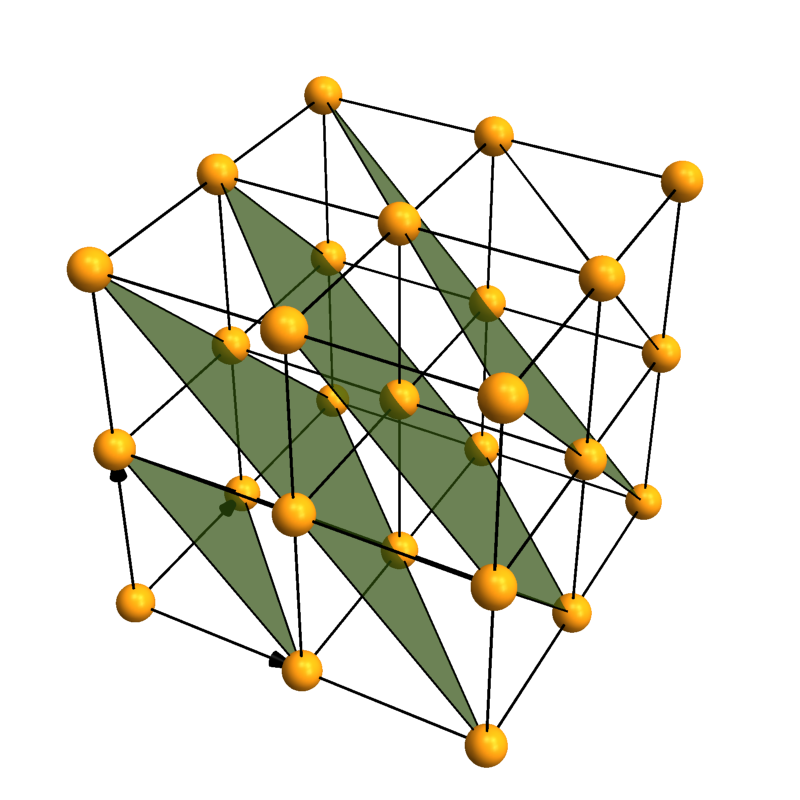
enter image description here

Coordination polyhedra

You can automatically search for and plot coordination polyhedra. This is not limited to the commonly occurring tetrahedra and octahedra - you can actually look for polyhedra with arbitrary numbers of corners. There are also options to fine-tune both the searching and the rendering.

plot[corners_,mixed_]:=CrystalPlot[{{0,0,0},{0,0,1.8},{-.9,-1.5,-.6},{-.9,1.5,-.6},{1.7,0,-.6},{.8,.8,.8}},{1,2,2,2,2,3},
BondStyle->False,ImageSize->250,
PolyMode[corners]->{"Show"->All,"AllowMixed"->mixed},PolyStyle[corners]->Directive[Opacity[.5],EdgeForm[Thick]]];
Grid[{{
"",
"Search for polyhedra with \n4 corners",
"Search for polyhedra with \n5 corners"
},{
"Allow \nmixed corners",
plot[4,True],
plot[5,True]
},{
"Don't allow \nmixed corners",
plot[4,False],
plot[5,False]
}},Dividers->All]
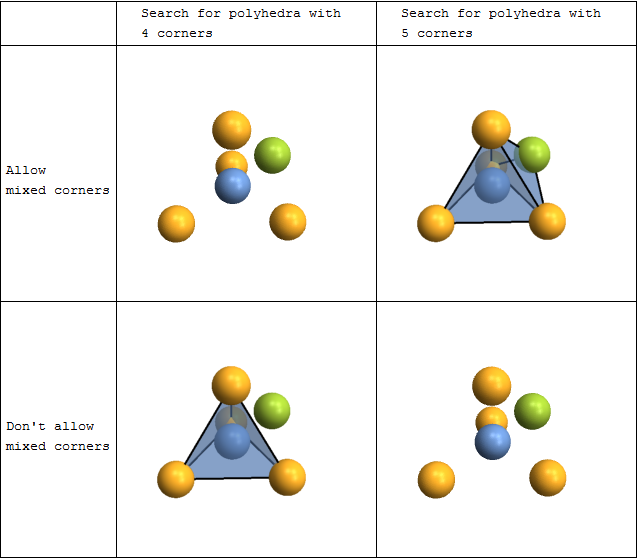
enter image description here

CrystalPlot[{{2.5,-4.3,0},{2.5,4.3,0},{0,0,5.5}},
{{.5,0,0},{0,.5,.7},{.5,.5,.3},{.2,.4,.5},{.6,.8,.2},{.2,.8,.8},{.8,.6,.5},{.4,.2,.2},{.8,.2,.8}},{1,1,1,2,2,2,2,2,2},
PolyMode[4]->True,PolyStyle[4]->EdgeForm[None],AddQ->True,
Sysdim->2,AtomRad->0,CellLineStyle->False,AtomCol->{"SlateGray","Firebrick"},
ViewAngle->.4,ViewPoint->{3.2,0,1.1},ViewVertical->{.5,0,1.2}]
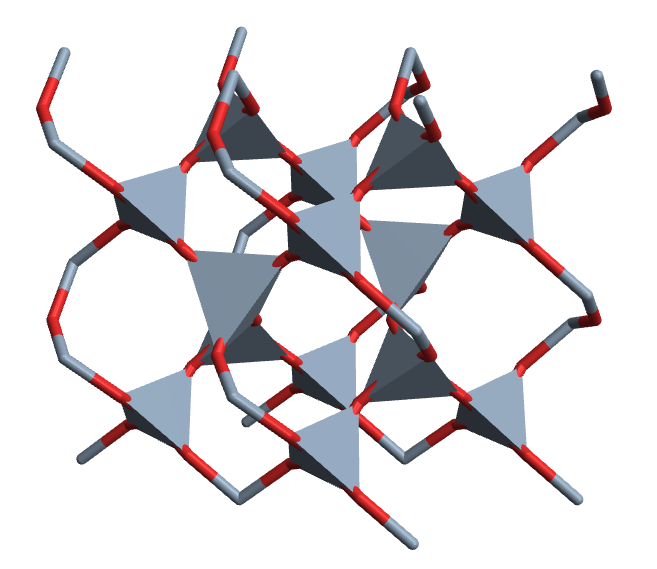
enter image description here

Other things

Visualization aside, you can also build supercells, change cell shapes, or add, remove and sort atoms... but that's a bit boring to read, so I'll refer you to the Documentation page of the CrystalChange function instead.

If you're interested, we can use this thread to talk about any questions you may have, or you can share your use of the package (if you decide to use it). I'm not offering full support here, but I'll be floating around, and I'd like to hear your feedback. We don't have any intentions to be involved in further development. But if you have a good idea and some time, then by all means, work on it for yourself, or host it on your favourite code collaboration site.

Bianca Eifert and Christian Heiliger

POSTED BY: Bianca Eifert
28 Replies

Hi everyone, and thanks to all of you who are still using Crystallica so many years later! I'm happy you've found it useful. This reply is for everyone who had problems with lattice planes in Mathematica 12, and I'm very sorry I haven't been able to react sooner. There was indeed a change in Mathematica that broke my code. Here's a fix you can make yourself:

  1. Find and open the file Crystallica/PackageFiles/CrystalPlot.m within your Crystallica installation.
  2. Find the following section of code:

    (*lattice planes: *)
    
    If[p3dQ||d2Q,
    oneplane[{h_,k_,l___},dist_]:=Cases[ContourPlot[{h,k}.{x,y}==dist,{x,0,sysdim[[1]]},{y,0,sysdim[[2]]},
    Evaluate[Sequence@@Join[FilterRules[options,Options[ContourPlot]],{Mesh->False,ContourLabels->False,ContourStyle->{Thick,Red}}]]],GraphicsComplex[x_,y__]:>GraphicsComplex[If[p3dQ,Join[#,{0}]&/@(x.lattvec[[{1,2},{1,2}]]),x.lattvec],y]],
    oneplane[{h_,k_,l_},dist_]:=Cases[ContourPlot3D[{h,k,l}.{x,y,z}==dist,{x,0,sysdim[[1]]},{y,0,sysdim[[2]]},{z,0,sysdim[[3]]},
    Evaluate[Sequence@@Join[FilterRules[options,Options[ContourPlot3D]],{Mesh->False,BoundaryStyle->None,ContourStyle->{Red,Opacity[.5]}}]]],GraphicsComplex[x_,y__]:>GraphicsComplex[x.lattvec,y]]
    ];
    planes=oneplane@@@(LatticePlanes/.options/.Options[CrystalPlot]);
    
  3. Replace it with the following:

    (*lattice planes: *)
    
    If[p3dQ||d2Q,
    oneplane[{h_,k_,l___},dist_]:=Cases[ContourPlot[{h,k}.{x,y}==dist,{x,0,sysdim[[1]]},{y,0,sysdim[[2]]},
    Evaluate[Sequence@@Join[FilterRules[options,Options[ContourPlot]],{Mesh->False,ContourLabels->False,ContourStyle->{Thick,Red}}]]],GraphicsComplex[x_,y__]:>GraphicsComplex[If[p3dQ,Join[#,{0}]&/@(x.lattvec[[{1,2},{1,2}]]),x.lattvec],y],Infinity],
    oneplane[{h_,k_,l_},dist_]:=Cases[ContourPlot3D[{h,k,l}.{x,y,z}==dist,{x,0,sysdim[[1]]},{y,0,sysdim[[2]]},{z,0,sysdim[[3]]},
    Evaluate[Sequence@@Join[FilterRules[options,Options[ContourPlot3D]],{Mesh->False,BoundaryStyle->None,ContourStyle->{Red,Opacity[.5]}}]]],GraphicsComplex[x_,y__]:>GraphicsComplex[x.lattvec,y],Infinity]
    ];
    planes=oneplane@@@(LatticePlanes/.options/.Options[CrystalPlot]);
    

Yes, it's basically just addding two "Infinity"s. Based on a quick test, that should work for both 2D and 3D now.

Sorry again to leave you alone with this. I sadly haven't used Mathematica in a long time myself. I hope this fix still helps someone.

POSTED BY: Bianca Eifert
Posted 5 years ago

LatticePlanes isn't working for me either, even in this simple example:

CrystalPlot[{{3, 0, 0}, {0, 3, 0}, {0, 0, 3}}, LatticePlanes -> {{{1, 1, 1}, 1}}]

hmm.. crystallica-bug

POSTED BY: Sterling Baird

Hello Someone can help me, I try to do something simple and I can't get the dimensions of the stutructure that's going on? When you download the package, save it to a cart then install it by File -> Install -> Crystallica.m which you are doing wrong. enter image description here

Posted 6 years ago

LatticePlanes is not working for me, although other features of CrystalPlot are. I've installed Crystallica in Mathematica 12 under Mac OS 10.12.6 Sierra. Any Idea what's wrong?

Attachments:
POSTED BY: Robert Walgate

Hello Robert. I use Mathematica 12.1 under macOS Catalina ver. 10.15.7. I ran the same codes and got the exact output as yours.

I wonder why... perhaps the codes don't work in Ver. 12?

I also notice the double and triple bond visualization problem has gone in Ver. 12. I tried to run

ChemicalData["Benzene", "MoleculePlot"]

and the output is excellent: we can see the double bond in the benzene. I guess they implemented Bianca's codes in the new version.

Anyway, the VaspImport package is great (even though I use Quantum Espresso for my work.)

Thank you.

POSTED BY: Febdian Rusydi

Hello Bianca,

Thank you so much for developing the Crystallica application. Its really impressive and helpful for me to work on lattice structures of metals. I am using the app to create the Cubic,BCC,FCC and HCP lattices. In them I am creating lattice planes to depict slip planes and slip directions originating from the atoms, using the statement below:

CrystalPlot[{{3, 0, 0}, {0, 3, 0}, {0, 0, 3}}, {{0, 0, 0}}, {1}, 
 AddQ -> True, AtomRad -> .3, AtomCol -> "CadmiumYellow", Sysdim -> 2,
  CellLineStyle -> {3, 3}, LatticePlanes -> {{{1, 1, 1}, 2}}, 
 ContourStyle -> {"TerreVerte", Opacity[.7]}, BoundaryStyle -> Thick, 
 CellLinesAdd -> {"multi", {{{0, 0, 0}, {0, 0, 0}, {-2, 2, 0}}, 9, 
    CellLineCol -> Red, 
    CellLineRad -> {.02, .05}}, {{{0, 0, 0}, {0, 0, 0}, {0, -2, 2}}, 
    13, CellLineCol -> Red, 
    CellLineRad -> {.02, .05}}, {{{0, 0, 0}, {0, 0, 0}, {2, 0, -2}}, 
    19, CellLineCol -> Red, CellLineRad -> {.02, .05}}}, 
 AxesLabel -> {x, y, z}, 
 AtomFunction -> ({Black, Text[Style[ToString[#5], Bold, 16], #], #3, 
     Sphere[#, #2]} &)]

This statement, helps me create a structure close to FCC excluding the central atom. Could you help me out with deleting the central atom so that the lattice structure becomes a perfect FCC structure with the planes and directions shown.

I tried the Reshape command too, however was not successful in generating a structure similar to the one I generating before.

Thank you ~Pawan

POSTED BY: Pawan Chaugule

Welcome to Wolfram Community! Please make sure you know the rules: https://wolfr.am/READ-1ST

The rules explain how to format your code properly. If you do not format code, it may become corrupted and useless to other members. Please EDIT your posts and make sure code blocks start on a new paragraph and look framed and colored like this.

int = Integrate[1/(x^3 - 1), x];
Map[Framed, int, Infinity]

enter image description here

POSTED BY: EDITORIAL BOARD

A quick way to delete the central atom from your plot:

plot = CrystalPlot[ ....];
DeleteCases[plot, Tooltip[_, 8], Infinity]

enter image description here

If you need to renumber the atoms, then you can adjust your AtomFunction to do that. You could also use the AtomFunction to choose not to draw atom 8, by giving it a radius of 0.

POSTED BY: Jason Biggs
POSTED BY: Pawan Chaugule

I tried moving the origin to another co-ordinate so that the dist value doesn't become zero, however I still wasn't able to generate the plane.

POSTED BY: Pawan Chaugule

Bianca, This package looks great! Would you be willing to host it on github, since the Wolfram Library Archive link is not active?

Thanks, Jason

POSTED BY: Jason Biggs

Thanks Jason! Is there anything wrong with the Library Archive link? It seems to work fine for me.

However, I understand that the Library Archive is somewhat static and we're missing out on easy updating and collaboration potential. I've never used github before, but I really just need to make some time and set it up - it's certainly on my list of things to do.

POSTED BY: Bianca Eifert
POSTED BY: Jason Biggs

Hm, that looks nasty. Your suspicion is correct; if you look at First[] of your output (to get the actual list of sphere and tube objects), you'll see that the bonds are in fact all there, they're just not shifted outwards. The problem with the shift function is the following: We're in the case where there are not enough neighbouring atoms to establish a molecular plane. For this case, I just hardcoded a fixed shifting direction under the assumption that the direction doesn't matter (which it doesn't, because there's no reference plane), but if the whole molecule is aligned the same way already, the shift isn't visible.

Compare these two:

multiBondPlot`Private`mbp[{{-60, 0, 0}, {60, 0, 0}}, {"C","C"}, {1 -> 2}, {"Triple"}]
multiBondPlot`Private`mbp[{{0, 0, -60}, {0, 0, 60}}, {"C","C"}, {1 -> 2}, {"Triple"}]

So... yeah... clearly a bug. Sorry about that. It seems that in the following bit of code in the package:

    (*... now construct a vector that is perpendicular to that plane and the bond;
    if there aren't enough neighbouring atoms to establish a plane, just assume a fixed vector of {0,0,1}: *)
    dir=If[Length[dir]<2,
        {0,0,1},
        Normalize[Cross[Subtract@@atomPositions[[dir[[1]]]],Subtract@@atomPositions[[dir[[2]]]]]]
    ];

... the "then" part of the If needs to be more intelligent. In fact, it would probably need to distinguish between Length[dir] values of 0, 1, 2, and greater than 2, where only the last case currently has a good solution.

I may need to think about the whole shift function some more though because I'm constantly surprised how often it works. But feel free to play around and post any new solutions (multiBondPlot has its own thread here).

Edit: Still haven't looked into making a repo for Crystallica, but my simple single-file packages have a home now if you want to contribute any improvements or if the link problems persist.

Re your edit: Yep, looks like that works. Thank you!

POSTED BY: Bianca Eifert

Just saw that you replied while I was drafting an edit to the post. I came up with a workaround, hope it's robust. Now my next goal is to find someway to download 3D structures for the 33,000 ChemicalData entities we don't have them for. Looking at ServiceConnect for this.....

POSTED BY: Jason Biggs

That would be interesting. I haven't looked at that yet since I don't work with molecules at the moment. Who knows, maybe ChemicalData will be updated now that PubChem is connected...

In case it got lost in the edits, you can contribute to the package if you like, that might finally force me to figure out how git actually works (the initial commit via the github website was just too easy, so no learning happened yet).

POSTED BY: Bianca Eifert
POSTED BY: Shenghui Yang
POSTED BY: Bianca Eifert

Impressive!

POSTED BY: Sander Huisman

enter image description here - you earned "Featured Contributor" badge, congratulations !

Dear @Bianca Eifert , this is a great post and it has been selected for the curated Staff Picks group. Your profile is now distinguished by a "Featured Contributor" badge and displayed on the "Featured Contributor" board.

POSTED BY: EDITORIAL BOARD
POSTED BY: Bianca Eifert

I would replace your long line:

conf=ReplacePart[chem,Flatten@Table[#->ii&/@(Flatten@Position[chem,DeleteDuplicates[chem][[ii]]]),{ii,1,Length@DeleteDuplicates[chem]}]]

with something like:

types = DeleteDuplicates[chem];
conf = chem /. Thread[types -> Range[Length[types]]]

or as a single line:

conf = chem /. Thread[# -> Range[Length[#]]] &[DeleteDuplicates[chem]]
POSTED BY: Sander Huisman

Or, if you want to live dangerously:

conf=chem/.Thread[(types=DeleteDuplicates[chem])->Range[Length[types]]]
POSTED BY: Sander Huisman

Ah yes, that is indeed so much easier to read, thank you!

(I grabbed my nasty line from a package I wrote years ago and never looked at again because it worked... You know how that goes!)

POSTED BY: Bianca Eifert

That happens, sometimes a much easier solution is possible, but you just don't see it somehow. Possibly one of the shortest (but not best) solution is:

conf = chem /. (# -> ++i & /@ (i = 0; DeleteDuplicates[chem]))
POSTED BY: Sander Huisman
POSTED BY: Bianca Eifert

You can also import structures from files related to the VASP program.

I'll use the POSCAR of BN from the official VASP site - the second one on the page (although either one will work). Just copy the data to a plain text file and name it "POSCAR". We'll import it with the VaspImport package.

The VASP formats are obviously useful for you if you work with the VASP program, but even if you don't, you may want to use these files: Many other crystal structure programs can import and export them, so you can now exchange data easily between Crystallica and other applications. Also, the POSCAR format in particular is easy to export (I'll show that later), and comfortably readable for a human.

The VaspImport package can read various types of VASP input and output files, namely CONTCAR / POSCAR, OUTCAR, XDATCAR, and vasprun.xml. CONTCAR and POSCAR are essentially the same format and this will be our test case for import and export. These files store one crystal structure. The other three file types can store multiple structures and lots of other information. What exactly these multiple structures are will obviously depend on the type of calculation you did. They might be steps of a structural relaxation or a molecular dynamics run. VaspImport automatically detects the file type and returns all structures in the file, but as for CIF, the last one is usually the one we want.

Let's import our POSCAR:

Get["VaspImport`"];
VaspImport["POSCAR"]

... which returns:

{<|"lattice"->{{0.`,1.785`,1.785`},{1.785`,0.`,1.785`},{1.785`,1.785`,0.`}},"atomcoords"->{{0.`,0.`,0.`},{0.25`,0.25`,0.25`}},
"atomtypes"->{1,2},"chemical"->{},"name"->"Cubic BN","file"->"E:\\POSCAR"|>}

VaspImport always returns a list of structures so that you can consistently work with Last[VaspImport[...]] without thinking about the file type.

We can also connect VaspImport to Crystallica the same way we did for CifImport:

Needs["Crystallica`"];
Needs["VaspImport`"];
vaspPlot[file_,options___]:=With[{data=Last[VaspImport[file]]},
CrystalPlot[data["lattice"],data["atomcoords"],data["atomtypes"],options,AtomCol->data["chemical"]]];
vaspPlot["POSCAR",AtomCol->{"B","N"}]

(I added atom colours because this specific POSCAR doesn't contain chemical atom types; but in general, many files will contain types.)

enter image description here

If you had a file with multiple structures you could do fun things like animations, and you might learn a lot about the process you were simulating.

Alright, so let's take a look at exporting to POSCAR since I promised that it's so easy and useful. As you may have noticed from the VASP documentation, POSCARs can look differently depending on your needs and preferences; they can store cartesian coordinates, or you can scale lattice vectors by giving a total colume for the cell. We'll just go with a very basic export here:

vaspExport[file_,lattvec_,coord_,conf_,chem_,name_]:=Module[{sorted,content},
(*atoms have to be sorted by type: *)
sorted=CrystalChange[lattvec,coord,conf,SortQ->"weak"];
(*export the file: *)
Export[file,Join[
{StringSplit[name],{1.0}},
sorted[[1]],
{chem,Tally[sorted[[3]]][[All,2]],{"Direct"}},
sorted[[2]]
],"Table","FieldSeparators"->" "]
];

And here's a usage example:

vaspExport["myPOSCAR",3*IdentityMatrix[3],{{0,0,0},{.5,.5,.5}},{1,2},{"Cu","O"},"definitely not copper oxide"]

That works, but there's one little problem that some of you may have (I know I do): Maybe you actually want to run the POSCAR through VASP on a Linux cluster, but you use a different OS to prepare the POSCAR. Let me just tell you that Fortran won't enjoy the wrong linebreaks! So here's a version of the export that enforces Unix-style linebreaks. It's an ugly kludge, but for some reason I haven't found a more natural solution. If anyone knows the hidden export option that would do the same, please do let me know.

vaspExport[file_,lattvec_,coord_,conf_,chem_,name_]:=Module[{sorted,content},
(*atoms have to be sorted by type: *)
sorted=CrystalChange[lattvec,coord,conf,SortQ->"weak"];
(*the actual file contents: *)
content=Join[
{StringSplit[name],{1.0}},
sorted[[1]],
{chem,Tally[sorted[[3]]][[All,2]],{"Direct"}},
sorted[[2]]
];
(*convert to UNIX linebreaks (LF): *)
content=ToCharacterCode[ExportString[content,"Table","FieldSeparators"->" "]];
content=If[MemberQ[content,10],(*from LFCR or CRLF: *)DeleteCases[content,13],(*from CR: *)content/.{13->10}];
(*export: *)
Export[file,content,"Binary"]
];

And that's it for VASP import/export!

POSTED BY: Bianca Eifert
Reply to this discussion
Community posts can be styled and formatted using the Markdown syntax.
Reply Preview
Attachments
Remove
or Discard