Group Abstract Group Abstract

Message Boards Message Boards

20
|
56.5K Views
|
28 Replies
|
35 Total Likes
View groups...
Share
Share this post:

Crystallica: A package to plot crystal structures

POSTED BY: Bianca Eifert
28 Replies

Hi everyone, and thanks to all of you who are still using Crystallica so many years later! I'm happy you've found it useful. This reply is for everyone who had problems with lattice planes in Mathematica 12, and I'm very sorry I haven't been able to react sooner. There was indeed a change in Mathematica that broke my code. Here's a fix you can make yourself:

  1. Find and open the file Crystallica/PackageFiles/CrystalPlot.m within your Crystallica installation.
  2. Find the following section of code:

    (*lattice planes: *)
    
    If[p3dQ||d2Q,
    oneplane[{h_,k_,l___},dist_]:=Cases[ContourPlot[{h,k}.{x,y}==dist,{x,0,sysdim[[1]]},{y,0,sysdim[[2]]},
    Evaluate[Sequence@@Join[FilterRules[options,Options[ContourPlot]],{Mesh->False,ContourLabels->False,ContourStyle->{Thick,Red}}]]],GraphicsComplex[x_,y__]:>GraphicsComplex[If[p3dQ,Join[#,{0}]&/@(x.lattvec[[{1,2},{1,2}]]),x.lattvec],y]],
    oneplane[{h_,k_,l_},dist_]:=Cases[ContourPlot3D[{h,k,l}.{x,y,z}==dist,{x,0,sysdim[[1]]},{y,0,sysdim[[2]]},{z,0,sysdim[[3]]},
    Evaluate[Sequence@@Join[FilterRules[options,Options[ContourPlot3D]],{Mesh->False,BoundaryStyle->None,ContourStyle->{Red,Opacity[.5]}}]]],GraphicsComplex[x_,y__]:>GraphicsComplex[x.lattvec,y]]
    ];
    planes=oneplane@@@(LatticePlanes/.options/.Options[CrystalPlot]);
    
  3. Replace it with the following:

    (*lattice planes: *)
    
    If[p3dQ||d2Q,
    oneplane[{h_,k_,l___},dist_]:=Cases[ContourPlot[{h,k}.{x,y}==dist,{x,0,sysdim[[1]]},{y,0,sysdim[[2]]},
    Evaluate[Sequence@@Join[FilterRules[options,Options[ContourPlot]],{Mesh->False,ContourLabels->False,ContourStyle->{Thick,Red}}]]],GraphicsComplex[x_,y__]:>GraphicsComplex[If[p3dQ,Join[#,{0}]&/@(x.lattvec[[{1,2},{1,2}]]),x.lattvec],y],Infinity],
    oneplane[{h_,k_,l_},dist_]:=Cases[ContourPlot3D[{h,k,l}.{x,y,z}==dist,{x,0,sysdim[[1]]},{y,0,sysdim[[2]]},{z,0,sysdim[[3]]},
    Evaluate[Sequence@@Join[FilterRules[options,Options[ContourPlot3D]],{Mesh->False,BoundaryStyle->None,ContourStyle->{Red,Opacity[.5]}}]]],GraphicsComplex[x_,y__]:>GraphicsComplex[x.lattvec,y],Infinity]
    ];
    planes=oneplane@@@(LatticePlanes/.options/.Options[CrystalPlot]);
    

Yes, it's basically just addding two "Infinity"s. Based on a quick test, that should work for both 2D and 3D now.

Sorry again to leave you alone with this. I sadly haven't used Mathematica in a long time myself. I hope this fix still helps someone.

POSTED BY: Bianca Eifert
Posted 5 years ago

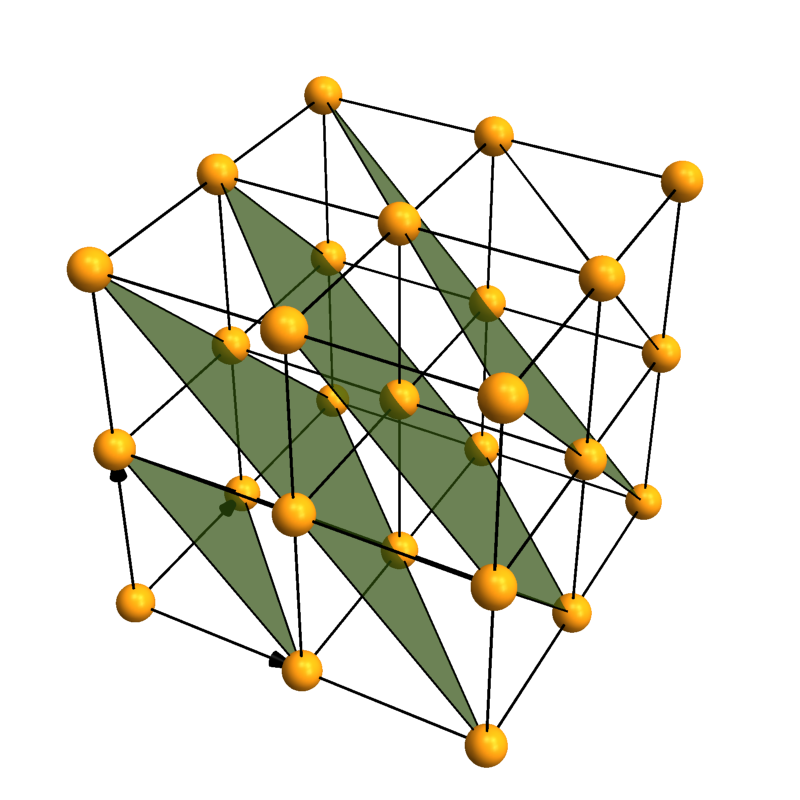
LatticePlanes isn't working for me either, even in this simple example:

CrystalPlot[{{3, 0, 0}, {0, 3, 0}, {0, 0, 3}}, LatticePlanes -> {{{1, 1, 1}, 1}}]

hmm.. crystallica-bug

POSTED BY: Sterling Baird

Hello Robert. I use Mathematica 12.1 under macOS Catalina ver. 10.15.7. I ran the same codes and got the exact output as yours.

I wonder why... perhaps the codes don't work in Ver. 12?

I also notice the double and triple bond visualization problem has gone in Ver. 12. I tried to run

ChemicalData["Benzene", "MoleculePlot"]

and the output is excellent: we can see the double bond in the benzene. I guess they implemented Bianca's codes in the new version.

Anyway, the VaspImport package is great (even though I use Quantum Espresso for my work.)

Thank you.

POSTED BY: Febdian Rusydi

Hello Someone can help me, I try to do something simple and I can't get the dimensions of the stutructure that's going on? When you download the package, save it to a cart then install it by File -> Install -> Crystallica.m which you are doing wrong. enter image description here

Posted 6 years ago

LatticePlanes is not working for me, although other features of CrystalPlot are. I've installed Crystallica in Mathematica 12 under Mac OS 10.12.6 Sierra. Any Idea what's wrong?

Attachments:
POSTED BY: Robert Walgate

I tried moving the origin to another co-ordinate so that the dist value doesn't become zero, however I still wasn't able to generate the plane.

POSTED BY: Pawan Chaugule

Thank you Jason for your swift reply. It was helpful for me. I do have one more issue. I am trying to generate LatticePlanes which pass through the origin. Since the syntax is:

LatticePlanes -> {{h,k},dist}

where dist is the distance of the plane from the origin, how can I plot a Lattice plane which passes through the origin. For eg. LatticePlanes -> {{{1, 1, 0}, 1}} plots a plane intersecting the x and y axes and the command LatticePlanes -> {{{-1, -1, 0}, 1}} should plot the plane perpendicular to the previous one, but it doesn't. I do not know what should give the value of dist in the second case.

POSTED BY: Pawan Chaugule

A quick way to delete the central atom from your plot:

plot = CrystalPlot[ ....];
DeleteCases[plot, Tooltip[_, 8], Infinity]

enter image description here

If you need to renumber the atoms, then you can adjust your AtomFunction to do that. You could also use the AtomFunction to choose not to draw atom 8, by giving it a radius of 0.

POSTED BY: Jason Biggs

Welcome to Wolfram Community! Please make sure you know the rules: https://wolfr.am/READ-1ST

The rules explain how to format your code properly. If you do not format code, it may become corrupted and useless to other members. Please EDIT your posts and make sure code blocks start on a new paragraph and look framed and colored like this.

int = Integrate[1/(x^3 - 1), x];
Map[Framed, int, Infinity]

enter image description here

POSTED BY: EDITORIAL BOARD
POSTED BY: Pawan Chaugule

That would be interesting. I haven't looked at that yet since I don't work with molecules at the moment. Who knows, maybe ChemicalData will be updated now that PubChem is connected...

In case it got lost in the edits, you can contribute to the package if you like, that might finally force me to figure out how git actually works (the initial commit via the github website was just too easy, so no learning happened yet).

POSTED BY: Bianca Eifert

Just saw that you replied while I was drafting an edit to the post. I came up with a workaround, hope it's robust. Now my next goal is to find someway to download 3D structures for the 33,000 ChemicalData entities we don't have them for. Looking at ServiceConnect for this.....

POSTED BY: Jason Biggs
POSTED BY: Bianca Eifert
POSTED BY: Jason Biggs
POSTED BY: Bianca Eifert

Bianca, This package looks great! Would you be willing to host it on github, since the Wolfram Library Archive link is not active?

Thanks, Jason

POSTED BY: Jason Biggs

That's actually really nice, hehe...

POSTED BY: Bianca Eifert

That would be cool! I'd also like to see multiple bonds for plots from ChemicalData... all the data is there, and my simple solution for how to orient the bonds in space seems to work (well, it may need more testing just to be sure). A chemist may be able to live with only single bonds because they know what the molecular really looks like, and that bonds are just a model anyway, and that some double bonds are actually there while others delocalize, etc... But for students it's quite confusing to see these two images of the same molecule:

Row[{ChemicalData["Benzene","MoleculePlot"],ChemicalData["Benzene","CHColorStructureDiagram"]}]

enter image description here

POSTED BY: Bianca Eifert

I wish to see this function gets enhanced in Wolfram Alpha in the future.

POSTED BY: Shenghui Yang

That happens, sometimes a much easier solution is possible, but you just don't see it somehow. Possibly one of the shortest (but not best) solution is:

conf = chem /. (# -> ++i & /@ (i = 0; DeleteDuplicates[chem]))
POSTED BY: Sander Huisman

Ah yes, that is indeed so much easier to read, thank you!

(I grabbed my nasty line from a package I wrote years ago and never looked at again because it worked... You know how that goes!)

POSTED BY: Bianca Eifert

Or, if you want to live dangerously:

conf=chem/.Thread[(types=DeleteDuplicates[chem])->Range[Length[types]]]
POSTED BY: Sander Huisman

I would replace your long line:

conf=ReplacePart[chem,Flatten@Table[#->ii&/@(Flatten@Position[chem,DeleteDuplicates[chem][[ii]]]),{ii,1,Length@DeleteDuplicates[chem]}]]

with something like:

types = DeleteDuplicates[chem];
conf = chem /. Thread[types -> Range[Length[types]]]

or as a single line:

conf = chem /. Thread[# -> Range[Length[#]]] &[DeleteDuplicates[chem]]
POSTED BY: Sander Huisman

Impressive!

POSTED BY: Sander Huisman
POSTED BY: EDITORIAL BOARD
POSTED BY: Bianca Eifert

This reply is about importing structures from CIF files.

I'll be using this CIF file of Rutile as an example and of course the CifImport package for import. But you will NEED to add something to the end of the CIF file. The last line is currently this: O 0.30530 0.30530 0.00000 You can just type "end" into the following line, or anything else you like; even an additional blank line will help. I'm sorry about this, it's a glitch in the way Import reads the file, so from my end, it could only be fixed by reading the file as a plain table instead.

CIF files are widely used for crystal structures, so if you're looking for a structure, you can usually find a CIF in a database somewhere. But you will see that the crystal structure in a CIF file is impossible to read for most humans, and not entirely trivial to import either. Exporting to CIF also requires extra work that is outside the scope of my packages. On the other hand, CIF files contain lots of metadata such as symmetry properties of the structure, information about the samples themselves, and citation information.

CIF is essentially a markup format where you have a name for each dataset and then the actual data. Mathematica can import our example CIF file and will return a list of rules linking the names and data of each dataset:

Import["Rutile.cif"]

So why do I keep saying that CIF files are not so trivial? Well, let's look at the actual file. You can open it in a text editor or via FilePrint.

Roughly the first half of the file is nicely readable for a human, you get citation information with journal and author names and years and pages and whatnot. Sometimes you'll get information on where the sample was found, or how it was synthesized. Then you get the lattice vectors in terms of their lengths and angles, and the space group. All of that is fine and great to have. But the actual crystal structure data is not so easy, look at this:

loop_
_space _group _symop _operation _xyz
  'x,y,z'
  '-y,-x,z'
  'y,x,-z'
  '1/2+y,1/2-x,1/2-z'
  '1/2-y,1/2+x,1/2+z'
  '1/2+x,1/2-y,1/2+z'
  '1/2-x,1/2+y,1/2-z'
  'x,y,-z'
  '-x,-y,z'
  'y,x,z'
  '-y,-x,-z'
  '1/2-y,1/2+x,1/2-z'
  '1/2+y,1/2-x,1/2+z'
  '1/2-x,1/2+y,1/2+z'
  '1/2+x,1/2-y,1/2-z'
  '-x,-y,-z'
loop_
_atom _site _label
_atom _site _fract _x
_atom _site _fract _y
_atom _site _fract _z
Ti   0.00000   0.00000   0.00000
O   0.30530   0.30530   0.00000

Spoiler alert: This structure, rutile, has 2 Ti and 4 O atoms, and it's a popular crystallization choice among metal dioxides. But the "atom_site" datasets only give us one atom of each type! What's going on here? Is it alchemy? Well, not quite. In addition to these 2 atoms, we also get all symmetry operations of the cell. If we assume for a moment that we have the complete cell with all 6 atoms, we could apply any of these symmetry transformations and we'd end up with the same structure. Atoms would be mapped onto other atoms of the same type. Back to our 2 atoms in the file: If we apply all symmetry operations to these 2 atoms, we will sometimes map them onto themselves, but at other times they will wind up on the positions of their missing friends. And this is how we can construct the complete crystal structure from a CIF file.

So let's import the structure "properly", with CifImport:

Needs["CifImport`"];
CifImport["Rutile.cif"]

... which gives us the following output:

{
<|"lattice"->{{4.59373`,0,0},{0,0},{0,0,2.95812`}},"atomcoords"->{{0.`,0.`,0.`},{0.3053`,0.3053`,0.`}},"atomtypes"->{1,2},"chemical"->{"Ti","O"},"name"->"Rutile","file"->"E:\\Rutile.cif","comment"->"atoms of the asymmetric unit with NONchemical types"|>,
<|"lattice"->{{4.59373`,0,0},{0,4.59373`,0},{0,0,2.95812`}},"atomcoords"->{{0.`,0.`,0.`},{0.5`,0.5`,0.5`},{0.30529999999999996`,0.30529999999999996`,0.`},{0.6947000000000001`,0.6947000000000001`,0.`},{0.8053`,0.19469999999999998`,0.5`},{0.19469999999999998`,0.8053`,0.5`}},"atomtypes"->{1,1,2,2,2,2},"chemical"->{"Ti","O"},"name"->"Rutile","file"->"E:\\Rutile.cif","comment"->"complete cell with chemical types"|>,
<|"lattice"->{{4.59373`,0,0},{0,4.59373`,0},{0,0,2.95812`}},"atomcoords"->{{0.`,0.`,0.`},{0.3053`,0.3053`,0.`}},"atomtypes"->{1,2},"chemical"->{"Ti","O"},"name"->"Rutile","file"->"E:\\Rutile.cif","comment"->"atoms of the asymmetric unit with chemical types"|>,
<|"lattice"->{{4.59373`,0,0},{0,4.59373`,0},{0,0,2.95812`}},"atomcoords"->{{0.`,0.`,0.`},{0.5`,0.5`,0.5`},{0.30529999999999996`,0.30529999999999996`,0.`},{0.6947000000000001`,0.6947000000000001`,0.`},{0.8053`,0.19469999999999998`,0.5`},{0.19469999999999998`,0.8053`,0.5`}},"atomtypes"->{1,1,2,2,2,2},"chemical"->{"Ti","O"},"name"->"Rutile","file"->"E:\\Rutile.cif","comment"->"complete cell with chemical types"|>
}

We get a list of Associations, where each Association represents one crystal structure. Why are there multiple structures? Well, read the "comment" entries: CifImport will give you the complete structure, but also the structure recorded in the file (which is sometimes called an asymmetric unit cell). Also, some structures need multiple atoms of the same type even within the asymmetric unit, and CIF files usually tag these atoms with labels that are suddenly no longer just the chemical species - so that's where the "nonchemical types" come in.

The structure you'll usually be interested in is the last one, which has all the atoms and chemical types. Let's just hook up the import with Crystallica really quickly:

Needs["Crystallica`"];
Needs["CifImport`"];
cifPlot[file_,options___]:=With[{data=Last[CifImport[file]]},
CrystalPlot[data["lattice"],data["atomcoords"],data["atomtypes"],options,AtomCol->data["chemical"]]];
cifPlot["Rutile.cif"]

And we get a plot!

enter image description here

If you wanted to export a structure to CIF format, you would definitely need code that finds the symmetries of your structure, and that can also return the actual name of the space group. You can write that, but you will find that various programs already exist that can export to CIF format, so you might be better off using one of those instead.

POSTED BY: Bianca Eifert
Reply to this discussion
Community posts can be styled and formatted using the Markdown syntax.
Reply Preview
Attachments
Remove
or Discard