Group Abstract Group Abstract

Message Boards Message Boards

0
|
16.4K Views
|
48 Replies
|
27 Total Likes
View groups...
Share
Share this post:

Sum positive elements of a list efficiently?

There are many ways to sum positive elements of a list such as, e.g.,

In[1]:= list = RandomReal[{-10, 10}, 1000000];

In[2]:= tList = {
  Plus @@ Map[If[# < 0, 0, #] &, list] // AbsoluteTiming,
  Total@Map[If[# < 0, 0, #] &, list] // AbsoluteTiming,
  Total[list /. x_ /; x < 0 -> 0] // AbsoluteTiming
  }

Out[2]= {{2.51129, 2.49923*10^6}, {1.93032, 2.49923*10^6}, {1.6144, 2.49923*10^6}}

In[3]:= BarChart@tList[[All, 1]]

enter image description here

Can you recommend a code better than above ones?

48 Replies
list = RandomReal[{-10, 10}, 1000000];

List of codes

ta = Table[taList = {
     (*  1 *)(Total[Abs[list]] + Total[list])/2 // AbsoluteTiming,
     (*  2 *) Total@Ramp@list // AbsoluteTiming,
     (*  3 *) Total@Clip[list, {0, \[Infinity]}] // AbsoluteTiming,
     (*  4 *) Plus @@ Ramp@list // AbsoluteTiming,
     (*  5 *) Plus @@ Clip[list, {0, \[Infinity]}] // AbsoluteTiming,
     (*  6 *) Total@Select[list, Positive] // AbsoluteTiming,
     (*  7 *) Total@Cases[list, _?Positive] // AbsoluteTiming,
     (*  8 *) Plus @@ Cases[list, _?Positive] // AbsoluteTiming,
     (*  9 *) Total@Cases[list, x_ /; x > 0] // AbsoluteTiming,
     (* 10 *) Plus @@ Cases[list, x_ /; x > 0] // AbsoluteTiming,
     (* 11 *) Plus @@ Select[list, # > 0 &] // AbsoluteTiming,
     (* 12 *) Total[list /. b_?Negative -> 0] // AbsoluteTiming,
     (* 13 *) Total[list /. x_ /; x < 0 -> 0] // AbsoluteTiming,
     (* 14 *) Total@Map[If[# < 0, 0, #] &, list] // AbsoluteTiming,
     (* 15 *) Plus @@ Map[If[# < 0, 0, #] &, list] // AbsoluteTiming,
     (* 16 *)(s = 0; l = Length[list]; 
       Do[If[list[[i]] > 0, s += list[[i]], s], {i, l}]; s) // 
      AbsoluteTiming,
     (* 17 *)(s = 0; l = Length[list]; 
       Table[If[list[[i]] > 0, s += list[[i]], s], {i, l}][[l]]) // 
      AbsoluteTiming,
     (* 18 *)(pcf = Function[x, Piec{x, x > 0}}, 0], Listable];
        Total[pcf[list]]) // AbsoluteTiming,
     (* 19 *)(s = 0; l = Length[list]; 
       For[i = 0, i <= l, i++, If[list[[i]] > 0, s += list[[i]], s]]; 
       s) // AbsoluteTiming,
     (* 20 *)(s = 0; i = 1; l = Length[list]; 
       While[i <= l, If[list[[i]] > 0, s += list[[i]], s]; i++]; s) //
       AbsoluteTiming
     };
   BarChart[taList[[All, 1]], PlotRange -> {{-.01, 20.5}, {0, 4}}]
   , {48}];

Test Results for a list with 1mln elements

List generation:

list = RandomReal[{-10, 10}, 1000000];

Animation includes the results of 48 tests made both with AbsoluteTiming and RepeatedTiming. The first BarChart is for AbsoluteTiming.

enter image description here

Numerically, we can conclude that the best code is the newest:

Comparing results

In[102]:= absTiming = taList[[All, 1]]

Out[102]= {0.00687931, 0.00704303, 0.015065, 0.359983, 0.321751, 0.683816, 0.779643, \
0.887773, 1.03672, 1.0153, 1.14582, 1.31585, 1.45897, 1.83022, 1.79794, \
2.67337, 2.94904, 3.10739, 3.46186, 3.73936}

In[103]:= absTiming/absTiming[[1]]

Out[103]= {1., 1.0238, 2.1899, 52.3284, 46.7708, 99.4018, 113.332, 129.05, 150.701, \
147.587, 166.561, 191.277, 212.081, 266.048, 261.355, 388.611, 428.682, \
451.701, 503.228, 543.567}

In[108]:= repTiming = trList[[All, 1]]

Out[108]= {0.00618, 0.00703, 0.0147, 0.27, 0.271, 0.638, 0.7696, 0.775, 0.9548, 0.9669, \
1.09, 1.20, 1.368, 1.73, 1.75, 2.60, 2.86, 3.06, 3.5, 3.74}

In[109]:= repTiming/repTiming[[1]]

Out[109]= {1.00, 1.14, 2.38, 44., 43.9, 103., 125., 125., 155., 157., 176., 194., 222., \
280., 283., 421., 463., 495., 5.6*10^2, 6.1*10^2}

Test Results for a list with 20 elements

List generation:

list = RandomReal[{-10, 10}, 20];

Animation includes the results of 60 tests made both with AbsoluteTiming and RepeatedTiming. The first BarChart is for AbsoluteTiming.

enter image description here

Comparing results

In[95]:= abs20Timing = taList20[[All, 1]]

Out[95]= {0.0000166167, 
 4.39853*10^-6, 0.0000151505, 0.0000131956, 0.0000146618, 0.0000244363, \
0.0000268799, 0.0000219927, 0.0000298123, 0.0000254138, 0.0000268799, \
0.0000508275, 0.0000478952, 0.0000444741, 0.0000390981, 0.0000669555, \
0.0000645118, 0.0000772187, 0.0000825947, 0.0000796623}

In[96]:= abs20Timing/abs20Timing[[1]]

Out[96]= {1., 0.264706, 0.911765, 0.794118, 0.882353, 1.47059, 1.61765, 1.32353, \
1.79412, 1.52941, 1.61765, 3.05882, 2.88235, 2.67647, 2.35294, 4.02941, \
3.88235, 4.64706, 4.97059, 4.79412}

In[97]:= rep20Timing = trList20[[All, 1]]

Out[97]= {4.761*10^-6, 2.2*10^-6, 5.53*10^-6, 
 7.6*10^-6, 0.000011419, 0.0000173, 0.000026, 0.00002, 0.000030, 0.000026, \
0.000028, 0.000044, 0.000048, 0.000047, 0.0000413, 0.000073, 0.000069, 0.003, \
0.0001, 0.0000795}

In[98]:= rep20Timing/rep20Timing[[1]]

Out[98]= {1.000, 0.45, 1.16, 1.6, 2.398, 3.62, 5.5, 5., 6.3, 5.5, 5.9, 9.2, 10., 
 1.*10^1, 8.67, 15., 14., 7.*10^2, 2.*10^1, 16.7}

For the short list the code with Total[] and Ramp[] functions is the fastest.

Posted 10 years ago

Readability is subject to Mathematica syntax, but if one understands the plan it seems clear. (and doesn't require M11)

shows lists aligned

Testing on HP5820, Windows 7 -

In[72]:= list = RandomReal[{-10, 10}, 1000000];
Total@Ramp@list // RepeatedTiming
(Total[Abs[list]] + Total[list])/2 // RepeatedTiming

Out[73]= {0.0026, 2.49858*10^6}

Out[74]= {0.00248, 2.49858*10^6}
POSTED BY: Douglas Kubler
Posted 10 years ago
(Total[Abs[list]] + Total[list])/2

This seems to beat all other timings on my machine (M 11).

POSTED BY: Douglas Kubler

Smart! Very nice find! Though compromises readability...

POSTED BY: Sander Huisman

For 10^6 items, the Ramp method is faster on my machine (Mac OSX V11) (using RepeatedTiming to get an accurate timing):

list = RandomReal[{-10, 10}, 1000000];
Total@Ramp@list // RepeatedTiming
(Total[Abs[list]] + Total[list])/2 // RepeatedTiming

{0.0014, 2.50381*10^6}
{0.0019, 2.50381*10^6}
POSTED BY: Sander Huisman

After the release of Mma 11, I introduced, according with Sander suggestion, two new codes with the function Ramp[].

The codes are sorted to emphasize their efficiency.

At the moment, there are 19 codes.

List with 1 mln random generated real elements

First, I have done tests on a list with 1 mln numeric elements

list = RandomReal[{-10, 10}, 1000000];

and AbsoluteTiming 48 repetitions:

ta = Table[tList = {
     (*  1 *) Total@Ramp@list // AbsoluteTiming,
     (*  2 *) Total@Clip[list, {0, \[Infinity]}] // AbsoluteTiming,
     (*  3 *) Plus @@ Ramp@list // AbsoluteTiming,
     (*  4 *) Plus @@ Clip[list, {0, \[Infinity]}] // AbsoluteTiming,
     (*  5 *) Total@Select[list, Positive] // AbsoluteTiming,
     (*  6 *) Total@Cases[list, _?Positive] // AbsoluteTiming,
     (*  7 *) Plus @@ Cases[list, _?Positive] // AbsoluteTiming,
     (*  8 *) Total@Cases[list, x_ /; x > 0] // AbsoluteTiming,
     (*  9 *) Plus @@ Cases[list, x_ /; x > 0] // AbsoluteTiming,
     (* 10 *) Plus @@ Select[list, # > 0 &] // AbsoluteTiming,
     (* 11 *) Total[list /. b_?Negative -> 0] // AbsoluteTiming,
     (* 12 *) Total[list /. x_ /; x < 0 -> 0] // AbsoluteTiming,
     (* 13 *) Total@Map[If[# < 0, 0, #] &, list] // AbsoluteTiming,
     (* 14 *) Plus @@ Map[If[# < 0, 0, #] &, list] // AbsoluteTiming,
     (* 15 *)(s = 0; l = Length[list]; 
       Do[If[list[[i]] > 0, s += list[[i]], s], {i, l}]; s) // 
      AbsoluteTiming,
     (* 16 *)(s = 0; l = Length[list]; 
       Table[If[list[[i]] > 0, s += list[[i]], s], {i, l}][[l]]) // 
      AbsoluteTiming,
     (* 17 *)(pcf = Function[x, Piecewise[{{x, x > 0}}, 0], Listable];
        Total[pcf[list]]) // AbsoluteTiming,
     (* 18 *)(s = 0; l = Length[list]; 
       For[i = 0, i <= l, i++, If[list[[i]] > 0, s += list[[i]], s]]; 
       s) // AbsoluteTiming,
     (* 19 *)(s = 0; i = 1; l = Length[list]; 
       While[i <= l, If[list[[i]] > 0, s += list[[i]], s]; i++]; s) //
       AbsoluteTiming
     };
   BarChart[tList[[All, 1]], PlotRange -> {{-.01, 19.5}, {0, 4}}]
   , {48}];
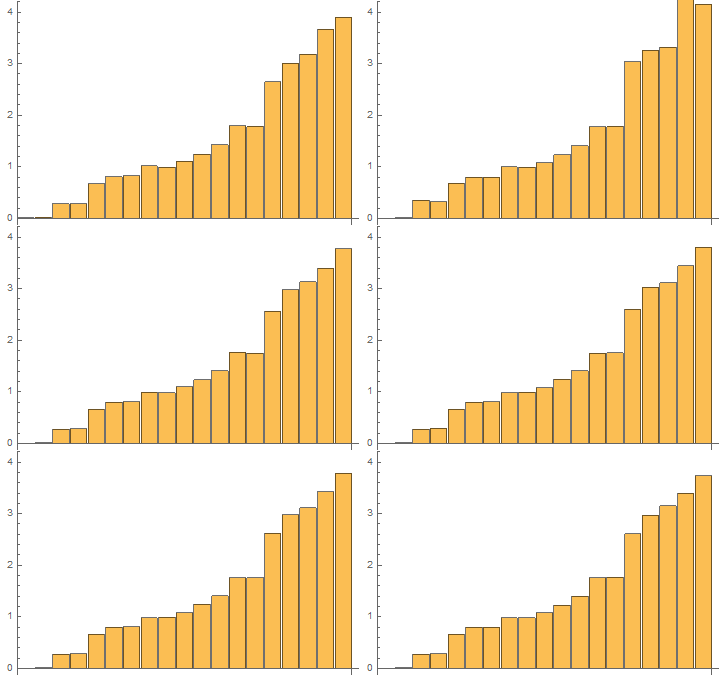
enter image description here

Time results for the last 48th test:

In[1]:= AbsTiming = tList[[All, 1]]

Out[1]= {0.00773412, 0.0147376, 0.273374, 0.285654, 0.659804, \
0.799176, 0.794375, 0.980972, 0.982004, 1.07851, 1.22457, 1.39598, \
1.75444, 1.76957, 2.60787, 2.97176, 3.15208, 3.39943, 3.73759}

In[2]:= AbsTiming/AbsTiming[[1]]

Out[2]= {1., 1.90553, 35.3465, 36.9342, 85.3108, 103.331, 102.711, \
126.837, 126.97, 139.448, 158.333, 180.496, 226.844, 228.8, 337.19, \
384.241, 407.556, 439.537, 483.26}

For the same list with 1 mln elements, the results of 48 tests with RepeatedTiming in one GIF
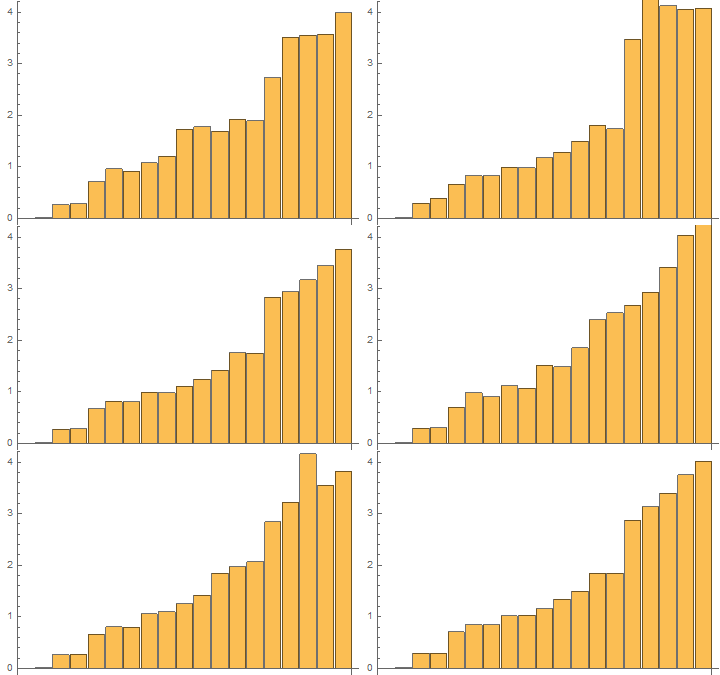
enter image description here

The time results of the last 48th test:

In[3]:= RepTiming = tList[[All, 1]]

Out[3]= {0.0076, 0.015, 0.291, 0.294, 0.708, 0.8480, 0.843, 1.02, \
1.04, 1.2, 1.3, 1.5, 1.84, 1.85, 2.87, 3.13, 3.39, 3.7516, 4.01}

In[4]:= RepTiming/RepTiming[[1]]

Out[4]= {1.0, 2.0, 38., 39., 9.*10^1, 1.1*10^2, 1.1*10^2, 1.3*10^2, 
 1.4*10^2, 1.5*10^2, 1.8*10^2, 2.0*10^2, 2.4*10^2, 2.4*10^2, 3.8*10^2,
  4.1*10^2, 4.5*10^2, 4.9*10^2, 5.3*10^2}

Remark, the first code is 2 times faster than the second code and 530 times faster than the 19th code.

Short list with 20 random generated real elements

Third, I have done tests for a short list with 20 elements and with 120 repetitions with AbsoluteTiming[]
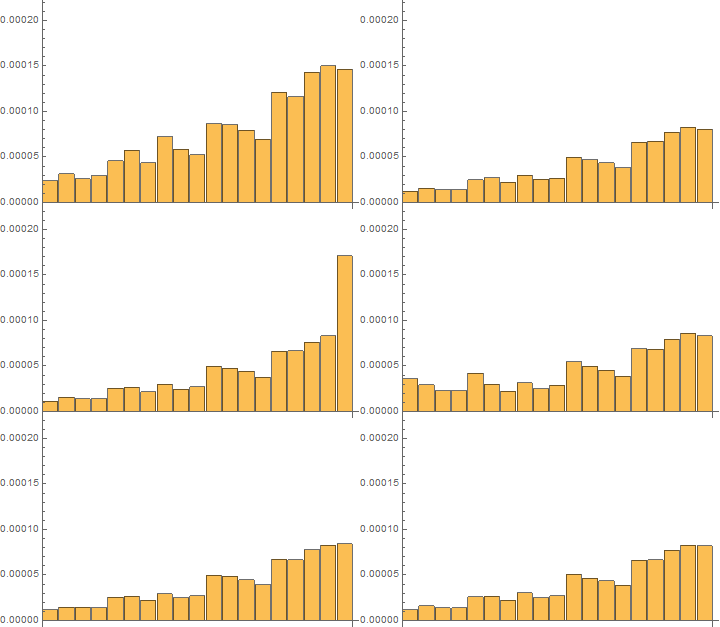
enter image description here

Time results for the last 120th test:

In[5]:= absTiming = tList[[All, 1]]

Out[5]= {0.0000112407, 0.0000156393, 0.0000136844, 0.0000141731, \
0.0000244364, 0.0000263913, 0.0000205266, 0.0000293237, 0.0000239477, \
0.0000259026, 0.0000498502, 0.0000474066, 0.000044963, 0.0000390982, \
0.0000606022, 0.000061091, 0.0000752641, 0.000077219, 0.0000767303}

In[6]:= absTiming/absTiming[[1]]

Out[6]= {1., 1.3913, 1.21739, 1.26087, 2.17391, 2.34783, 1.82609, \
2.6087, 2.13043, 2.30435, 4.43478, 4.21739, 4., 3.47826, 5.3913, \
5.43478, 6.69565, 6.86957, 6.82609}

Fourth, I have done tests with on the same short list with 20 elements with 120 repetitions with RepeatedTiming
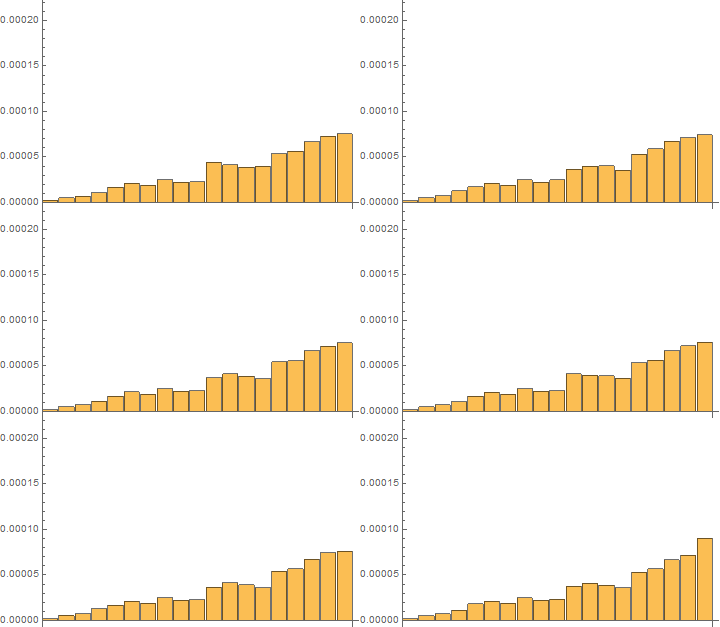
enter image description here

Time results for the last 120th test:

In[7]:= repTiming = tList[[All, 1]]

Out[7]= {2.016*10^-6, 5.33*10^-6, 
 7.16*10^-6, 0.0000110, 0.000019, 0.00002111, 0.0000189, 0.0000249, \
0.00002229, 0.0000230, 0.0000373, 0.0000408, 0.0000387, 0.0000360, \
0.0000532, 0.0000568, 0.0000664, 0.0000718, 0.00009}

In[8]:= repTiming/repTiming[[1]]

Out[8]= {1.000, 2.64, 3.55, 5.48, 9.2, 10.47, 9.4, 12.3, 11.06, \
11.4, 18.5, 20.2, 19.2, 17.8, 26.4, 28.2, 32.9, 35.6, 4.*10^1}

Conclusions

The function Ramp[] together with Total[] is more faster than all the rest of codes as for large lists as for short lists.

These results may serve as a good bases to construct efficient summations in other situations and cases.

These codes are good to use in classrooms as examples of good/efficient and bad/non-efficient programming.

Thanks for sharing!

POSTED BY: Sander Huisman

This code doesn't work.

In[12]:= list = {-1, 2, 1, 2, -1};
Total[list /. Negative[b] -> 0]
Out[13]= 3

But, I have such code with replacement in my test list of codes and it works. It's somewhat strange in my opinion that Repeatedly is not optimized to recognize such simple problems.

Thanks, J.M. May be I will return with mixed list formed both of numerical and other types of elements.

Posted 10 years ago

Sorry 'bout that; I've edited the post. I seem to have pasted the wrong snippet.

POSTED BY: J. M.

Dear J.M., any response of yours produces improvement of the entire list of codes. I entered your code in the list after the number 7 marked by ' sign. I have changed verification of the expressions like ">0" or "<0" by checking ?Positive or ?Negative in 2 of codes. So, I have obtained two new modified pieces of code after numbers 4 and 5.

First, I have done tests on a list with 1 mln list elements and with AbsoluteTiming 48 repetitions.

tList = {
  (*  1 *) Total[Clip[list, {0, \[Infinity]}]] // AbsoluteTiming,
  (*  2 *) Plus @@ Clip[list, {0, \[Infinity]}] // AbsoluteTiming,
  (*  3 *) Total[Select[list, Positive]] // AbsoluteTiming,
  (*  4 *) Total[Cases[list, x_ /; x > 0]] // AbsoluteTiming,
  (*   '*) Total[Cases[list, _?Positive]] // AbsoluteTiming,
  (*  5 *) Plus @@ Cases[list, x_ /; x > 0] // AbsoluteTiming,
  (*   '*) Plus @@ Cases[list, _?Positive] // AbsoluteTiming,
  (*  6 *) Plus @@ Select[list, # > 0 &] // AbsoluteTiming,
  (*  7 *) Total[list /. x_ /; x < 0 -> 0] // AbsoluteTiming,
  (*   '*) Total[list /. b_?Negative -> 0] // AbsoluteTiming,
  (*  8 *) Total@Map[If[# < 0, 0, #] &, list] // AbsoluteTiming,
  (*  9 *) Plus @@ Map[If[# < 0, 0, #] &, list] // AbsoluteTiming,
  (* 10 *)(s = 0; l = Length[list]; 
    Do[If[list[[i]] > 0, s += list[[i]], s], {i, l}]; s) // 
   AbsoluteTiming,
  (* 11 *)(s = 0; l = Length[list]; 
    Table[If[list[[i]] > 0, s += list[[i]], s], {i, l}][[l]]) // 
   AbsoluteTiming,
  (* 12 *)(pcf = Function[x, Piecewise[{{x, x > 0}}, 0], Listable]; 
    Total[pcf[list]]) // AbsoluteTiming,
  (* 13 *)(s = 0; l = Length[list]; 
    For[i = 0, i <= l, i++, If[list[[i]] > 0, s += list[[i]], s]]; 
    s) // AbsoluteTiming,
  (* 14 *)(s = 0; i = 1; l = Length[list]; 
    While[i <= l, If[list[[i]] > 0, s += list[[i]], s]; i++]; s) // 
   AbsoluteTiming
  }

Animated results are in the following GIF

enter image description here

For the same list with 1 mln elements, the 24 tests with RepeatedTiming are reflected by the following GIF

enter image description here

For a list with 20 elements, the results of the 120 tests with AbsoluteTiming are reflected by the GIF:

enter image description here

For the same list with 20 elements, the results of the 120 tests with RepeatedTiming are reflected by the GIF:

enter image description here

Conclusion: making an efficient code needs to know some small and very important details. Some of them are inserted in the above list of codes.

Posted 10 years ago
POSTED BY: J. M.

Nevertheless, J.M., why is so slow the following code?

Total[list //. {a___, b_, c___} /; b < 0 -> {a, 0, c}]

Must it be so slow because of its essence?

Does the expression

{a___, b_, c___} /; b < 0 -> {a, 0, c}

mean simply a substitution of negative elements by 0 or the expression has some other meaning?

Posted 10 years ago
POSTED BY: J. M.

You may want to use RepeatedTiming at least for the first one, because it is so fast! On my machine just 2.8 milliseconds!

POSTED BY: Sander Huisman

Sure, I can do it, but for our goals it's not so important! It's just for principles and ideas.

Posted 10 years ago
POSTED BY: J. M.

Yes! Simple and Clear!

Another approach is:

AbsoluteTiming[pcf = Piecewise[{{x, x > 0}, {0, True}}]; Total[pcf /@ list];]

But it is slower (at least on my computer).

POSTED BY: Sander Huisman
Posted 10 years ago

I'd have done it this way: pcf = Function[x, Piecewise[{{x, x > 0}}, 0], Listable]; Total[pcf[tst]]

POSTED BY: J. M.

@Sander The code contains errors! Try it on a small list!

After J.M. improvement

In[32]:= list = RandomReal[{-10, 10}, 1000000];

In[33]:= tList = {
  Plus @@ Map[If[# < 0, 0, #] &, list] // AbsoluteTiming,
  Total@Map[If[# < 0, 0, #] &, list] // AbsoluteTiming,
  Total[list /. x_ /; x < 0 -> 0] // AbsoluteTiming,
  Plus @@ Select[list, # > 0 &] // AbsoluteTiming,
  Total[Clip[list, {0, \[Infinity]}]] // AbsoluteTiming,
  AbsoluteTiming[
   pcf = Function[x, Piecewise[{{x, x > 0}}, 0], Listable]; 
   Total[pcf[list]]]
  }

Out[33]= {{1.71495, 2.50376*10^6}, {1.70818, 2.50376*10^6}, {1.3847, 
  2.50376*10^6}, {1.03566, 2.50376*10^6}, {0.0151026, 
  2.50376*10^6}, {3.1214, 2.50376*10^6}}

In[34]:= BarChart@tList[[All, 1]]

enter image description here

You are right, I copied the wrong stuff from my test-notebook... But fixed by JM.. thanks

POSTED BY: Sander Huisman
Posted 10 years ago

Then how do you know if they're positive? How do you wish them to be dealt with?

POSTED BY: J. M.
Posted 10 years ago

That wasn't an answer to my question. :) If you have a list like {1, 2, x, -1, -4}, should x be added to the sum, or removed from the list before summing? Same question for {1, 2, I, -1, -4}.

POSTED BY: J. M.
Posted 10 years ago

And what about the second list I gave? Complex numbers like I are neither positive nor negative.

POSTED BY: J. M.

As you asked me, J.M., about the summation, we can imagine an improvement of the function Total[] that will include the criterion according to which the summation is done, i.e.

Total[list, crit, {Subscript[n, 1],Subscript[n, 2]}]

crit means criterion and it may be, e.g., Reals, Complex, Integers, and so on...

Posted 10 years ago

Then the use of Select[]/Cases[]/Pick[] can prolly not be avoided. Use e.g. Total[Select[list, Positive]].

POSTED BY: J. M.

Thanks a lot, J.M.

POSTED BY: John Doty

Yes, it is the fastest! It is the lowest bar in the precedent BarChart!

In[4]:= tList = {Plus @@ Map[If[# < 0, 0, #] &, list] // 
   AbsoluteTiming, 
  Total@Map[If[# < 0, 0, #] &, list] // AbsoluteTiming, 
  Total[list /. x_ /; x < 0 -> 0] // AbsoluteTiming,
  Plus @@ Select[list, # > 0 &] // AbsoluteTiming }

Out[4]= {{0.942527, 2.49442*10^6}, {0.977524, 
  2.49442*10^6}, {0.778662, 2.49442*10^6}, {0.595495, 2.49442*10^6}}
POSTED BY: Frank Kampas

Thanks!

In[6]:= list = RandomReal[{-10, 10}, 1000000];

In[10]:= tList = {
Plus @@ Map[If[# < 0, 0, #] &, list] // AbsoluteTiming,
Total@Map[If[# < 0, 0, #] &, list] // AbsoluteTiming,
Total[list /. x_ /; x < 0 -> 0] // AbsoluteTiming,
Plus @@ Select[list, # > 0 &] // AbsoluteTiming,
Total[Clip[list, {0, \[Infinity]}]] // AbsoluteTiming
}

Out[10]= {{1.76125, 2.49895*10^6}, {1.78087, 2.49895*10^6}, {1.42525,  2.49895*10^6},
{1.07893, 2.49895*10^6}, {0.0146056, 2.49895*10^6}}

In[11]:= BarChart@tList[[All, 1]]

enter image description here

Unbelievable fast!

Posted 10 years ago

Total[Clip[list, {0, ?}]] is pretty quick.

POSTED BY: J. M.

Fantastic! Thanks a lot! You are magician!

I just wanted to reply this, Clip is the way to do this!

In the next release a new function will arrive that will cut this time in half (compared to Clip).

POSTED BY: Sander Huisman

It's very impressive for me!

Posted 10 years ago
POSTED BY: J. M.
POSTED BY: Sander Huisman

Thanks, Sander, for the information about function Ramp[]! We just have to wait for version 11 of Mma!

Reply to this discussion
Community posts can be styled and formatted using the Markdown syntax.
Reply Preview
Attachments
Remove
or Discard