A new study group covering the basics of machine learning begins Monday! This group will be led by Wolfram certified instructor @Abrita Chakravarty and meets daily, Monday to Friday for one week. Abrita will share the excellent short lesson videos created by @Jon McLoone for the Wolfram U course Zero to AI in 60 Minutes. Study group sessions include time for additional examples, exercises, discussion and Q&A. Certification of program completion is available. Sign up: https://wolfr.am/R2s6PERk
4 Likes
Looking forward to reviewing these topics along with you all. Please feel free to post any questions you may have, from the course or from the daily study group sessions, here.
Also look out for the fun daily challenges to showcase your new machine learning skills.
See you on Monday.
4 Likes
Daily Challenge: Day 1
Here is a challenge to celebrate NaNoWriMo. Write a short story (or select an extract from your favorite story - perhaps one for which the text is available in the public domain). Use the “Sentiment” classifier in the Wolfram Language to detect the sentiment of each sentence. Plot the probability of the sentiment of each sentence in the story being “positive”, as the plot progresses.
If it’s your own story, have fun tweaking the plot to see how the changes are reflected in the sentiment plot.
1 Like
ListLinePlot[
Classify[“Sentiment”,
TextSentences[ExampleData[{“Text”, “AliceInWonderland”}]],
“Probability” → “Positive”]]
1 Like
Here are a few stories which I applied the sentiment classifier and generated matrix plots. SCF’s 1,2, and 3 are the various stories. P 1,2, and 3 are the resulting probabilities extracted from the association returns from SCF’s.
ML_Challenge_1.nb (21.9 KB)
1 Like
Pretty fun. I have used The Picture of Dorian Gray. After taking off sentences of less than 3 words (arbitrary decision…) I have used a lowpassfilter with very low cuttoff. Funny part, the graphs showed a high probability of a neutral end (??). After reviewing the text I realized that the end of the text was license agreement. After removing that, the end of the book could be positive too… In the images green is positive, red is negative and orange is neutral.


1 Like
Ok. So I have one of those pesky theory questions… In yesterday’s session, we saw several examples of “very small numbers” returned for (admittedly unlikely) probabilities within the classification function exercises. Returning to the concept of how Mathematica/WL symbolically evaluates the expression of SQRT(2)^2-1 from a previous seminar series… would it be safe to say that these “very small numbers” are themselves measurements of computational error?
I’ve attached screen captures with evaluation of the “Supervised Learning: Classification - Basic Example” from my own computer (64 bit PC) and from the lecture video. (Mr. McLoone’s obviously superior computing cluster) So what result does everyone else get when evaluating this expression?
And if my hypothesis is correct (more processing cores = reduced computational error) is there a method for “forcing” WL to askew floating point arithmetic? Or does this even matter provided we askew “mission critical” uses as mentioned in the video and remain cognizant of error propagation?
Or… is there some form of symbolic approach to this issue? (for which I admittedly have absolutely no idea what such methods might even look like) Just curious. Seems like an emerging issue as we continue to measure more things more often with ever increasing levels of precision.

Hi,
I’m confused about how to import excel files into the “{parameters}->label” format. My excel file looks like the picture below, with some of the data being blank.

@ivang1 Perhaps the example in the attached notebook will help.
WranglingDataForPredict.nb (9.24 KB)
1 Like
Here’s my attempt at analyzing the sentiment of “Pride and Prejudice”:
prideAndPrejudice =
  TextCases[ResourceData["Pride and Prejudice"], "Sentence"];

sentiment =
  Classify["Sentiment", prideAndPrejudice,
   "Probability" -> "Positive"];

MovingAverage[sentiment, 500] // ListLinePlot

Daily Challenge: Day 2
The dataset at https://datarepository.wolframcloud.com/resources/State-of-the-Union-Addresses contains the complete text of State of the Union addresses from 1790 to 2019. Test the performance of a Predictor trained to predict the age of the president from the date and text of the address.
Thank you! That worked perfectly!
I’m wondering about slide 7 of the presentation where it mentions automating the method choice by testing different approaches on subsets of data - do you have any examples of this?
Thanks!
Just to give context:
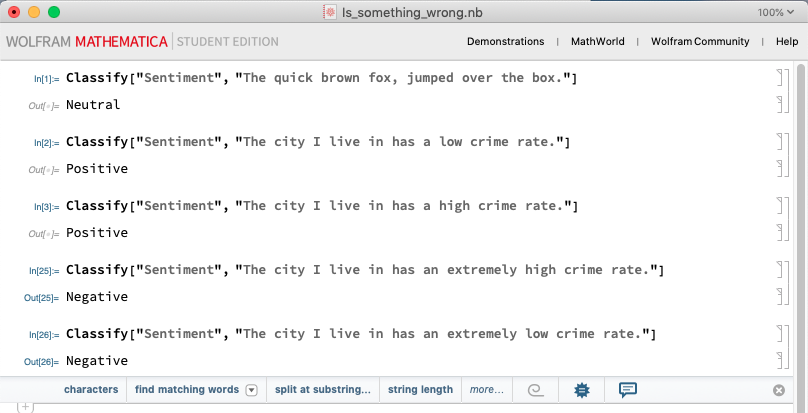
My approach could just be naïve (I’m a beginner here, so pardon me in advance) but using the Classifier function to analyze the sentiment is throwing some weird results my way. I wanted to just use a few sentences before I approached with a larger text file.
Here is what I have:

I was wondering if the word ‘extremely’ had some weight to it that made the output different?
Thanks for the help!
[1]: https://community.wolfram.com//c/portal/getImageAttachment?filename=whats_the_deal.png&userId=2116896
I run into some trouble with the format of DataSet.
The following runs without errors and trains fairly:
addressData = ResourceData["State of the Union Addresses"];
addressEssensialData = addressData[All, {"Date", "Text", "Age"}];
{training, testing} = TakeDrop[addressEssensialData, 200];
Note that at this point:
In[16]:= training // Head
Out[16]= Dataset
Next, I can successfully use variable training in the following way
p = Predict[training -> "Age"]
Further, I am OK with getting predictions and actual data “by hand”:
predictionsOnTesting = p[testing]
actualsOnTesting = testing[[All, 3]] // Normal
And further I can plot their comparison plot (also “by hand”)

However, if I try feeding testing into PredictorMeasurements[..]
pm = PredictorMeasurements[p, testing]
or similarly as it worked earlier with Predict[..]
pm = PredictorMeasurements[p, testing->"Age"]
It runs with the following error
PredictorMeasurements::bdfmt: Argument Dataset [<<33>>] should be a rule or a list of rules.
And usually crashes Mathematica if I try doing anything further. Though one time I somehow managed:

I am a bit at a loss how to properly figure out PredictorMeasurements[…] with DataSet variable for the training set… (I also tried turning DataSets into Lists but this seems wrong and I didn’t have much success with it either)
MLChallenge2.nb (173 KB)
1 Like
Kevin - While the algorithm in me desires to reply that “extremely” represents 75% or greater level of emphasis and could typically be interchanged with the term “high degree;” the human in me dictates need to break out the red felt tip pen, circling words “extremely low crime rate” and scribbling “AWK.”
The truth is that English-speaking humans rarely speak like this. (ie high degree of low in something that is unpleasant) Instead, one would much more likely focus upon the positive (eg my city is safe)
Given numerous other tests haven’t revealed the WL sentiment algorithm to be completely irrational (like say… perhaps some reddit automod gone awry) I consider it an intelligent resource. Perhaps a bit too eager to provide non-neutral responses, but intelligent nonetheless. Hope that helps.

This is being automatically done by the Classify or Predict function. You will observe it in the training progress panel as the training happens. You will see it is trying different algorithms.
I would attribute such results really to the training data. The performance of most classification algorithms is closely tied in with the quality and availability of the training data.
A new study group covering the basics of machine learning begins Monday! This group will be led by Wolfram certified instructor @Abrita Chakravarty and meets daily, Monday to Friday for one week. Abrita will share the excellent short lesson videos created by @Jon McLoone for the Wolfram U course Zero to AI in 60 Minutes. Study group sessions include time for additional examples, exercises, discussion and Q&A. Certification of program completion is available. Sign up: https://wolfr.am/R2s6PERk
Daily Challenge: Day 3
Today’s challenge will lead nicely into tomorrow’s topic “Neural Networks”. Visit the GloVe 100-Dimensional Word Vectors Trained on Tweets available in the Wolfram Neural Net repository. Look at the example offered under “Feature Visualization”. Try FeatureSpacePlot with FeatureExtractor set to this particular model to visualize a clustering of words in any text of your choice. Share any interesting results you find here.
Unfortunately it appears that PredictorMeasurements cannot deal with test data being in a Dataset. We will have to wrangle it into key-value pairs {feature1, feature2,…} → target
For this specific dataset we can do the following:
modifiedTesting = Most[#] -> Last[#] & /@ Values[Normal[testing]]
which will set up the test data as: {date, text of address}-> age and allow you to use the PredictorMeasurements function.