Group Abstract Group Abstract

Message Boards Message Boards

1
|
8.6K Views
|
11 Replies
|
5 Total Likes
View groups...
Share
Share this post:

Set custom Graphics axes directions?

Posted 6 years ago

By default in Graphics, the axes run from left to right (x) and bottom to top (y). Often one needs different directions, in particular, the y-axes running from top to bottom.

I cannot find an option with determines axes directions. Any help?

POSTED BY: Werner Geiger
11 Replies
Posted 6 years ago
POSTED BY: Werner Geiger
Attachments:
POSTED BY: Ian Williams
POSTED BY: Neil Singer
Posted 6 years ago

I think as well, that's a bug. I can't imagine any reason why not all coordinates could be transformed automatically by the ScalingFunctions-option. Nor that it is not supported in Graphics (but - surprise! - accepted). The underlying transformations are trivial.

Do you know, when 12.1 will arrive?

POSTED BY: Werner Geiger
POSTED BY: Ian Williams
Posted 6 years ago

Thanks a lot, Henrik. This does what I want to do. I've stupidly overlooked the option ScalingFunctions so far.

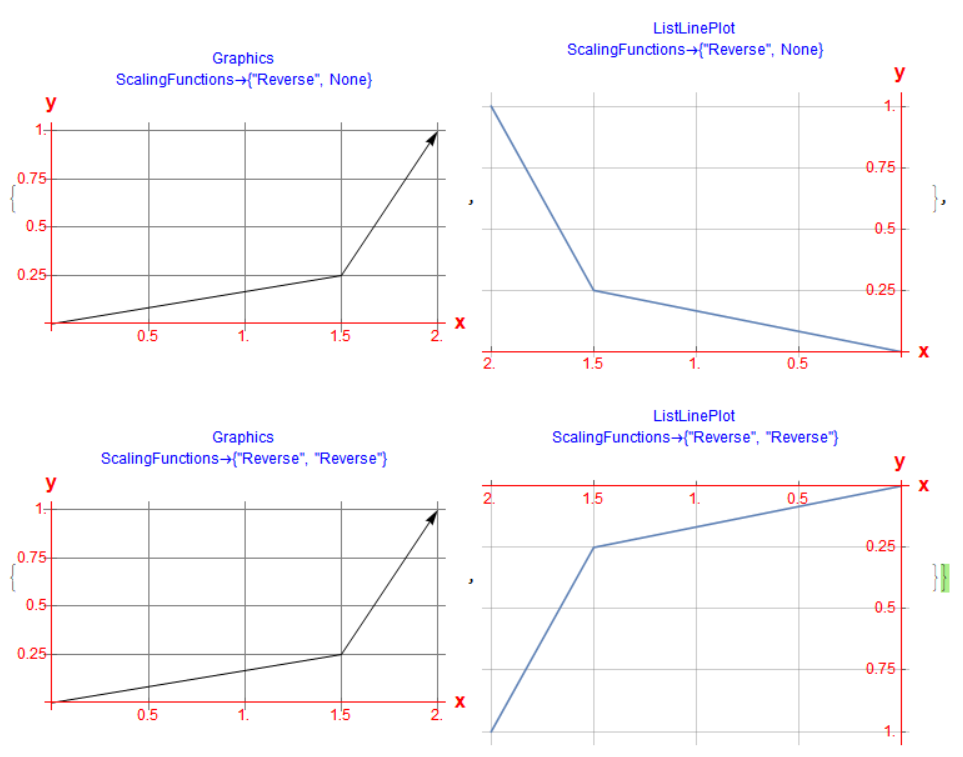
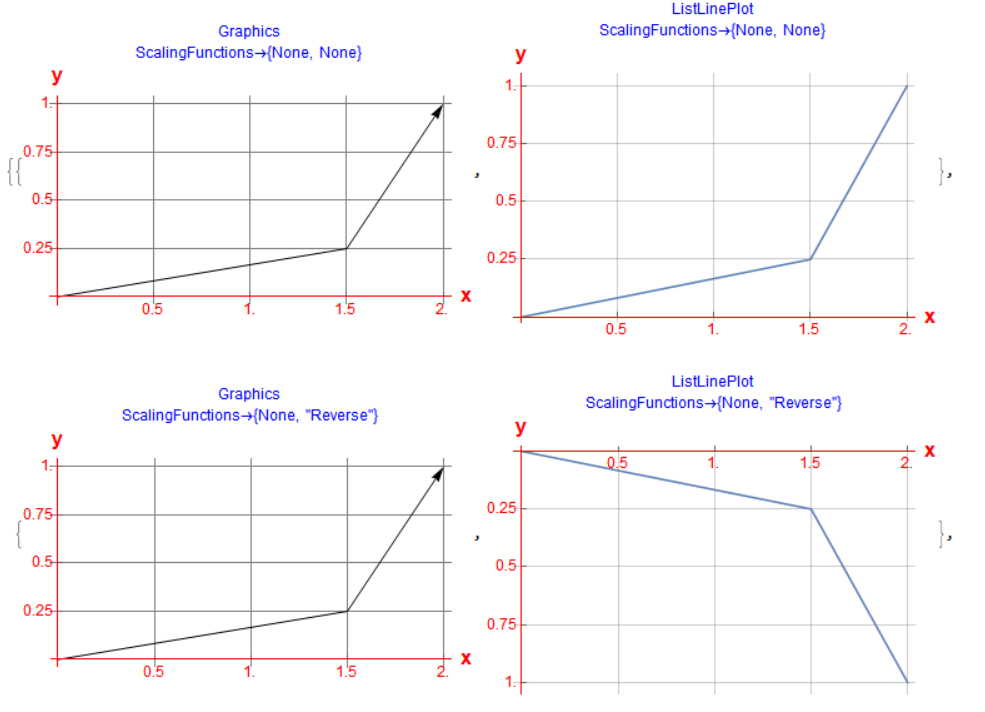
Unfortunately, it works for the Plot-functions only, but not for Graphics. Strange enough, for Graphics it is accepted, marked red but ignored.

The following code draws a broken line with all four axis orientations. Once with Graphics as an Arrow and once with ListLinePlot as a Line. Everything else is identical.

You can see that ListLinePlot does everything right. (Maybe except for the AxesLabel, which are not placed at the correct position at the end of the axis).

Block[{graphs, i, pts, xticks, yticks},
 pts = {{0, 0}, {1.5, 0.25}, {2, 1}};
 xticks = 0.5*Range[4]; yticks = 0.25*Range[4];
 graphs = Table[{Null, Null}, 4]; i = 0;
 Do[i++;
  graphs[[i, 1]] = Graphics[Arrow[pts]
    , Axes -> True, AxesStyle -> Directive[Red, 12], 
    ScalingFunctions -> sfs
    , AxesLabel -> (Style[#, Red, Bold, 16] & /@ {"x", "y"})
    , Ticks -> {xticks, yticks}, GridLines -> {xticks, yticks}
    , PlotLabel -> 
     Style[Column[{"Graphics", 
        Row[{"ScalingFunctions\[Rule]", sfs // InputForm}]}, Center], 
      Blue]
    , ImageSize -> Medium];
  graphs[[i, 2]] = ListLinePlot[pts
    , Axes -> True, AxesStyle -> Directive[Red, 12], 
    ScalingFunctions -> sfs
    , AxesLabel -> (Style[#, Red, Bold, 16] & /@ {"x", "y"})
    , Ticks -> {xticks, yticks}, GridLines -> {xticks, yticks}
    , PlotLabel -> 
     Style[Column[{"ListLinePlot", 
        Row[{"ScalingFunctions\[Rule]", sfs // InputForm}]}, Center], 
      Blue]
    , ImageSize -> Medium]
  , {sfs, {{None, None}, {None, "Reverse"}, {"Reverse", 
     None}, {"Reverse", "Reverse"}}}
  ];
 Print[graphs]
 ]
enter image description here

enter image description here

POSTED BY: Werner Geiger

Maybe you can mimic your graphic using ListPlot and friends. Then there is the option ScalingFunctions -> "Reverse", e.g.:

pts = RandomReal[{-1, 1}, {10, 2}];
gr = Graphics[{EdgeForm[Thick], White, Polygon[pts]}, Frame -> True, PlotLabel -> "Graphics"];
llp = ListLinePlot[Append[pts, First[pts]], Joined -> True, ScalingFunctions -> "Reverse", Frame -> True, AspectRatio -> Automatic, PlotLabel -> "ListLinePlot (Reverse)"];
GraphicsRow[{gr, llp}]

enter image description here

Does that help?

POSTED BY: Henrik Schachner
Posted 6 years ago

@Rohit: Well, this are still standard axes. y is running from the bottom (-3) to top (0). You just changed the labeling of ticks, not the coordinate system.

You can achieve the same with the standard Ticks option.

Block[{pt, yTicks},
 pt = {2, -2}; yTicks = {#, -#} & /@ Range[-3, 0, 0.5];
 Graphics[{Circle[pt, 1],
   Arrow[{{0, 0}, pt}], Red, PointSize -> Large, Point[pt], 
   Inset[Style[pt, 12], pt, {0, 2.0}]}
  , Axes -> True, AxesOrigin -> {0, 0}, Ticks -> {Automatic, yTicks}]
 ]

enter image description here

POSTED BY: Werner Geiger
Posted 6 years ago

Hi Werner,

You could try the undocumented Charting`ScaledTicks function.

Graphics[Circle[{2, -2}, 1], Axes -> True, AxesOrigin -> {0, 0}, 
 Ticks -> {Automatic, Charting`ScaledTicks["Reverse"][##, {12, 6}] &}]

enter image description here

But note that you will have to flip the sign of all y coordinates {2, -2} above.

POSTED BY: Rohit Namjoshi
Posted 6 years ago

No. This are standard axes. y is running from the bottom (-3) to top (0).

What I want is y=0 on top and y=3 on the bottom. I.e. the standard way how by example screen display points are addressed (origin at top left).

POSTED BY: Werner Geiger
Posted 6 years ago

Like this, maybe?

Graphics[Circle[{2,-2},1],Axes->True,AxesOrigin->{0,0}]
POSTED BY: Hans Milton
Reply to this discussion
Community posts can be styled and formatted using the Markdown syntax.
Reply Preview
Attachments
Remove
or Discard