Just a reminder that we start early tomorrow at 1:30 AM CT for a series review.
If you were unable to put in your request for a review topic, feel free to reply to this post and add it here.
|
|
|
Abrita I noticed that the 3rd Quiz doesn't have a scoring button, nor does it seem to be connected to the cloud. Are we expected to email the Quiz in? This may have been discussed in the final session which I missed but I still plan on listening to... Thanks for the great Study Group sessions and for all the work you do! Joe
|
|
|
You are very welcome. When you click the "Check My Solution" button for each problem in Quiz 3, your graded submission (Correct or Incorrect) automatically gets recorded at our end. We are able to pull your total score for the quiz from those submissions.
|
|
|
If one downloads a copy of Quiz 3 notebook and clicks the Check My Solution, will the score get recorded in the backend? Thanks in advance for your feedback.
|
|
|
Hi Abrita, Concerning quiz 3, I'm experiencing similar issues I encountered in previous DSGs in that I get some answers marked as wrong (3.4 and 3.5 in this case) despite I can reproduce the expected output by using the required functions as stated in the questions.
Should I send a local copy of the notebook via email? Thanks in advance! __ FA
|
|
|
You can do a lot even without Regular Expressions. You will have to use dedicated functions to work with string patterns like StringReplace, StringMatchQ, StringContainsQ etc. You will find them listed here and you can use this tutorial to get started.
|
|
|
Hi. If I define an uppervalue x by: x /: _[x] = 0, How can I clear it?
|
|
|
Hi Abrita, Thanks for your reply. I want to clear x specifically defined as this and say I want to clear x and used it in other things, such as Sin[x]. Clear[x] and Unset[x] will match the pattern and return 0, so cannot clear x.
In[1]:= x /: _[x] = 0
Out[1]= 0
In[2]:= Clear[x]
Unset[x]
Out[2]= 0
Out[3]= 0
In[4]:= Sin[x]
Out[4]= 0
|
|
|
@Jin Zhang I reached out to our instructor Dave Withoff for further help on this. Below I have posted Dave's suggestion:
This particular rule for x can be cleared using Clear[x,x] or
Clear["x"].
For example:
In[1]:= x /: _[x] = 0
Out[1]= 0
In[2]:= Clear[x]
Out[2]= 0
In[3]:= Clear["x"]
In[4]:= Sin[x]
Out[4]= Sin[x]
Clear[x,x] would also work because that upvalue for x only applies to expressions with one argument x, and so that rule doesn't apply to Clear[x,x]. Clear["x"] clears any symbols with names that match the string pattern "x". The basic problem, as you presumably noticed, is that the upvalue for x gets applied to anything of the form _[x], including Clear[x], and since upvalues get applied before downvalues, and since Clear[x] works using a downvalue for Clear, this makes it difficult to clear the rule for x. Clear["x"] works because, although the string "x" gets converted to the symbol x within the Clear function, that conversion doesn't happen until after the downvalue for Clear is already being applied, and the Clear function clears the rule for x in a way that does not involve evaluating Clear[x]. More generally, this is an example of one of a small handful of inputs in the Wolfram Language that can be difficult to undo. These things almost never come up in practical applications, but they do sometimes come up by accident, or sometimes they come up when just trying things out to see what will happen. For example, I do not recommend evaluating:
$Pre = Function[x, Pause[600]; x, HoldAll]
which will introduce a ten minute pause before every evaluation. The pause can be aborted, but it is difficult to remove that pause without waiting ten minutes for a subsequent evaluation to remove it. It is unlikely that such a thing would be entered by accident, of course, but if a predicament arises where something that is difficult to undo has happened, a general solution is to quit the Wolfram Language session and start over.
|
|
|
Hi Abrita, Thank you for this comprehensive explanation. Really helpful!
|
|
|
In today's study group's "Exercises for Image Processing", Exercise 1. the code provided does not work on my Windows 10 21H2 machine with Mathematica version 13.0.1.0 i.e. the 2D slider t2 doesn't do anything.
img = Binarize[
   Graphics[{Disk[{0, 0}, 8], White, Disk[{0, 0}], Disk[{2, 2}]},
    ImageSize -> 200]];
Manipulate[
 ImageResize[ImageTrim[img, {t1, t2}],
  400], {t1, {1, 1}, {177, 177}, {1, 1},
  Appearance -> "Labeled"}, {{t2, {400, 400}}, {271, 271}, {400,
   400}, {1, 1}, Appearance -> "Labeled"}, ControlPlacement -> Left]
Is this an issue on my end or is this a bug? If the latter, is there a work-around? Cheers, Dave
|
|
|
Dave I have a similar setup to you and its working fine on my machine ( I tend to forget to set the "dynamic Update Enabled " under the evaluation menu and at times my Mathematica resets this while running code )
|
|
|
Thanks Doug. The "Dynamic Updating Enabled" is on, or else the t1 2D slider wouldn't work either.
Maybe my installation is corrupted somehow.
|
|
|
Hi Dave,
Does a simple 2DSlider work for you?
Slider2D[{.7, .3}]
|
|
|
After spending some time problem solving, it's not an issue with the t2 slider after all.
If I do:
img = Binarize[
   Graphics[{Disk[{0, 0}, 8], White, Disk[{0, 0}], Disk[{2, 2}]},
    ImageSize -> 200]];
ImageTrim[img, {{177, 177}, {271, 271}}]
The result is a white image of 24 x 24 pixels, not the picture in the Exercise solution.
For some reason the code does not work with this image on my system, which I am not going to explore further. If I replace the image by Dave's balloon image in the Lesson 27 notebook, all works fine. At least, as an additional exercise I spent some time with sliders, Manipulate and even DynamicModule :)
|
|
|
Quiz 2, problem 4 (please do not discuss solutions, just a meaning of the word):
what is the meaning of "where" in "where evaluation can still be done"?
|
|
|
Quiz 2, Problem 4, answer option A says "Displays a dialog box with the message 'Click OK', where evaluations can still be done without dismissing the dialog box", i.e. you can continue to evaluate further code in the notebook, without dismissing the dialog box.
|
|
|
Dave Withoff suggests the following:
XOR matrix multiplication is defined differently in different contexts, but a typical definition can be computed using the Inner function, as in
In[]:= x = {{1, 1, 1}, {1, 1, 1}, {0, 0, 0}};
In[]:= y = {{0, 0, 1}, {1, 0, 1}, {0, 1, 1}};
In[]:= Inner[BitXor, x, y, BitOr]

Out[]= {{1, 1, 0}, {1, 1, 0}, {1, 1, 1}}
which shows XOR matrix multiplication defined as matrix multiplication with bitwise XOR in place of multiplication and bitwise OR in place of addition. Other definitions can be computed using combinations of logical functions, bitwise logical functions, and matrix operations like Inner and Outer.
|
|
|
Thanks Abrita
Inner[ Times, x, y, BitXor ]
is the solution
|
|
|
What is the most efficient way to do XOR matrix multiplication?
 Attachments:
|
|
|
I am not entirely clear about this behavior of Interval[ ]:
|
|
|
@lara wag please find below the response from Dave Withoff:
This is a common generic problem in propagation of uncertainty that I
first (several decades ago) saw referred to as "The Problem of All
Errors Being Treated as Independent". The result from b-b, for example, could reasonably be expected to be
zero, since b-b is zero for any number b, and this is obviously true
even if b is a number chosen from an interval. That, however, is not how the calculation is done, or how propagated
errors are typically calculated. If b is an interval, say, for
example, Interval[{1,5}], then b-b becomes Interval[{1,5}] -
Interval[{1,5}] and the calculation is done by working on the range of
possible answers for any number in the interval {1,5} minus any other
number also in the interval {1,5}, without the restriction that the
two numbers have to be the same number. This is a very common issue in numerical analysis, specifically in
working out accumulated error in numerical algorithms. Parameters that
come up in numerical algorithms almost always occur in lots of places
within the numerical calculation. If those parameters have some
uncertainty, the uncertainty in the result is overestimated if the
values of the parameter are treated as different independent values
everywhere that each parameter occurs. Although a better error estimate can be obtained by recognizing that
the value of a parameter is always the same, even if that value might
be uncertain, this makes the propagation of error calculation so much
more difficult that it is usually done only in limited examples. It is
not typically done in results from functions like Solve. In the result from
In[]:= Solve[x^2 + b x == 6, x][[2]]

Out[]= {x -> (1/2)*(-b + Sqrt[24 + b^2])}
for example, the parameter b occurs in two different places. If that
parameter is replaced by Interval[{1,5}] the result is
In[]:= {x -> (1/2)*(-b + Sqrt[24 + b^2])} /. b -> Interval[{1, 5}]

Out[]= {x -> Interval[{0, 3}]}
which is the result returned by Solve. For any value of b in the
interval {1,5} that solution is always between 1 and 2, so the result
could instead be Interval[{1, 2}]. The actual interval returned by
Solve is bigger because the two appearances of b in the result are
treated as independent.
|
|
|
I must confess that I am totally confused about the concept of precision in Mathematica / Wolfram Language. Let me share this confusion with you:
|
|
|
Thank you Lara for cheering me up. But I'm still ready to let gravity take its course ... :)
|
|
|
Hi Zbigniew, I think all of your questions are related to the fact that by default the frontend only shows 6 digits for MachinePrecision values, irrespective of what precision values is passed to N.
sol // InputForm
(* {-3.035090330572526, 1.0350903305725259} *)
This can be changed, e.g.
(* For the current frontend session *)
SetOptions[$FrontEndSession, PrintPrecision-> 16]

(* For the current and future frontend sessions *)
SetOptions[$FrontEnd, PrintPrecision-> 16]

(* For the current notebook *)
SetOptions[InputNotebook[], PrintPrecision-> 16]
Or you can use NumberForm.
NumberForm[sol[[1]], 16]
(* -3.035090330572526 *)
|
|
|
Thank you for the thourough explanation.
|
|
|
The problem of squaring an interval was left kind of open. Here is an explanation.
|
|
|
Attachments:
|
|
|
Attachments:
|
|
|
If you create DockedCells eg  How do you remove it ?
|
|
|
Doug, To remove all docked cells
SetOptions[EvaluationNotebook[], DockedCells -> {}]
|
|
|
Input
NRoots[x^2 == 5, x] gives me an error:
... General: 5 is not a valid variable. What's wrong?
|
|
|
Try evaluating x by itself and I think you'll see where the Irishman comes from :). Run ClearAll[x] after that and NRoots will do its job as expected.
|
|
|
Attachments:
|
|
|
I feel like I am doing something exceedingly stupid, but am having trouble getting the volume of a sphere as given below. 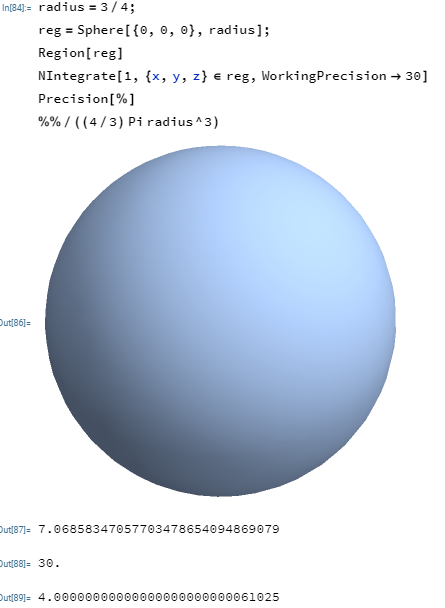
This calculation gives 7.06858347057703478654094869079, which is off by a factor of 4.
|
|
|
Arben, thank you for your kind response. Indeed, the use of Ball in place of Sphere makes everything work wonderfully.
I went on to play around with some cool and fun examples, and I am including the updated notebook.
Here is a highlighted example from the attached notebook, where it finds a closed form solution.
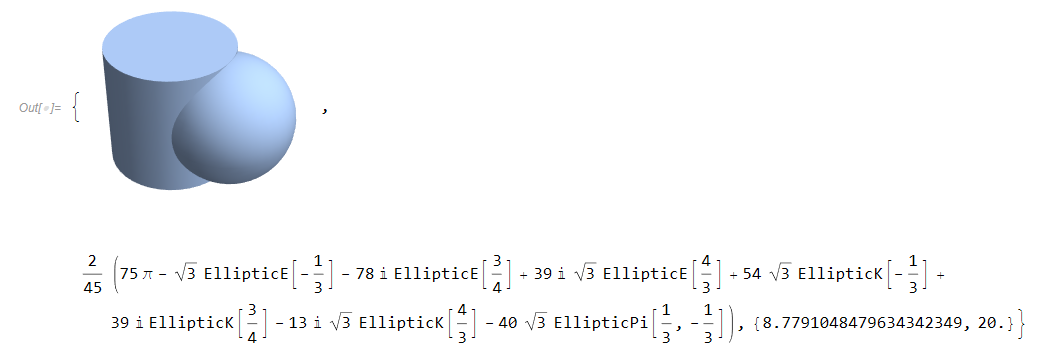
Attachments:
|
|
|
Attachments:
|
|
|
I have added more cool examples on neat regions that can be generated using the GenerateLinearRegion UsingA methodology of a previous post. An exotic region is depicted below. 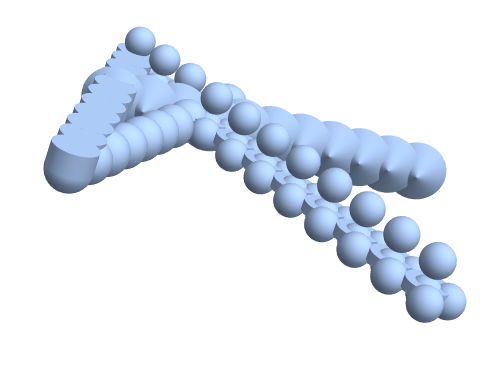
I also have added some things that alternatively work within the context of the + operator.
DrawLineOf[Ball] + From[{0, 0, 0}] + To[{5, 0, 0}]
This generates the same image as above. Because + is orderless, the items can appear in any order. 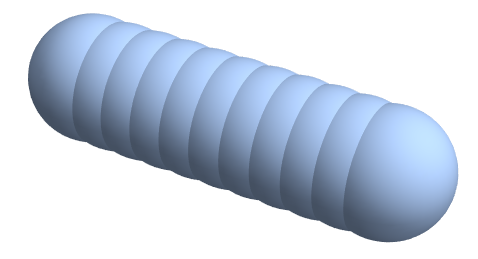
In fact we don't need the + above, and if we leave it blank it will use Times instread of Plus.
From[{0, 0, 0}] DrawLineOf[Ball] To[{5, 0, 0}]
This creates the same line of balls as above. There is more discussion in the notebook. Sorry for all the verbosity, but I am finding it hard not to work on this. In addition to finding the volume measure of these regions, it is even more amazing that in WL these regions can be integrated over (perhaps with a wave function as the integrand) or used as region constraint areas for numerical optimization problems.
Attachments:
|
|
|
I am repeating this calculation using RegionMeasure. It is totally amazing that Mathematica finds a closed form solution!!! Don't complain if it takes a few minutes -- wanna try it by hand?? haha. ![enter image description here][1]
|
|
|
The first two Print statements below center the text. The third Print statement, which just combines the first two, does not center the text. Attached file "GDorfman_PrintIssue.nb" shows the three Print statements and their output. Why does the third Print statement not center the text? How can it be modified so it does center the text?
Print[Style["Options for Plot and ListPlot",Bold,16,Orange,TextAlignment->Center]]

Print[Style["\nOptions in Common\n",Italic,14,Blue,TextAlignment->Center]]

Print[Style["Options for Plot and ListPlot",Bold,16,Orange,TextAlignment->Center],
Style["\nOptions in Common\n",Italic,14,Blue,TextAlignment->Center]]
Attachments:
|
|
|
[WSG22] Daily Study Group: A Guide to Programming and Mathematics with WL
|
|
|
The notebook for Friday's lesson (#19) appears to be missing. When will it be made available?
|
|
|
Notebook 19SolvingEquations.nb has now been added.
|
|
|
Is there a way to prevent Mathematica from inserting spaces into a URL I put in a notebook? If I copy a URL into Mathematica, then copy it from there, it comes out like this: https : // www . wolframalpha . com/input?i =
Table %5 BExpand %5 B %28 Power %5 BGoldenRatio %2 Cn %5 D + -+Power \
%5 B %281 + -+GoldenRatio %29 %2 Cn %5 D %29 %2 FSqrt %5 B5 %5 D %5 D \
%2 C + %7 Bn %2 C + 0 %2 C + 18 %7 D %5 D
|
|
|
Hi Thomas! When pasted as text, there are no spaces. So, format the cell as text first, then past. Have fun!
|
|
|
Thank you @Olga Pavlova We are in the process of getting the quizzes ready for release. We hope to share a link to the first quiz by the end of the week. We will share it in the live session and also include it in reminder emails.
|
|
|
Hi Abrita! Thank you, Abrita, and everyone working to put them together!
|
|
|
Q&A transcript from Day 5 of Week 1 has been added to the download folder. We'll add the digest from this week at the end of the week.
|
|
|
In session 16, Symbolic Mathematics, I modified some code in subsection "Root Expressions" to get a legend on the plotted output. My modified code is:
In[24]:= sol=Solve[x^8+ x+b==0,x]
Plot[Abs[x/.sol],{b,-5,5},PlotRange->All,PlotLegends->Automatic]
Here is the output of the first line of code:
Out[24]= {{x->Root[b+#1+#1^8&,1]},{x->Root[b+#1+#1^8&,2]},{x->Root[b+#1+#1^8&,3]},{x->Root[b+#1+#1^8&,4]},{x->Root[b+#1+#1^8&,5]},{x->Root[b+#1+#1^8&,6]},{x->Root[b+#1+#1^8&,7]},{x->Root[b+#1+#1^8&,8]}}
The second line of code includes my added option "PlotLegends->Automatic" but it does not result in any legends. I guess the reason has to do with the form of Out[24] which is the value assigned to sol. Please explain why "PlotLegends->Automatic" doesn't work here and what code will generate legends in the Plot. Attached as file GDorfmanPlot_26apr22.nb is a copy of the graph in which I have interactively colored the curves representing the absolute values (i.e., lengths of the complex values) of the solutions as functions of b. There are 4 rather than 8 curves. I assume this is because the solutions come in conjugate pairs.
Attachments:
|
|
|
Something like this?
Plot[Evaluate[Abs[x /. sol]], {b, -5, 5},
 PlotRange -> All,
 PlotStyle -> ColorData[3, "ColorList"],
 PlotLegends -> "Expressions"]
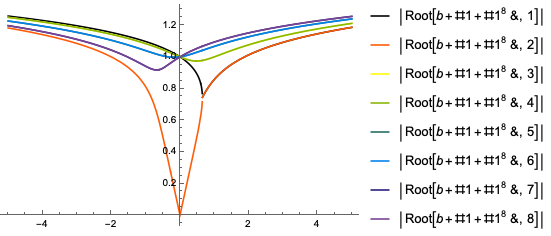
|
|
|
@Thomas Ray Worley please feel free to email wolfram-u@wolfram.com if you are facing issues with the notebooks. We will be happy to help you troubleshoot further. You should be able to open all the notebooks in the same way.
|
|
|
Week 1 Review notebook added to download folder.
|
|
|
Thanks Richard. That second reason should always be kept in mind.
|
|
|
Thanks Richard. It appears that f[x_] := f[x] =. .. is more efficient. Is there ever a case in which it should not be used?
|
|
|
You would probably not want to use this if the function was unlikely to be frequently called with the same argument. You would DEFINITELY NOT want to use it if you need the function to return different results when called with the same argument (e.g. if the result depended on some extermal value such as the current time or any of the Random* functions).
|
|
|
Thanks for the response and explanation, @Richard Hewens SetDelayed OR Set should serve well in defining a function. Here is an example of where using Set and SetDelayed together is helpful and might explain why it would be not advisable to try and use them together ALL the time. In the following example, when the need arises to store some constant values, immediate assignments are made. On the other hand, to store a more generic definition of the function, delayed assignment is used:
fib[0] = 0;
fib[1] = 1;
fib[n_] := fib[n] = fib[n - 1] + fib[n - 2]
The use of both Set and SetDelayed allows assignments to be made dynamically:
?fib
The Wolfram Language provides automatic recursion, coded into the delayed assignment definition of fib[n_]. Each time a new n is used, a new value for the function fib is defined and stored away. This avoids having to return all the way to the base case for every value that is used:
fib[3]

?fib

Trace[fib[4]]

Clear[fib]
|
|
|
When defining functions, when is it better to use f[x_] := f[x] =. ..instead of just f[x_] := ...? Why?
|
|
|
When using the "f[x_] := f[x]=...", this is creating a more specific function with the same name (which will be called before the original f[x_] form). This is most useful when the function will be called multiple times with the same argument, is which case the computation will only need to be done once.
|
|
|
Can someone explain this curious behavior of the Defer function:
Defer[Plus[0, 1, 2, 3, 4, 0, 1, 2, 3, 4]] results in 0 + 1 + 2 + 3 + 4 + 0 + 1 + 2 + 3 + 4, but
Defer[Times[0, 1, 2, 3, 4, 0, 1, 2, 3, 4]] results in 0 x 2 x 3 x 4 x 0  x 2 x 3 x 4
It appears that Defer somehow "knows" that any 1's can be removed from a product without affecting the result (but doesn't remove the 0s from a sum) . My first thought was that Plus and Times might have different attributes, but they were identical. Any clues to what's going on here will be appreciated.
|
|
|
Bravo, Richard. You have a sharp eye. Not everyone would have noticed this nuance.
|
|
|
Based on my previous experience ( about 6 classes taken at different times), I would recommend the following.
(1) Create a notebook, say "Class3_my practice and questions". Let's call it MNB (my notebook).
(2) Open the downloaded class notebook(s), typically one or two (CNBs).
(3) The goal is to reproduce in MNB the most of activities presented in CNBs. Also, consider some variations of the offered examples, mark the difficulties and formulate the questions.
(4) In doing so, make sure to create sections in MNB ( using Alt-1 - Alt-6 shortcuts, with textual inserts using Alt-7) reflecting the corresponding sections in CNBs (so that the general structure of MNB is similar to CNB, but it may include some additional sub(-sub)sections such as "My question to the forum", or "some additional examples", or "the definition of such and such function...").
(5) Watch the pieces of the class video addressing the questionable parts (in case you do not have time to watch the whole video).
(6) As a result, you should have a few unanswered questions. Never hesitate to post them on the forum. This is good for all the participants! So, consider it a public service :)
(7) In parallel, create the notebooks Quiz1, 2, etc for solving the quiz problems. Each lecture contains (hints to) the answers to some Quiz questions. Doing it continually makes the Quiz activities less stressful (make sure not to discuss directly the Quiz questions on the forum, but you can discuss any related general issues ). Good luck.
|
|
|
This is really helpful - thank you!
|
|
|
Please post more 'stackoverflow'-like post like this in the future... it benefits a LOT.. on a very LONG run..
|
|
|
Thank you. :-) Class is going a bit rapidly. Consequently, I like to work the notebooks and exercises after class in the evening to reinforce my learnings. I am very much enjoying the classes, but there are so many new ideas and insights every day that it takes some time and practice to internalize the use and application of all the tools we have been exposed to. What is the best way to get more practice?
|
|
|
With more than 24 new functions per second, one probably has to assume a movie. Nevertheless, the study group is absolutely fascinating, and offers many new insights.
|
|
|
Responding to multiple-choice Qs does not contribute to certification. It's for self-testing. Watching the lectures and passing the quizzes do.
|
|
|
That is correct. Thanks Michael. The requirement for certificate of Program Completion for the study group is attending the live sessions and passing the online quizzes with a score of at least 60%. We will release 3 quizzes over the entire duration of this 3-week study group and you will have time till may 13th to complete all the quizzes.
|
|
|
I need to regroup for a trip that starts Monday. For that time I will switch to a cloud account and need to arrange file directories. (1) How to (up)load their files for the class? (2) How to order them based on the sessions' order number?
. The ordering turned out to be especially ticky.
Thank you
|
|
|
Hi, I can watch the lectures as a recorded video. Is there an another way to get certificate of progtam completion rather than solving multiple choices problems on live sessions?
|
|
|
Are we able to get copies of the exercises so we can work them offline to ensure we understand?
Thank you!
|
|
|
Posted exercises for days 1, 2 and 3 in the series download folder.
|
|
|
Hello, Abrita, and thank you.
M
|
|
|
Is it possible to access the NB files and quizzes for this class in the cloud?
|
|
|
Please help me to fix this attempt to modify the p in addition to q and r:
Range[10]/.{p___,q_,r_} -> { #^2&/@p, q r }
(motivated by the 1st example from the 'Rule-Based Programming' section of the first class NB). Also, transformation p-> 2*p leads to a strange result:
In[37]:= Range[10] /. {p___, q_, r_} -> {2 p, q r} Out[37]= {**80640**, 90}
Thanks.
M PS What is wrong with using #^2&/@p where p corresponds to 8 initial elements of the list, given that
"#^2&/@Range[8]" works as expected.
|
|
|
The following code should explain what parts of the expression Range[10] are matching p, q and r:
Range[10] /. {p___, q_,
r_} -> {{"This is p: ", p}, {"This is q: ", q}, {"This is r: ", r}}
This is the output you get:
{{"This is p: ", 1, 2, 3, 4, 5, 6, 7, 8}, {"This is q: ", 9}, {"This is r: ", 10}}
So what is essentially happening with the {#^2 & /@ p, q r} part of the expression is {#^2 & /@ 1, 2, 3, 4, 5, 6, 7, 8, q r} i.e. #^2 is mapped over the single element 1 and therefore gives the result {1, 2, 3, 4, 5, 6, 7, 8, 90} This would give the expected result:
Range[10] /. {p___, q_, r_} :> Join[#^2 & /@ {p}, {q r}]
|
|
|
Awesome! Thank you very much, Abrita.
Best.
M
|
|
|
Range[10] /. {p___, q_, r_} :> {Hold[ 2 p], q r}
shows what's happening with 2 p. It is computing 2X2X3X4X5X6X7X8 p (from the RHS of the rule) is really a fragment of an expression. It needs to be explicitly turned into a list to get the output you are looking for.
Maybe something like:
Range[10] /. {p___, q_, r_} :> Append[2 {p}, q r]
|
|
|
Michael—sequences can indeed be a little tricky, but they're a great tool to add to your arsenal. You can really start manipulating things at a low level once you have a grasp on them and how they work with patterns!
|
|
|
Hi Abrita! The first chunk you posted:
Range[10] /. {p___, q_, r_} :> {Hold[ 2 p], q r}
...helped me find a solution to something related to what
Richard Hewens posted. I found a different solution but I like yours so much better. THANK YOU! :-D
|
|
|
Caesar Cipher example and Day 1 exercises have been added to the download folder.
|
|
|
Where is the link to the download folder?
|
|
|
Hi Syd, The link is included in the reminder emails you have been receiving from the Wolfram U Team. It is also shared during the session.
|
|
|
Hi Joel,
You can join the Wolfram Community and participate in any discussion thread. This particular thread is dedicated to the Daily Study Group: A Guide to Programming and Mathematics with the Wolfram Language. You can click on "Follow this Post" to receive notifications of any activity on this thread.

|
|
|
Dear Abrita.
Due to the trip, my deadline was shifted till today. I submitted the solutions to three quizzes. In the last quiz, four problems were accepted, and one was rejected. I sent a file describing my solution to the rejected problem and asked to check if it was really wrong. It was sent to Wolfram-U, with attention to you and Arben. I do not worry about the final score but would like to understand the reason for rejection. Could you please help me with this? Thank you. Michael.
|
|
|
@Michael Partensky sometimes the auto-grader is unable to handle alternative solutions. All your solutions were accepted on manual grading.
|
|
|
Thank you.
The auto-grader is an interesting creature on its own. Is it one of Wolfram's projects? If it is, please post a link. What are the grading criteria (in addition to the final result), the ideas behind it, how does it learn...? Are there wider applications, e.g., for a justice system, or for use by a Supernal being judging the Humans?
Thanks again.
Michael.
|
|
|
Do we have to post a reply to join the group?
|
|
|
Reply to this discussion
in reply to
|



