HI Arno,
I am not sure whether this is what you need, but here are some pieces of code. First I create two similar graphs with some common nodes.
adAuthors = {"mary", "peter", "peter", "peter"};
adRecipients = {"jane", "arthur", "diana", "diana"};
adAuthors2 = {"paul", "victor", "mary", "diana", "peter"};
adRecipients2 = {"peter", "mary", "paul", "paul", "alonso"};
We can plot the graphs separately:
adGraph =
 Graph[Thread[DirectedEdge[adAuthors, adRecipients]],
  VertexLabels -> Placed["Name", Tooltip]]
and
adGraph2 =
 Graph[Thread[DirectedEdge[adAuthors2, adRecipients2]],
  VertexLabels -> Placed["Name", Tooltip]]
We can user Union to generate a list of all authors and all recipients.
Union[adAuthors, adAuthors2]
(*{"diana", "mary", "paul", "peter", "victor"}*)
and
Union[adRecipients, adRecipients2]
(*{"alonso", "arthur", "diana", "jane", "mary", "paul", "peter"}*)
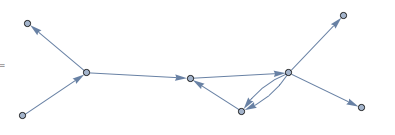
We can also plot the joint graph like so:
adGraphjoin =
 Graph[Thread[DirectedEdge[Join[adAuthors, adAuthors2], Join[adRecipients, adRecipients2]]],
  VertexLabels -> Placed["Name", Tooltip]]
So a combination of Union and Join functions should do the trick for you.
Best wishes from Aberdeen and thanks again for the great conference/workshop in Oxford,
Marco



